






Definition and Meaning
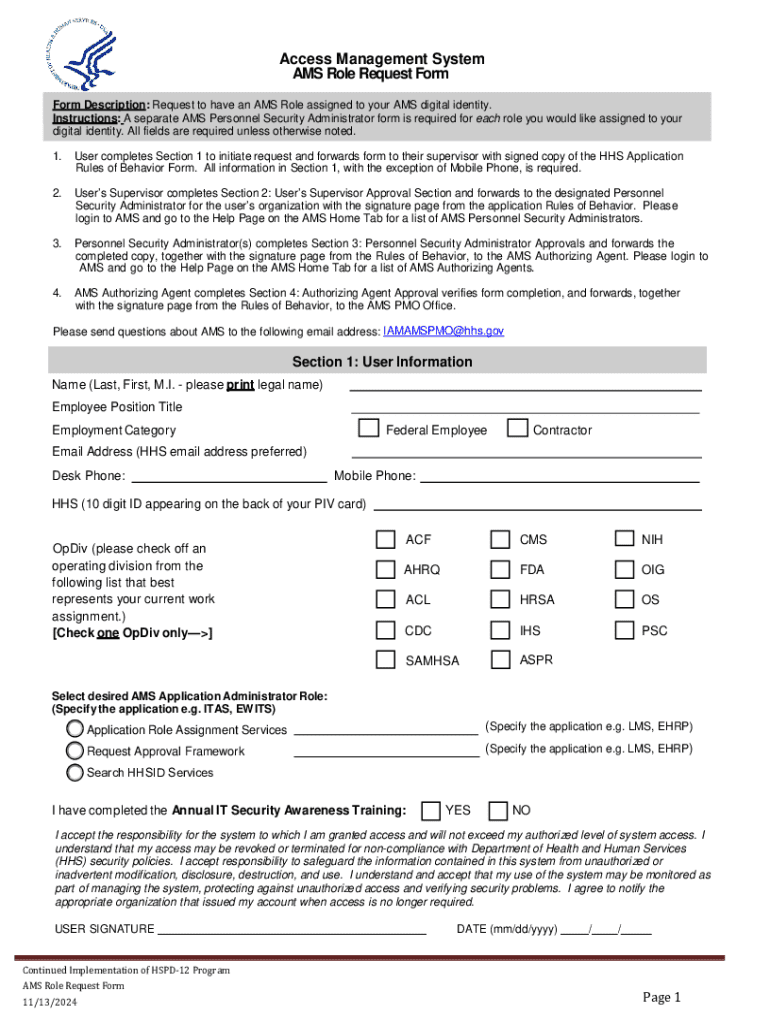
The AMS Role Request Form is a structured document used within organizations to formally request a role assignment to a user's digital identity within the Access Management System (AMS). This form acts as a bridge between users, their supervisors, and personnel security administrators, ensuring all requests for access are properly documented and processed. It facilitates controlled access to secure systems by verifying necessary approvals and regulatory compliance.
The form includes sections where users provide personal and role-related information, supervisors confirm the necessity and appropriateness of the role, and personnel security administrators ensure security protocols are met before granting access. This structured approach aims to enhance security by limiting access to sensitive information to authorized individuals only.
How to Use the AMS Role Request Form
To effectively use the AMS Role Request Form, follow these essential steps:
- Understand the Purpose: Familiarize yourself with why the form is needed and how it benefits both the user and the organization.
- Gather Necessary Information: Before filling out the form, ensure you have all required information, including role details and personal identification.
- Complete User Information Section: Fill out personal details accurately, such as name, employee ID, and contact information.
- Describe Role Requirements: Provide a detailed explanation of why the access is needed and any specifics about the job functions involved.
- Supervisor's Endorsement: Ensure the form is reviewed and signed by your immediate supervisor, with a justification for why the role assignment is necessary.
- Submit for Approval: Forward the form to the Personnel Security Administrator for security verification and final authorization.
- Track Status: Monitor the progress of your request through organizational channels to guarantee it gets processed promptly.
Practical use cases often involve employees in sensitive positions needing temporary access to restricted systems for project-based tasks, highlighting the form's role in balancing access and security.
Steps to Complete the AMS Role Request Form
Completing the AMS Role Request Form involves several key steps:
-
Initiating the Form:
- Begin by accessing the digital or paper version of the AMS Role Request Form from your internal network or administrative office.
-
Filling User Information:
- Include personal data such as full name, position, department, and unique employee identifier.
- Ensure accuracy to prevent processing delays.
-
Detailing the Role Request:
- Specify the exact nature of the role requested, aligning it with job functions and organizational needs.
- Include the expected duration of access.
-
Gathering Supervisor Approval:
- Obtain written approval from your supervisor, including a signature and comments regarding the necessity of access.
- Supervisors may also need to confirm that access aligns with organizational policies.
-
Security Administrator Review:
- Submit the completed form to the Personnel Security Administrator to assess risks and finalize clearance.
- This step often involves cross-referencing organizational security standards.
-
Final Authorization:
- The form requires final approval from an Authorizing Agent who validates that all procedural checks are satisfied.
Each block within this process ensures not only the efficient handling of role requests but also mitigates potential risks associated with unauthorized access.
Key Elements of the AMS Role Request Form
The AMS Role Request Form contains critical sections necessary for safeguarding access management:
- User Information: Collects personal data for identification.
- Role Specifications: Details the required access, including scope and duration.
- Approval Hierarchy:
- Supervisor Approval: Validates necessity and aligns with operational requirements.
- Personnel Security Administrator: Reviews for security and compliance adherence.
- Authorizing Agent: Provides the final affirmation to proceed.
These elements ensure a systematic approach to handling role requests, supporting organizational control measures to manage access related to digital identities.
Important Terms Related to AMS Role Request Form
Understanding the terminology related to the AMS Role Request Form is crucial:
- Access Management System (AMS): A framework to manage user roles and permissions within an organization.
- Role Assignment: The process of assigning specific access rights to users based on their job functions.
- Personnel Security Administrator: An individual tasked with verifying security compliance and protocol adherence.
- Authorizing Agent: An authority that grants final approval for access requests, ensuring adherence to organizational policies.
Recognizing these terms is important for accurately completing the form and adhering to relevant policies.
Who Typically Uses the AMS Role Request Form
Primarily utilized by the following groups:
- Employees: Requesting temporary or permanent access to specialized systems.
- Supervisors: Validating access rights in alignment with departmental needs.
- Security Personnel: Implementing organizational and regulatory security measures.
- IT Departments: Ensuring proper access configuration and maintaining digital security.
The form is often part of broader access control strategies in industries like finance, healthcare, and government where security and compliance are paramount.


Legal Use of the AMS Role Request Form
The AMS Role Request Form is integrated into legal and compliance frameworks to meet data protection regulations. Its use is mandated by:
- Federal Laws: Governing data privacy and access control standards.
- Organizational Policies: Specific internal regulations for data security.
- Audit Requirements: Ensuring proper documentation for audit trails and compliance checks.
Legal cases often involve ensuring only authorized personnel can access confidential data, minimizing liability risks related to unauthorized data breaches.
Application Process and Approval Time
The application process for the AMS Role Request Form typically follows these steps:
- Submission: The user completes the form and submits it for supervisor approval.
- Review and Security Check: Personnel Security Administrators conduct a risk assessment.
- Final Authorization: The Authorizing Agent grants or denies access based on compliance validation.
Approval time varies depending on organizational workload and the complexity of the role requested, with some taking from a few hours to several business days. Rejections usually occur due to incomplete information or non-alignment with security policies.
Efficient processing hinges on clarity and completeness of the information provided, thereby ensuring a smooth workflow for both users and administrators.