
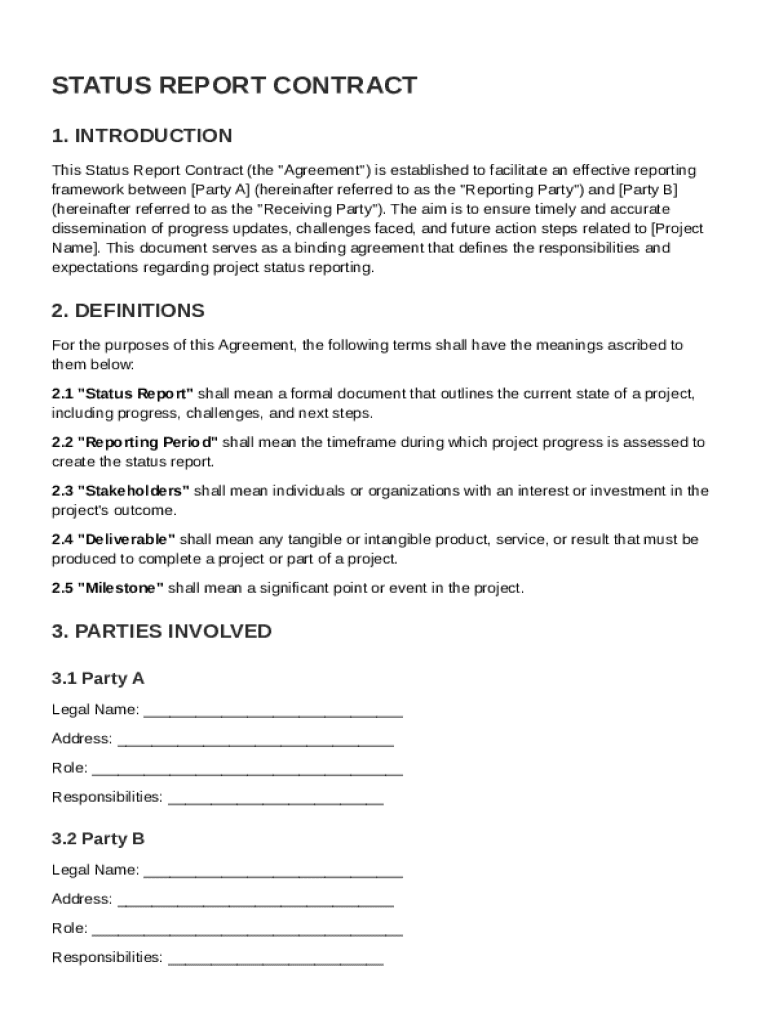







Definition and Importance of the Status Report Contract Template
The Status Report Contract Template serves as a standardized framework for documenting and communicating project updates. This template defines the structure for creating regular status reports, ensuring that all stakeholders remain informed about a project's progress. The contract template outlines responsibilities, sets reporting schedules, and specifies the content requirements for these reports. This is vital for maintaining transparency and accountability, facilitating effective communication among teams and stakeholders throughout a project's lifecycle.
With an emphasis on clear and concise reporting, this template assists in systematically presenting progress, identifying risks, and proposing future actions. By leveraging this contract template, project managers and coordinators can foster an environment conducive to collaborative problem-solving and proactive management of project timelines and deliverables.
How to Obtain and Use the Status Report Contract Template
Acquiring the Status Report Contract Template typically involves downloading it from a document management platform such as DocHub. This ensures users have access to a ready-to-use format that can be easily tailored to specific project requirements.
- Download Options: The template can be imported from various cloud storage services, including Google Drive, Dropbox, or directly from your local device. This flexibility allows seamless integration into your current workflow, eliminating the need for cumbersome download steps.
Once obtained, the template can be customized:
- Tailor Content: Modify sections to fit project-specific details, such as objectives, deliverables, and timeline expectations.
- Define Roles: Clearly outline the reporting responsibilities of each team member, ensuring everyone understands their roles.
- Establish Schedules: Set clear deadlines for report submissions to maintain a consistent flow of information.
By following these steps, users can effectively implement the Status Report Contract Template in their projects to enhance organization and reporting efficiency.
Steps to Complete the Status Report Contract Template
Completing the Status Report Contract Template involves a structured process that ensures clarity and comprehensiveness. Below are the detailed steps necessary to fill out the template effectively:
-
Initial Setup: Start by entering the basic information about the project, such as the project name, management team, and contact details.
-
Objective Outline: Clearly define the objectives of the project to set the context for the report's content.
-
Progress and Milestones: Document the current stage of the project and achievements since the last report. Highlight key milestones and any deviations from the original plan.
-
Challenges and Solutions: Identify any current challenges or obstacles along with the proposed resolutions. This section should provide a detailed analysis of potential risks and mitigation strategies.
-
Future Actions: Outline the upcoming steps, timelines, and any resources needed to achieve the project's next phase.
Each section should be concise yet detailed, ensuring that all essential information is covered. Consistently using the template for each reporting period will help in tracking progress and making informed decisions throughout the project.
Key Elements of the Status Report Contract Template
The Status Report Contract Template encompasses several critical components essential for comprehensive reporting:
-
Project Overview: Offers a snapshot of the project's purpose, scope, and deliverables.
-
Reporting Frequency: Establishes how often reports should be generated, ensuring stakeholders receive timely updates.
-
Contact Information: Lists key contacts, including project managers and team leads, for streamlined communication.
-
Confidentiality and Privacy Clauses: Ensures that sensitive project data is protected and outlines the measures for safeguarding information.
-
Feedback and Amendments Section: Allows for ongoing input from stakeholders and adjustments to the reporting process to adapt to changing project needs.
Incorporating these elements ensures that the template aligns with project objectives and stakeholder expectations, creating a robust framework for status reporting.
Legal Use and Compliance of the Status Report Contract Template
Utilizing the Status Report Contract Template involves adherence to specific legal guidelines to ensure compliance and validity. The template should:
-
Include Standard Clauses: Such as confidentiality, intellectual property rights, and data protection to safeguard information and proprietary data.
-
Reflect Accurate Historical Data: Ensure that all reported information is factual and accurately represents the project's progress and actions taken.
-
Alignment with Contractual Obligations: The template must be used in conjunction with existing project agreements and contractual terms, ensuring consistency across all documentation.
Failure to comply with legal standards can result in disputes and potential liabilities. Therefore, attention to detail and thorough understanding of applicable laws are crucial when drafting status reports using the template.
Examples of Using the Status Report Contract Template
Real-world applications of the Status Report Contract Template demonstrate its versatility and effectiveness in project management across various industries:
-
Construction Projects: Used to keep stakeholders informed about progress, resource allocation, and potential delays, fostering collaborative problem-solving and timely project completion.
-
Software Development: Helps in tracking feature releases, bug fixes, and enhancements, ensuring that teams remain aligned with the project's roadmap and technical requirements.
-
Marketing Campaigns: Enables marketers to report on campaign performance metrics, audience engagement, and budget utilization, facilitating data-driven decision-making and strategy adjustments.
These scenarios illustrate how the template supports diverse project environments, enabling teams to maintain transparency and efficiency in reporting.
Software Compatibility and Use Cases
The Status Report Contract Template is versatile and compatible with various software solutions, enhancing its usability in digital workflows:
-
DocHub Integration: Allows seamless document editing and sharing within the Google Workspace, ensuring smooth collaboration among teams using Google Drive and Gmail.
-
Third-Party Applications: Compatible with project management tools like Trello, Asana, and Jira, allowing users to integrate status reports into broader project management systems.
-
Mobile and Desktop Access: The template's accessibility on multiple devices ensures that reports can be completed and reviewed wherever necessary, supporting remote work environments and on-the-go updates.
By leveraging these compatibility features, teams can efficiently integrate the template into their preferred tools, streamlining project management and reporting processes.




