Signed Email Contract Template 2026

Get Form
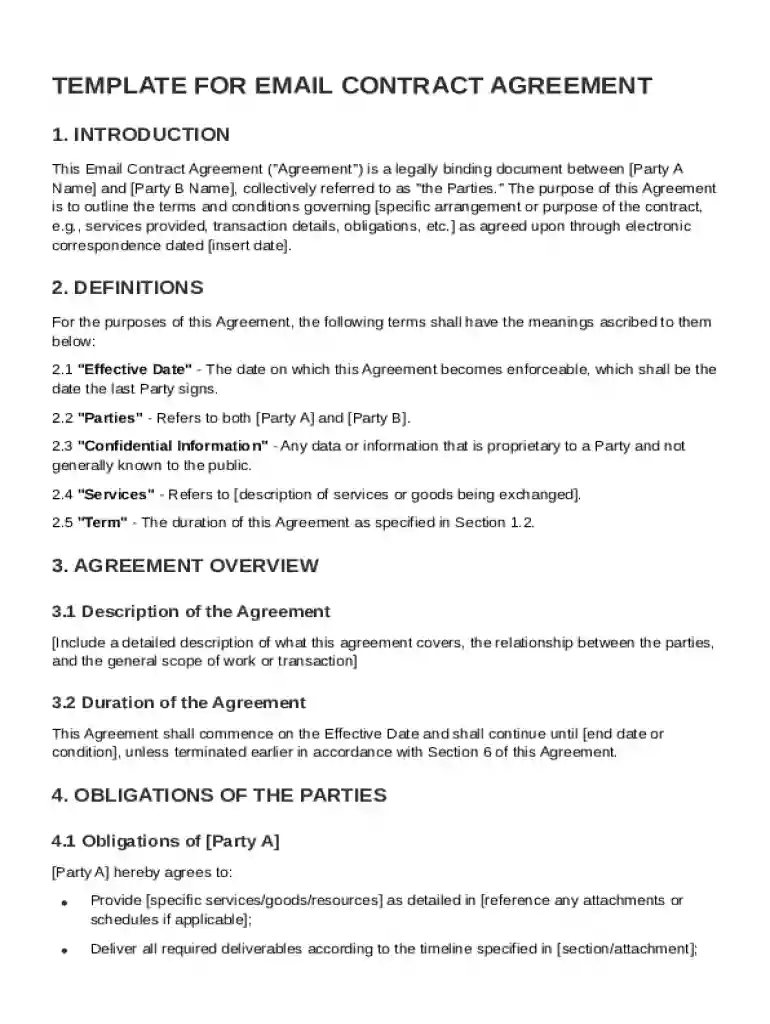
Signed Email Contract Template Preview on Page 1

Here's how it works

01. Edit your form online
Type text, add images, blackout confidential details, add comments, highlights and more.

02. Sign it in a few clicks
Draw your signature, type it, upload its image, or use your mobile device as a signature pad.

03. Share your form with others
Send it via email, link, or fax. You can also download it, export it or print it out.

Definition and Meaning of a Signed Email Contract Template

The Signed Email Contract Template is an essential document that facilitates the establishment of a legally binding electronic agreement between two or more parties via email. This template outlines the terms and conditions pertinent to the arrangement, covering various critical aspects such as definitions, responsibilities, payment terms, confidentiality, and dispute resolution mechanisms. It enables parties to formalize their agreements without the need for physical meetings or hard copies, thereby increasing efficiency and adaptability to modern business practices.

How to Use the Signed Email Contract Template

Utilizing the Signed Email Contract Template involves a few straightforward steps designed to ensure clarity and legal compliance:

  1. Download and Review: Begin by downloading the template to review and customize it according to the specifics of the agreement. Ensure all sections align with the intended transaction.

  2. Populate the Template: Insert accurate and complete information related to parties involved, such as names, roles, and responsibilities.

  3. See Signature Arrangements: Determine how signatures will be collected—whether digitally through platforms supporting electronic signatures or via print and scan methods.

  4. Emails Draft: Craft a clear and concise email that outlines the necessary context of the contract and attach the finalized document.

  5. Send and Track: Email the contract to the other party and ask for feedback or signature confirmation. Use tools to track if and when the document is opened and read, ensuring timely acknowledgment and response.

Key Elements of the Signed Email Contract Template

A comprehensive Signed Email Contract Template typically includes several fundamental sections:

  • Definitions: Clearly delineates key terms used throughout the document for precision and avoidance of ambiguity.
  • Obligations and Responsibilities: Specifies the duties and roles of each party involved in the agreement to ensure both understand their commitments.
  • Compensation and Payment Terms: Details the financial elements, such as payment amounts, schedules, and methods, ensuring all parties agree on these terms.
  • Confidentiality Clause: Provides a framework for protecting sensitive information exchanged during the contractual engagement.
  • Termination Clause: Outlines the conditions under which the agreement can be terminated, along with any associated penalties or procedures.

Legal Use of the Signed Email Contract Template

The Signed Email Contract Template adheres to the Electronic Signatures in Global and National Commerce Act (ESIGN Act) guidelines, which authorize the use of electronic records and signatures in commercial and contract-related scenarios in the United States. It provides legal validity to agreements made with digital signatures, as long as the process captures the signer's intent to sign and their consent to use electronic records.

Important Terms Related to the Signed Email Contract Template

Understanding key terminology is crucial for effective use of the Signed Email Contract Template:

  • Electronic Signature: A digital form of signing a document that verifies the individual's commitment to the agreement's terms.
  • Binding Agreement: A legally enforceable arrangement between parties once all have affixed their signatures to the document.
  • Review Period: The time allocated for all parties to assess the contract before signing to ensure agreement on all sections.

State-Specific Rules for the Signed Email Contract Template

While the Signed Email Contract Template follows federal guidelines, certain states might have additional provisions or modifications, especially concerning specific business transactions. Parties are advised to consult with legal professionals familiar with state legislation to ensure the template accounts for all regional legal requirements.

Who Typically Uses the Signed Email Contract Template

The template is broadly used by various entities and individuals:

  • Businesses: From small enterprises to large corporations, the template facilitates quick contract finalizations.
  • Freelancers and Independent Contractors: Helps formalize agreements with clients without the need for in-person contracts.
  • Legal Professionals: Assist clients in drafting and executing efficient and legally compliant agreements.
decoration image ratings of Dochub

Examples of Using the Signed Email Contract Template

Consider these real-world scenarios that illustrate the utilization of the template:

  • Consulting Services: A consultant uses the template to finalize service agreements with a client, detailing deliverable expectations and payment schedules.
  • Partnerships: Two startup founders use this document to outline each other's investments and operational roles.
  • Vendor Agreements: A retail company formalizes a deal with a supplier through this template, ensuring terms of supply and delivery are captured and agreed upon electronically.

Steps to Complete the Signed Email Contract Template

Completing the template involves sequential actions that ensure thoroughness and legality:

  1. Customize the Template: Tailor it with specific details related to the transaction.
  2. Review by All Parties: Allow all parties to examine the document, making necessary adjustments.
  3. Approval and Signature: Once agreed upon, each party signs digitally or through printed methods.
  4. Distribution and Archiving: Distribute final copies to all parties involved and archive for record-keeping.

Each of these sections provides the essential knowledge and guidance required to effectively use and manage the Signed Email Contract Template, ensuring legally sound and efficient administrative processes.

be ready to get more

Complete this form in 5 minutes or less

Get form

Got questions?

We have answers to the most popular questions from our customers. If you can't find an answer to your question, please contact us.
Contact us
Add the Document as an Email Attachment Another method is to use an eSignature tool to sign your document, download it, and then attach it to your email. This will allow you to create a legally binding digital signature and add it to your document. You can also add names and addresses.
A contract email can be legally binding if it meets basic contract law requirements: offer, acceptance, and consideration. Even informal emails can establish enforceable agreements if the intent to contract is clear. Electronic signatures and typed names can constitute valid acceptance.
Tips for Writing Sending Contract Emails Use a clear subject line. No need to be clever. Summarize the key details. Briefly restate the project scope, timeline, and total cost in the body of your email. Outline the next steps. Dont leave them guessing. Make signing simple. Set a polite deadline.
How to send an online contract for signing Register or download a contract program. Create a contract in a writing or word processor program. Upload the contract file to the program. Add the names and email addresses of the contract signers to the program. Select the locations where you want eSignatures, initials and dates.

Security and compliance

At DocHub, your data security is our priority. We follow HIPAA, SOC2, GDPR, and other standards, so you can work on your documents with confidence.

Learn more
be ready to get more

Complete this form in 5 minutes or less

Get form