
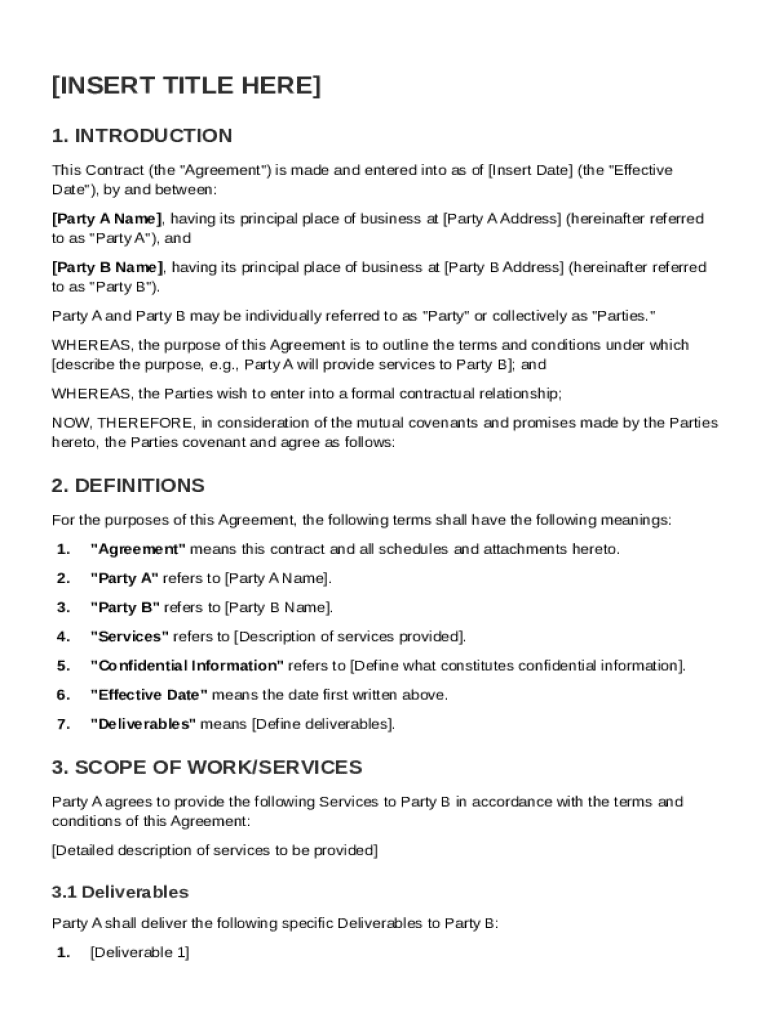







Definition & Meaning
A Signed Contract Template is a standardized document designed to formalize agreements between two or more parties. Typically, it encompasses the terms and conditions for the provision of goods, services, or other mutual commitments. The template acts as a legal framework outlining obligations, expectations, and rights, making it an essential tool for ensuring all aspects of an agreement are transparent and enforceable.
The signed contract serves several purposes. It provides a clear record of the agreement, ensuring accountability and reducing the risk of misunderstandings. Additionally, it lays the foundation for legal recourse in case of disputes or non-compliance. By using a signed contract template, parties can streamline the drafting process while maintaining consistency and legal integrity across multiple agreements.
How to Use the Signed Contract Template
To effectively use a signed contract template, parties should begin by identifying the specific details of the agreement. This involves entering the names and contact information of each party, followed by specifics relevant to the contract's purpose—such as a description of services or goods and payment terms. Once all fields are adequately filled out, the next step is to review the document for accuracy and completeness.
After ensuring the template's content is accurate, parties should arrange for an electronic signature. Platforms like DocHub facilitate this process by allowing users to easily add legally binding electronic signatures. It's crucial to track that all involved parties have signed the document. Maintaining a clear audit trail is beneficial, as it verifies the signature process and the document's legal enforceability.
Key Elements of the Signed Contract Template
The signed contract template typically contains several critical sections to cover all necessary aspects:
- Definitions: Outlines specific terms used within the contract to avoid ambiguity.
- Scope of Work: Details what each party is expected to perform or deliver.
- Payment Terms: Specifies how and when payments will be made.
- Obligations: Lists the responsibilities of involved parties.
- Confidentiality Clauses: Protects sensitive information shared under the contract.
- Termination Conditions: Describes conditions under which the contract may be dissolved.
- Dispute Resolution: Provides methods for resolving disagreements.
Understanding these elements is crucial. Each section must be tailored to the specific agreement being reached to ensure all parties are protected and informed.
Legal Use of the Signed Contract Template
The legal use of a signed contract template requires ensuring that all sections adhere to local laws, especially if the contract spans multiple jurisdictions. In the United States, contracts must follow federal guidelines and specific state regulations to be considered legally binding. Ensuring compliance might involve consulting legal professionals to verify that custom clauses do not violate applicable laws.
Electronic signatures are another significant consideration. The ESIGN Act governs their legal acceptance in the U.S., which mandates proper authentication and clear intent to sign. Utilizing a digital tool like DocHub assures compliance with these standards, safeguarding the contract's binding nature upon execution.
Steps to Complete the Signed Contract Template
Completing a signed contract template generally follows these steps:
-
Initial Preparation: Gather all pertinent details concerning the parties and the terms of the agreement.
-
Template Selection: Choose an appropriate template that matches the specific context of the agreement.
-
Filling Details: Enter all necessary information, ensuring accuracy in descriptions, party identities, and financial details.
-
Review Process: Have all parties review the document, confirming understanding and agreement on all terms.
-
Signature Gathering: Use a digital tool to obtain electronic signatures from all parties involved, ensuring compliance with legal standards.
-
Document Storage: Securely store the completed contract in a centralized location, preferably with cloud storage services for easy access and auditability.
Who Typically Uses the Signed Contract Template
Signed contract templates are used widely across various sectors, including individuals, businesses, and governmental entities. Freelancers and consultants often use them to delineate terms with clients, while businesses utilize them to formalize vendor agreements, employment terms, or partnership deals. In corporate settings, these templates ensure consistent and legally robust agreements, reducing the risk of discrepancies.
Government bodies may also rely on such templates to standardize procedures and terms in public sector contracts. By using templates, these entities can readily ensure that all contractual agreements comply with state and federal regulations.


Important Terms Related to the Signed Contract Template
Understanding terms related to the signed contract template is essential:
- Parties: Individuals or entities entering into the contract.
- Consideration: The value exchanged in the contract, which can be monetary or service-based.
- Mutual Assent: Agreement from all parties on contract terms.
- Enforceability: Conditions under which the contract can be upheld legally.
- Boilerplate Language: Standardized clauses used across many contracts.
These terms form the backbone of contract language and understanding them helps in drafting a comprehensive and effective agreement.
State-by-State Differences
The validity and enforceability of a signed contract template can vary between states due to differing legal requirements. For instance, some states may have unique regulations governing electronic signatures or mandate particular disclosures within certain types of agreements. Understanding these variances is crucial when a contract spans multiple jurisdictions or when conducting business operations across different states.
Legal professionals can assist in navigating these differences, ensuring all contractual terms and conditions comply with state-specific laws. For nationwide agreements, maintaining a template library tailored to these nuances is advisable to prevent legal challenges.
Software Compatibility
DocHub is compatible with various file formats, including PDF, DOC, PPT, XLS, and TXT, allowing broad usability for different business needs. This compatibility means users can seamlessly integrate existing documents into DocHub without needing additional software, providing an efficient workflow.
Integration with platforms such as Google Workspace enhances ease of use, enabling documents from Google Drive and Gmail to be directly edited and signed within the platform. This feature streamlines operations and ensures documents can be updated and stored without conversion between file types.




