




Here's how it works

01. Edit your profit and loss statement template online
Type text, add images, blackout confidential details, add comments, highlights and more.

02. Sign it in a few clicks
Draw your signature, type it, upload its image, or use your mobile device as a signature pad.

03. Share your form with others
Send year to date profit and loss statement template via email, link, or fax. You can also download it, export it or print it out.
How to use or fill out Profit Loss Statement Template with our platform

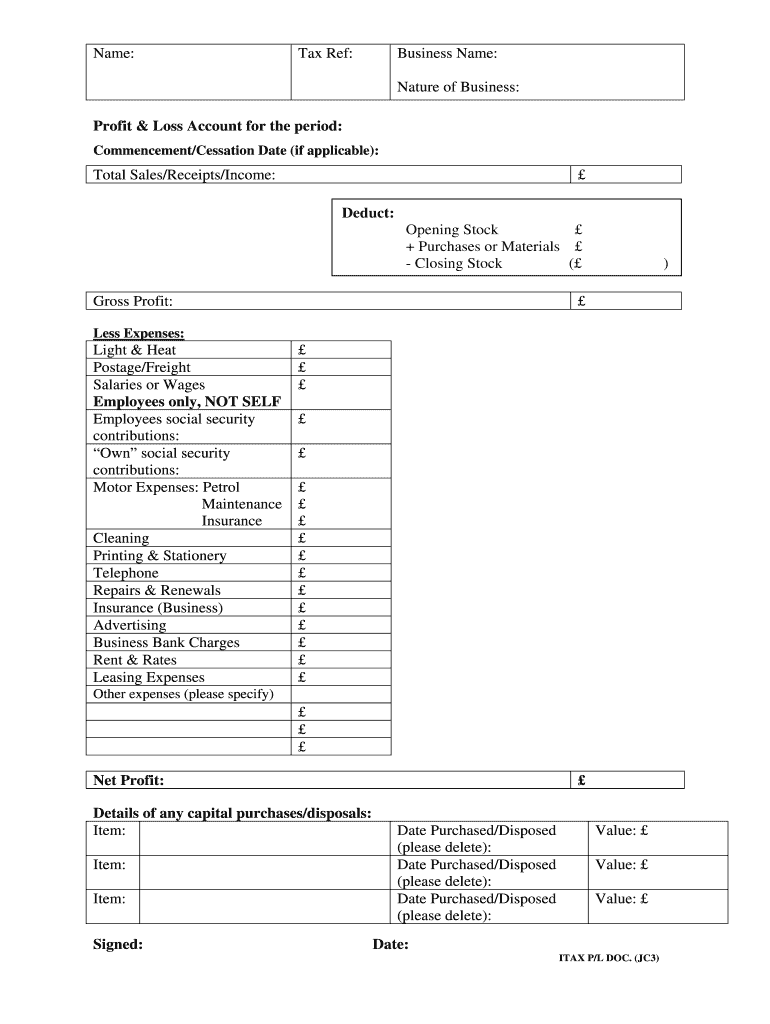
- Click ‘Get Form’ to open the Profit Loss Statement Template in the editor.
- Begin by entering your Tax Reference and Business Name at the top of the form. This information is crucial for identifying your financial records.
- Specify the Nature of Business and the Commencement/Cessation Date if applicable. This helps in understanding the context of your financial data.
- Fill in Total Sales/Receipts/Income, followed by deducting Opening Stock, Purchases or Materials, and Closing Stock to calculate Gross Profit.
- List all expenses under 'Less Expenses', including Light & Heat, Salaries or Wages, and other relevant costs. Ensure each amount is accurately entered for precise calculations.
- Calculate Net Profit by subtracting total expenses from Gross Profit. This figure represents your business's profitability during the specified period.
- Detail any capital purchases or disposals, including items and their values. This section provides insight into significant financial changes within your business.
- Finally, sign and date the document to validate it before saving or sharing it through our platform.
Start using our platform today to effortlessly complete your Profit Loss Statement Template online for free!
Fill out Profit Loss Statement Template online
It's free
It's free
See more Profit Loss Statement Template versions
We've got more versions of the Profit Loss Statement Template form. Select the right Profit Loss Statement Template version from the list and start editing it straight away!
| Versions | Form popularity | Fillable & printable |
|---|---|---|
| 2010 | 4 Satisfied (36 Votes) |
Got questions?
We have answers to the most popular questions from our customers. If you can't find an answer to your question, please contact us.
Contact us
What is a very simple profit and loss statement?
In its most basic form, the PL statement shows the profitability of the business for a set time period. The time period can be for the year, quarter, month, or even a day whatever you need to understand. Profit is how much you are making from the business; loss is how much you are losing on the business.
What information do I need for a profit and loss statement?
A profit and loss statement (PL) statement includes a businesss revenue, cost of goods and services sold, operating expenses, interest, taxes, net income and any other gains and losses. Revenue is known as the top line, and net income is called the bottom line.
What is a simple profit and loss statement?
A profit and loss (or income) statement lists your sales and expenses. It tells you how much profit youre making, or how much youre losing. You usually complete a profit and loss statement every month, quarter or year.
How do I create a profit and loss statement?
How To Create a Profit and Loss Statement Choose a reporting period. Gather financial statements and information. Add up revenue. List your COGS. Record your expenses. Figure your EBITDA. Calculate interest, taxes, depreciation, and amortization. Determine net income.
Does Excel have a PL template?
FPA template FAQs Yes, there is a preformatted PL template for Excel that you can use to track monthly, quarterly, or yearly expenses, income, and profit. The template supports budgeting, planning, and financial reporting. It includes formulas for automatically calculating total expenses, revenue, and net income.
Security and compliance
At DocHub, your data security is our priority. We follow HIPAA, SOC2, GDPR, and other standards, so you can work on your documents with confidence.
Learn more


People also ask
Does Word have a profit and loss template?
Microsoft Word Profit and Loss Financial Statement Template Notable Template Features: This template offers a simple layout with sections for gross profit calculation, detailed expense categories, and net income. The template provides example expenses, which you can edit to suit your organization.
Who can make me a profit and loss statement?
You can ask your accountant to prepare a profit and loss statement for your company or you can build one yourself using the steps below.