






Definition & Meaning
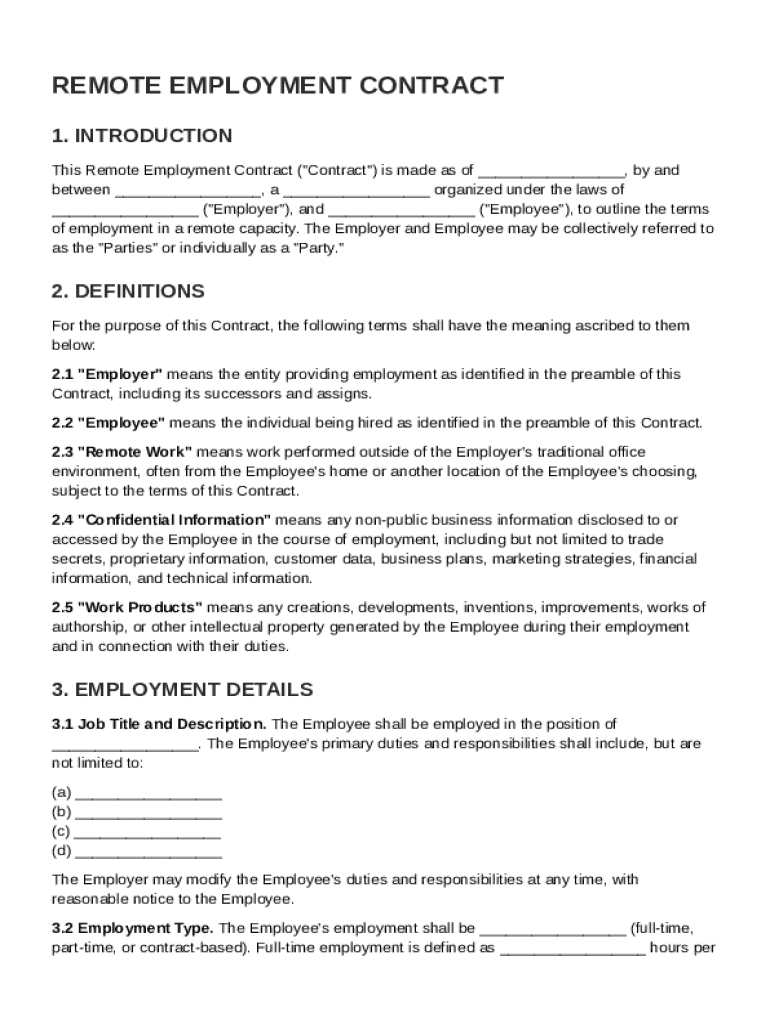
A Remote Employment Contract Template is a standardized document used to outline the terms and conditions governing a remote working relationship between an employer and an employee. This template provides a comprehensive framework for defining job responsibilities, compensation, benefits, work schedule, and other critical components of remote employment. By using a structured template, both parties can ensure clarity and consistency in their agreements, which helps prevent misunderstandings and disputes. The template serves as a foundational tool to streamline the creation of legally compliant remote employment contracts.
Key Elements of the Remote Employment Contract Template
A robust Remote Employment Contract Template typically includes several essential components to safeguard both employer and employee rights. Key elements often featured in this template are:
- Job Responsibilities: Clearly outlined duties and tasks the employee is expected to perform.
- Compensation and Benefits: Details regarding salary, bonuses, benefits, and payment frequency.
- Work Schedule: Specifies expected working hours, flexibility, and time zone considerations.
- Remote Work Expectations: Defines communication protocols, performance metrics, and reporting requirements.
- Termination Conditions: Outlines circumstances under which the contract may be terminated.
- Dispute Resolution Procedures: Provides guidelines for resolving potential conflicts.
Each element must be carefully considered and tailored to suit the specific needs of the employment relationship, ensuring compliance with all legal and organizational requirements.
Steps to Complete the Remote Employment Contract Template
Completing a Remote Employment Contract Template involves several steps to ensure accuracy and compliance:
- Review the Template: Familiarize yourself with all sections of the template and identify any customizations needed.
- Enter Employee Information: Fill in the employee's name, contact details, and job title.
- Define Job Responsibilities: Clearly specify the role and responsibilities of the employee.
- Set Compensation Terms: Detail the agreed salary, bonuses, and payment schedule.
- Specify Benefits: Include information about health insurance, retirement plans, and other benefits.
- Outline the Work Schedule: Define working hours, break times, and expectations for availability.
- Establish Remote Work Guidelines: Include expectations for communication and performance evaluations.
- Include Legal Clauses: Add necessary legal language related to confidentiality, data protection, and compliance.
Concluding this process will produce a tailored employment contract ready for review and signature by both parties.
Legal Use of the Remote Employment Contract Template
Employing a Remote Employment Contract Template requires adherence to legal standards and regulations. The template should be used in accordance with:
- ESIGN Act Compliance: Ensure electronic signatures used within the contract are legally binding.
- State Employment Laws: Abide by jurisdiction-specific employment regulations governing remote work.
- Data Protection Regulations: Include clauses addressing employee data privacy and confidentiality.
Consulting with legal experts or employment attorneys is advisable to ensure that the contract adheres to formal requirements and legal nuances specific to remote work environments.
Important Terms Related to Remote Employment Contract Template
Understanding specific terminology is crucial when dealing with a Remote Employment Contract Template. Essential terms often include:
- Telecommuting: Working from a location other than the traditional office environment.
- Non-Disclosure Agreement (NDA): A legal contract protecting confidential information.
- At-Will Employment: Employment that can be ended by either party without cause.
- Intellectual Property: Creations of the mind potentially owned by the employer.
- Compulsory Arbitration: A method of dispute resolution outside of the court system.
These terms offer a foundation for interpreting contract provisions accurately and understanding the rights and obligations of each party involved.
Who Typically Uses the Remote Employment Contract Template
Multiple stakeholders may utilize a Remote Employment Contract Template, including:
- HR Professionals: Crafting employment agreements that align with company policies.
- Remote Employers: Defining terms for new remote roles and maintaining consistent documentation.
- Employees: Understanding the expectations and responsibilities tied to their remote role.
Organizations across industries can benefit from the standardized framework a template provides, ensuring unity and compliance in remote employment agreements.


Software Compatibility
DocHub's Remote Employment Contract Template is compatible across various platforms owing to its broad support for multiple file formats. It can:
- Integrate with Google Workspace: Seamlessly import and export documents with Google Drive and Gmail.
- Collaborate on Cloud Platforms: Utilize tools from Dropbox and OneDrive for document storage and sharing.
- Support Various Formats: Work with files in PDF, DOC, PPT, XLS, and TXT formats.
This flexibility facilitates ease of use within preferred digital environments, streamlining the document editing and signing process for all involved.
Examples of Using the Remote Employment Contract Template
Employers and employees can leverage a Remote Employment Contract Template in various scenarios, including:
- Onboarding New Remote Employees: Setting clear expectations and agreements at the start of employment.
- Updating Terms for Existing Employees: Modifying existing contracts to reflect remote work arrangements.
- Expanding into Remote Work: Transitioning from traditional to remote operations requires standardized contracts.
These applications highlight the versatility and importance of using a well-crafted contract template for managing remote work agreements effectively.
State-specific Rules for the Remote Employment Contract Template
Remote employment regulations can vary significantly by state, impacting how the contract template must be utilized. Consider the following:
- Employee Classification: States may have specific criteria for classifying employees as remote.
- Wage and Hour Laws: Minimum wage, overtime pay, and break requirements can differ.
- Tax Implications: States may enact unique tax codes affecting remote employees.
Understanding and incorporating these state-specific requirements ensures that the contract remains compliant and legally valid, regardless of jurisdiction. Legal consultation may be necessary to address complex state-driven nuances effectively.
Versions or Alternatives to the Remote Employment Contract Template
Several alternatives or versions of the Remote Employment Contract Template may be applicable based on specific organizational needs:
- Freelance Agreements: Contracts tailored for independent contractors or gig workers.
- Part-Time Remote Contracts: Templates adapted for part-time remote roles.
- Project-Based Contracts: Specific to temporary or project-oriented employment.
These variations enable adaptability, allowing businesses to employ templates fitting their unique contractual requirements and remote employment strategies.