






Key Elements of the General or Cost Plus Contract Template
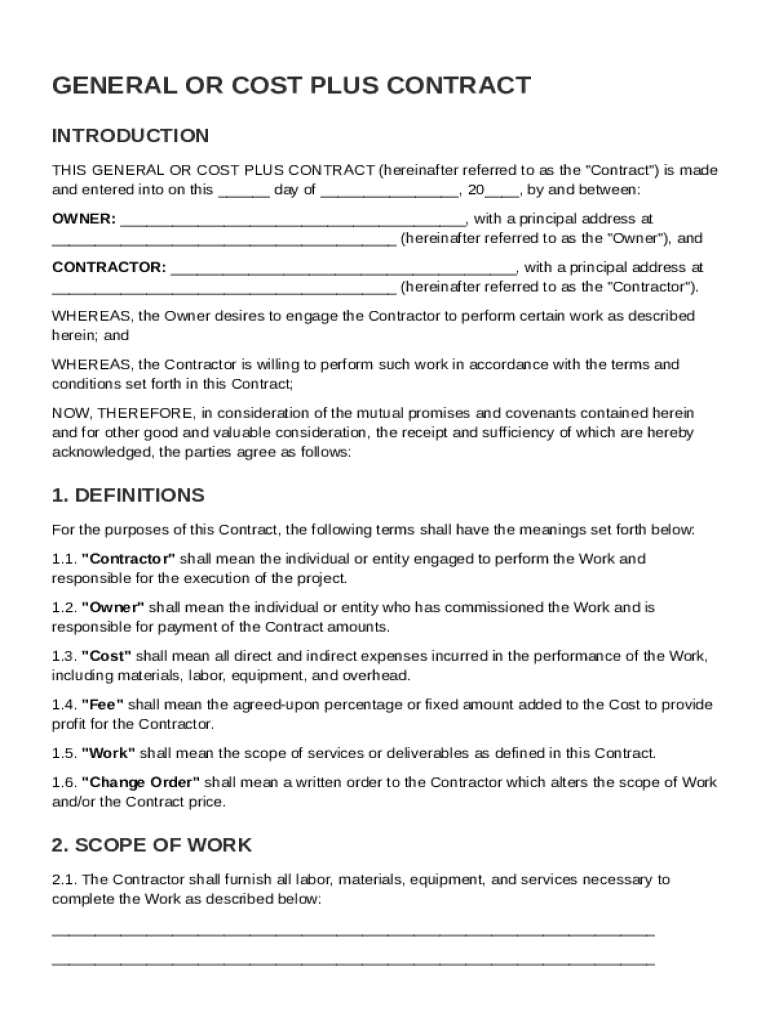
The General or Cost Plus Contract Template is designed to outline the specific terms and conditions between an owner and a contractor. This type of contract is particularly useful in construction and similar projects where the scope of work can evolve over time. Key elements typically include:
-
Definitions of Key Terms: Clear definitions are essential to prevent misunderstandings. Terms such as "cost," "fee," "overhead," and "profit" should be clearly defined.
-
Scope of Work: This section details the specific tasks and responsibilities of the contractor. It identifies what is included in the project and any exclusions.
-
Payment Terms: This outlines how the contractor will be compensated. The cost-plus format generally includes the reimbursement of actual costs plus a fee for profit.
-
Cost Management Procedures: Details on how costs are tracked and reported. This section may include clauses about audits and approvals for incurred costs.
-
Change Order Processes: Specifies how changes to the project scope or other elements are managed. This includes procedures for approval and documentation of changes.
-
Responsibilities and Liabilities: Clarifies each party's responsibilities and liabilities, providing a clear framework for the project execution.
Definition & Meaning of a General or Cost Plus Contract
A General or Cost Plus Contract is a construction contract format where the client agrees to reimburse the contractor for construction costs stated in the contract, plus a set margin for profit. This type of contract is favored when project specifics are not completely determined at the outset, allowing more flexibility.
-
Reimbursement Model: The owner pays the contractor for all project costs, such as materials and labor, and an additional fee that represents profit.
-
Flexibility: Beneficial for projects where scope development occurs as construction progresses.
-
Transparency: Requires detailed documentation and verification of costs, promoting mutual trust.
Steps to Complete the General or Cost Plus Contract Template
Completing a General or Cost Plus Contract Template involves several steps to ensure the contract is comprehensive and legally sound:
-
Identify Parties Involved: Clearly state the names and addresses of the owner and the contractor.
-
Define Scope and Deliverables: Detail the expected work and deliverables, including timelines and milestones.
-
Determine Cost and Fee Structure: Specify how costs will be reimbursed and the contractor's profit margin.
-
Establish Change Procedures: Include provisions for handling scope changes or unexpected issues during the project lifecycle.
-
Include Legal Protections: Add clauses for indemnification, dispute resolution, and liabilities to protect both parties.
-
Review with Legal Advisor: Have the completed contract reviewed by a legal expert to ensure compliance with relevant laws.
Legal Use of the General or Cost Plus Contract Template
The legal use of the General or Cost Plus Contract Template ensures that all parties involved understand their rights and obligations. This type of contract must comply with local, state, or federal regulations to be enforceable.
-
Compliance with Local Laws: Verify that the contract meets local construction and contract laws, which vary by state.
-
Dispute Resolution: Include a structured approach for resolving disputes, such as mediation or arbitration.
-
Indemnification Clauses: Protects the owner against potential losses or damages due to contractor's actions or negligence.
-
Insurance Requirements: Specifies the types and amounts of insurance the contractor must carry during the project.
Examples of Using the General or Cost Plus Contract Template
Understanding real-world applications of this contract can solidify its relevance and utility:
-
Residential Construction: Often used in custom home building when design details evolve during construction.
-
Commercial Projects: Applicable in office buildings or retail space renovations where flexible scope management is needed.
-
Government Contracts: Frequently employed in public sector projects due to the need for transparency and accountability in spending.
-
Renovations and Add-Ons: Suitable for projects with higher uncertainty in the final outcome, like adding features to existing structures.
Who Typically Uses the General or Cost Plus Contract Template
This contract template is favored by entities needing a flexible, transparent pricing structure, commonly including:
-
General Contractors: Use it to provide detailed billing for large-scale construction projects.
-
Homeowners: Opt for this contract type when engaging builders for custom homes or extensive renovations.
-
Commercial Entities: Businesses looking to build or modify facilities to accommodate unique needs use this format for its adaptability.
-
Public Agencies: Government bodies often require this type of contract for infrastructure projects due to transparency in costs.


Important Terms Related to the General or Cost Plus Contract Template
Understanding terminology specific to the General or Cost Plus Contract Template is crucial for stakeholders:
-
Cost-Based Reimbursement: Refers to payment for all incurred costs plus a negotiated profit margin.
-
Profit Margin: The fee added to the costs to ensure the contractor earns a profit on the project.
-
Direct Costs: Costs that can be directly attributed to the project's execution, like materials and labor.
-
Indirect Costs: Overhead expenses not directly tied to a specific project but necessary for overall operation, such as utilities and management salaries.
Software Compatibility for Filling the Contract Template
Filling out a General or Cost Plus Contract can be made easier using various document management and editing software:
-
DocHub: Offers comprehensive tools for editing and signing documents online, supporting a broad range of formats including PDFs and DOC files.
-
Adobe Acrobat Reader: Widely used for PDF documents, allowing for filling and signing capabilities.
-
Microsoft Word: Provides user-friendly editing features for drafting and modifying contract templates.
-
Google Workspace: Integrates with cloud storage for collaborative editing and signed document management.
By understanding these elements and utilizing appropriate tools, users can effectively manage their General or Cost Plus Contract Template to ensure successful project execution.