Type text, add images, blackout confidential details, add comments, highlights and more.
02. Sign it in a few clicks
Draw your signature, type it, upload its image, or use your mobile device as a signature pad.
03. Share your form with others
Send it via email, link, or fax. You can also download it, export it or print it out.
How to use or fill out Renovation Contract for Contractor - New Mexico
Ease of Setup
DocHub User Ratings on G2
Ease of Use
DocHub User Ratings on G2
Click ‘Get Form’ to open it in the editor.
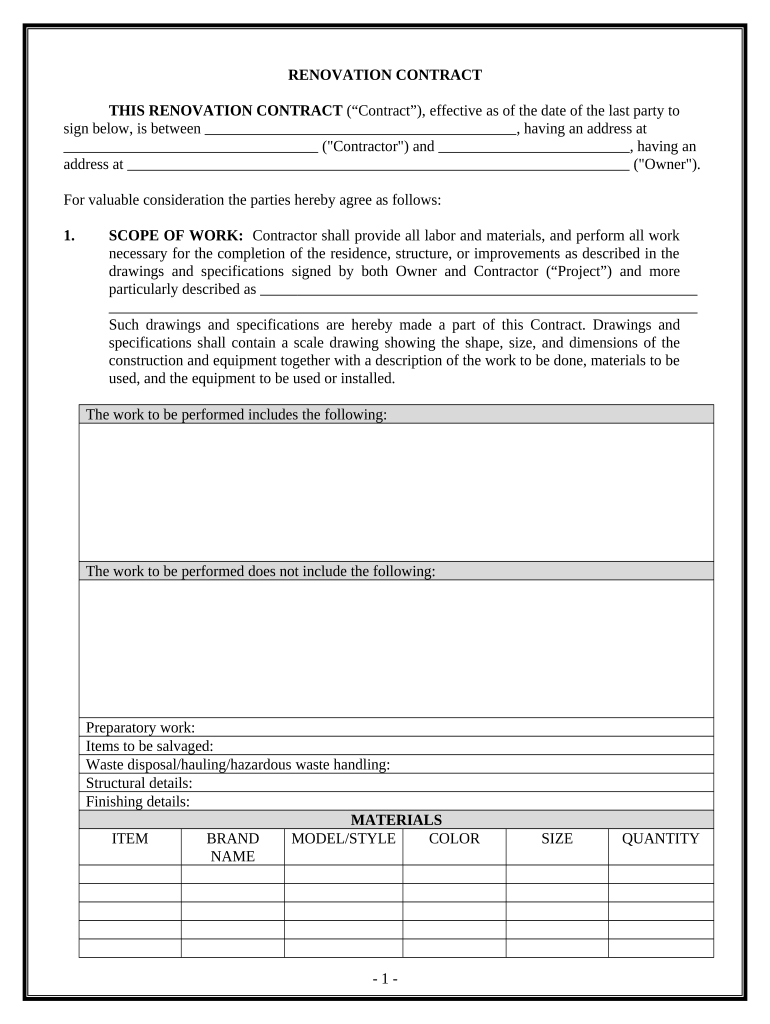
Begin by entering the Contractor's name and address in the designated fields at the top of the contract.
Next, fill in the Owner's name and address. This establishes who is involved in the agreement.
In the 'SCOPE OF WORK' section, detail all labor and materials required for the project. Be specific about what is included and excluded from the work.
Specify the 'WORK SITE' by providing the property address where renovations will take place.
Indicate the 'TIME OF COMPLETION' by filling in start and completion dates, ensuring clarity on project timelines.
Complete sections regarding permits, soil conditions, insurance, and any changes to scope as necessary.
Finally, review all entries for accuracy before signing. Ensure both parties sign and date at the end of the document.
Start using our platform today to streamline your renovation contract process for free!
Fill out Renovation Contract for Contractor - New Mexico online It's free
Renovation contract for contractor new mexico templateRenovation contract for contractor new mexico template freeRenovation contract for contractor new mexico pdfFree renovation contract for contractor new mexicoContractor renovation contract templateConstruction renovation contractStandard renovation contractResidential new construction contract
Security and compliance
At DocHub, your data security is our priority. We follow HIPAA, SOC2, GDPR, and other standards, so you can work on your documents with confidence.
Create indefinite delivery-indefinite quantity construction (IDIQ) contracts that may be used by those participating entities for projects related toRead more
Early incorporation of a green remediation strategy into project documents such as a feasibility study and cleanup service contract can help attain costRead more
Cookie consent notice
This site uses cookies to enhance site navigation and personalize your experience.
By using this site you agree to our use of cookies as described in our Privacy Notice.
You can modify your selections by visiting our Cookie and Advertising Notice.