
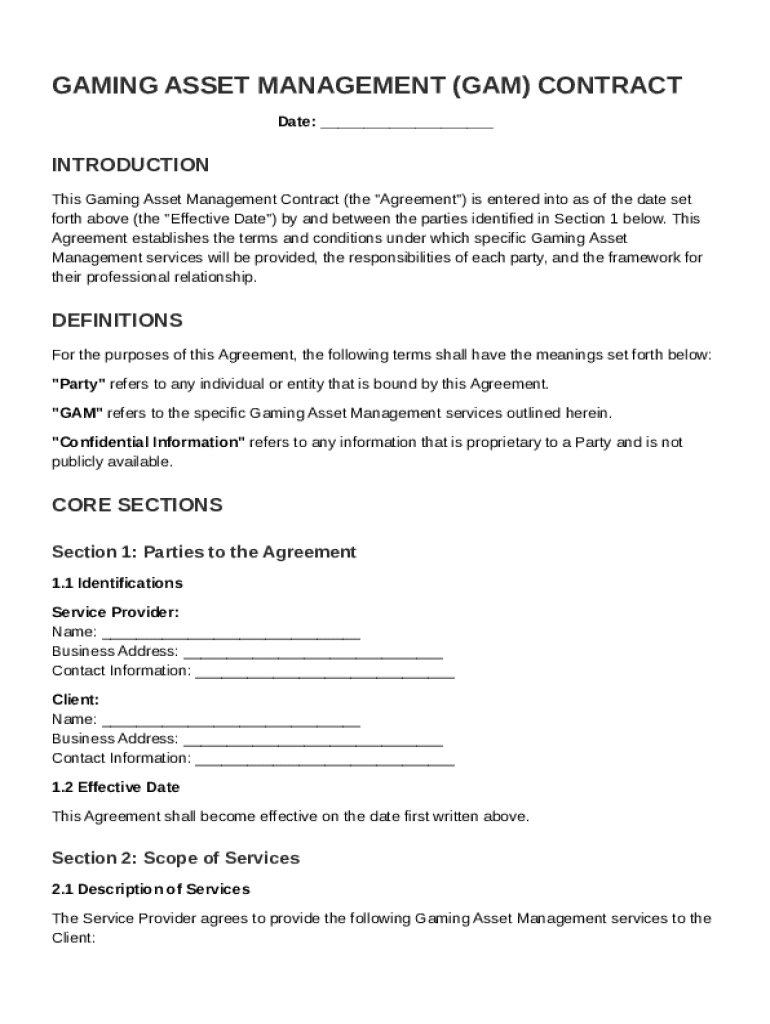







Definition and Purpose of the GAM Contract Template
The GAM Contract Template serves as a foundational agreement within the gaming industry, where it outlines the roles and responsibilities between a service provider and a client regarding gaming asset management services. The contract establishes a comprehensive framework for managing gaming assets, ensuring clarity and mutual understanding. With this template, both parties can delineate specific service details, financial obligations, and operational scope, assuring that every aspect of the asset management process is accounted for and legally documented.
Specific Elements Defined
- Scope of Services: Details the exact nature of services provided by the asset manager.
- Financial Terms: Specifies payment schedules, invoicing practices, and compensation structures.
- Responsibilities: Clearly delineates duties for both the service provider and the client.
- Confidentiality Obligations: Includes agreements on information non-disclosure to protect proprietary information.
How to Use the GAM Contract Template
Utilizing the GAM Contract Template involves several systematic steps to ensure it is tailored to meet your specific needs. Start by reviewing the template in its entirety to familiarize yourself with its structure and content.
- Customize Content: Modify sections to reflect the precise scope and terms applicable to your agreement, ensuring clarity in areas such as payment terms and deliverables.
- Consult Legal Expertise: Engage with legal professionals to verify compliance with industry standards and adjust any contractual language to fit unique business needs.
- Collaborative Review: Share the draft with all stakeholders involved. Gathering input prior to finalization prevents disputes and clarifies expectations.
Making Effective Edits
- Use clearly defined terminology to eliminate ambiguity.
- Highlight critical deadlines and milestones for easy reference.
- Ensure definitions of key terms align with industry norms to prevent misinterpretations.
Steps to Complete the GAM Contract Template
Completing a GAM Contract Template demands a thorough approach, paying attention to all crucial contractual aspects. Follow these sequential steps:
- Preparation: Gather all necessary information pertinent to your business arrangement, such as service details and pricing.
- Customization: Adjust template clauses to suit your business's specific circumstances, including applicable laws and regulatory requirements.
- Review: Conduct a meticulous check for coherence and correctness of all inputs added into the contract.
- Finalization: After confirming all components are accurately captured, print and sign the document to make it legally binding.
Special Considerations
- Verify that all required fields are completed prior to signing.
- Consider electronic signature options for efficiency and tracking.
- Confirm both parties have identical copies for record-keeping.
Key Elements of the GAM Contract Template
Understanding key elements in the GAM Contract Template enhances its effective application. Each element within the contract is integral to forming a robust agreement that protects both parties' interests.
Core Components
- Terms and Conditions: Comprehensive explanation of the contractual obligations.
- Liability Limits: Specifies the extent of responsibility for losses or damages incurred.
- Dispute Resolution: Procedures for handling disagreements that may arise.
- Termination: Clearly detailed terms under which the contract can be dissolved by either party.
Practical Implications
- Ensures all parties have the same understanding of every clause.
- Regular updates to terms based on industry changes mitigate risks associated with outdated practices.
- Defines steps for conflict resolution, minimizing legal complications.
Legal Use and Compliance
Utilizing the GAM Contract Template requires strict adherence to relevant legal frameworks. Understanding compliance ensures the protection of interests and the enforceability of the document.
Compliance Checklist
- Confirm alignment with federal and state laws applicable to gaming operations.
- Include provisions adhering to privacy regulations to protect sensitive information effectively.
- Regularly update provisions, especially surrounding liability and compliance penalties.
Contract Enforcement
- Regularly consult legal advisories to ensure the contract remains valid and enforceable.
- Highlight any clauses that might conflict with local regulations and adjust accordingly.
- Familiarize all signing parties with their legal obligations under the contract.
Important Terms Related to the GAM Contract Template
Grasping key terms used in the GAM Contract Template aids in understanding its full dimensions and ensuring its correct application.
- Asset Management: The systematic process of deploying, operating, maintaining, upgrading, and disposing of assets cost-effectively.
- Confidential Information: Data shared between parties during the execution of a contract that must remain undisclosed beyond the agreed parameters.
- Service Level Agreement (SLA): A component of the contract dictating the expected level of service performance.
Detailed Analysis
- Asset Management: Aligns goals between stakeholders to enhance mutual benefit from managed assets.
- Confidential Information: Protects intellectual property and competitive advantage.
- Service Level Agreement: Establishes accountability and benchmarks performance metrics.
State-Specific Rules for the GAM Contract Template
In the United States, specific state regulations can influence the implementation of the GAM Contract Template, making it crucial to factor in these differences to maintain legality.
Variations by State
- Licensing Requirements: Certain states may mandate specific licenses to engage in gaming asset management.
- Data Protection Regulations: Variations exist concerning data privacy, requiring customized confidentiality clauses.
- Tax Implications: Different states enforce varying taxation methods and rates on gaming revenues and transactions.
Application Strategies
- Consult with state-specific legal experts to ensure all regional regulations are met.
- Update the template in line with jurisdiction-specific requirements before renewal.
- Use localized terminology to satisfy regional legal descriptions and mandates.
Examples of Using the GAM Contract Template
To illustrate the practical application of the GAM Contract Template, consider these common scenarios where such a document proves beneficial.
Real-World Applications
- Online Gaming Platforms: Ensuring seamless operations while managing digital game inventories and customer interface effectively.
- Casino Asset Management: Streamlining operations management, including the upkeep of equipment and the allocation of resources.
- Game Development Collaborations: Facilitating partnerships for co-development while safeguarding intellectual property and shared assets.
Case Study Insights
- Implemented accurately, a GAM Contract Template provides clarity, prevents disputes, and offers efficient asset management, demonstrated by sustained operational success in high-pressure environments.
- A thorough template can enhance trust and collaboration between diverse stakeholders in the rapidly evolving gaming industry landscape.




