






Definition and Meaning
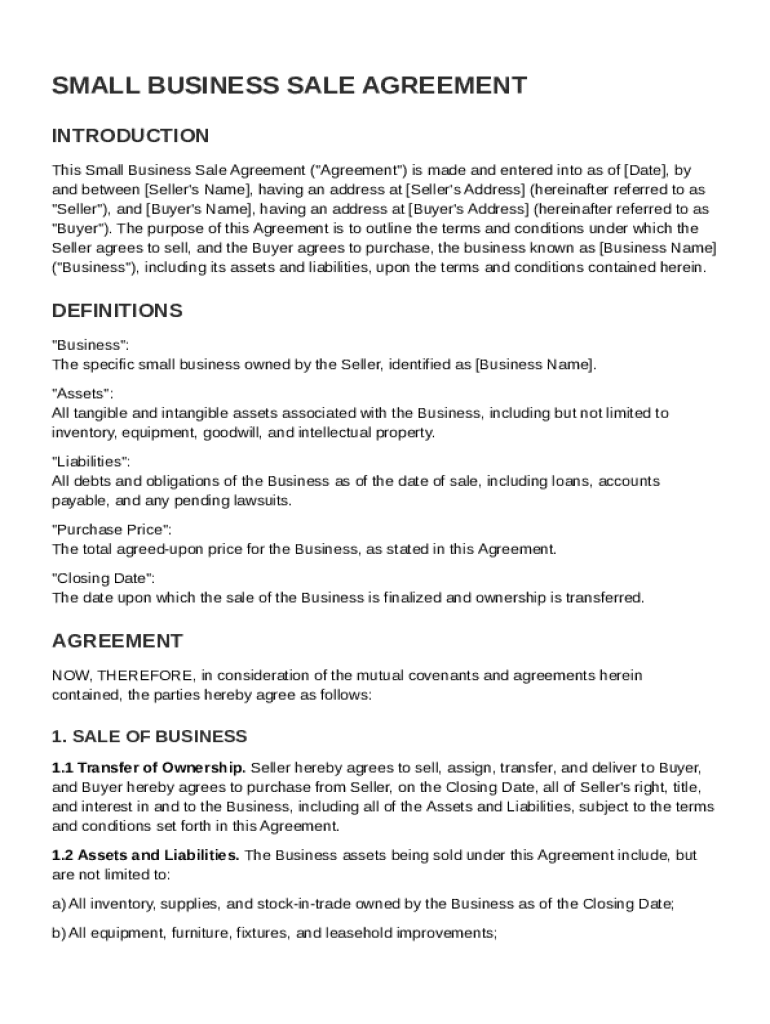
A Small Business Sale Agreement Template is a standardized document that outlines the terms and conditions for selling a small business. It serves as a legal contract between the buyer and seller, clarifying aspects such as the assets being transferred, liabilities assumed, purchase price, payment terms, and the closing date. This template also includes representations and warranties by both parties, specifying obligations, confidentiality, indemnification clauses, and dispute resolution methods. By formalizing the transaction, the template ensures that both parties understand their responsibilities and protects their interests.
Key Elements of a Small Business Sale Agreement
Business Details and Assets
The agreement should detail the specific business being sold, including its name, location, and any significant physical or intellectual assets. This might encompass equipment, property leases, inventory, customer lists, trademarks, and proprietary information. Clear identification of these components ensures that there is a mutual understanding of what the buyer is acquiring.
Purchase Price and Payment Terms
This section defines the total purchase price, payment schedule, and any deposits or earnest money involved in the transaction. It is crucial that the agreement specifies whether the payment will be made in full at closing or through installments, and outlines any interest rates applicable to deferred payments. Both parties must agree on the valuation method used to determine the price.
Liabilities Assumed by Buyer
The buyer may agree to assume certain liabilities as part of the sale. This could include outstanding loans, leases, or contracts. The agreement should enumerate these liabilities to prevent disputes later. It is important to have a clear description of how these liabilities will be managed by the buyer post-purchase.
Steps to Complete the Small Business Sale Agreement Template
-
Review and Prepare Information: Gather all relevant business records, financial statements, and legal documents. Make sure you have accurate and updated information on business assets, liabilities, and ownership rights.
-
Draft Key Sections: Begin by filling out the business details, the purchase price, and the intended closing date. Next, articulate any conditions precedent that need to be satisfied before the sale can be finalized.
-
Identify and Include Indemnifications: Specify how each party is protected against potential future claims or losses due to misrepresentations or breaches of warranty by the other party.
-
Define Confidentiality Provisions: Outline the expectations for handling sensitive information disclosed during negotiations and after the sale.
-
Solicit Legal Review: Engage a legal professional to review the draft to ensure it complies with applicable laws and thoroughly protects your interests.
-
Finalize and Execute: After reaching mutual agreement on all terms, both parties should sign the document and retain copies for their records.
Legal Use of the Small Business Sale Agreement
Enforceability and Dispute Resolution
A Small Business Sale Agreement becomes legally enforceable when it is duly signed by both parties and any attached conditions precedent are fulfilled. The agreement should specify a governing law jurisdiction and a methodology for resolving disagreements, whether through arbitration, mediation, or court proceedings. Including an explicit dispute resolution framework helps manage potential conflicts efficiently and with minimal business interruption.
Who Typically Uses the Small Business Sale Agreement Template


Target Users
-
Business Owners and Entrepreneurs: Individuals looking to sell their entire business or a portion of it.
-
Prospective Buyers and Investors: Individuals or entities considering the purchase of an existing business to expand their operations.
-
Legal and Financial Advisors: Professionals who guide buyers and sellers through the process, ensuring every term reflects their clients' best interests.
Important Terms Related to Small Business Sale Agreements
Representations and Warranties
These are declarations of fact made by both parties concerning the business's condition, ensuring transparency in the transaction. Common warranties include assertions about the accuracy of financial statements and the absence of pending litigation.
Conditions Precedent
These are specific conditions that must be met before the sale can be completed. They could involve regulatory approvals, satisfactory due diligence, or the buyer securing financing. Clearly defined conditions help manage expectations and timelines.
State-Specific Rules for Small Business Sale Agreements
Variability by Jurisdiction
While the basic structure of a Small Business Sale Agreement may remain consistent, specific state laws can affect the contract’s enforceability. For example, state tax obligations or specific disclosure requirements. Parties should seek legal counsel to adapt the agreement to their particular jurisdiction, ensuring compliance with local regulations.
Software Compatibility for Document Preparation
Integration with DocHub
DocHub offers a seamless solution for drafting, editing, and managing the Small Business Sale Agreement Template. Its compatibility with formats like DOC and PDF allows for easy adjustments and sharing. You can import relevant documents directly from cloud services such as Google Drive or Dropbox, and manage revisions through real-time synchronization with collaborators, eliminating concerns about outdated versions.