






Definition & Meaning
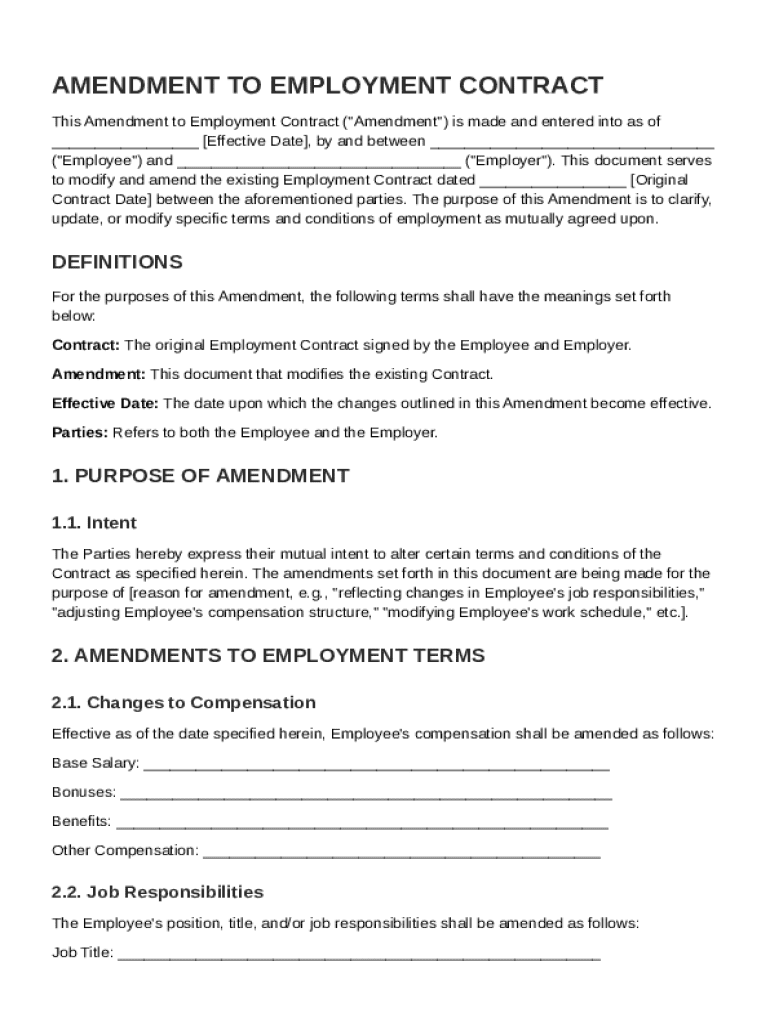
An Amendment to Employment Contract Template is a formal document used to make changes to an existing employment agreement between an employer and an employee. This template is designed to modify specific aspects of the original contract, such as salary adjustments, job responsibilities, work schedules, or the duration of employment. It reaffirms any unaltered provisions from the initial contract and typically includes governing law and miscellaneous clauses to ensure legal compliance and clarity.
How to Use the Amendment To Employment Contract Template
Using the Amendment to Employment Contract Template involves several steps to ensure it accurately reflects the changes required. First, review the original employment contract to identify which terms need alteration. Next, download or access the template from a reliable source, such as a legal document service. Fill in the template with the necessary information, such as the names of the parties involved, specific amendments to terms, and the effective date. Both the employer and employee must review the document to confirm their understanding and agreement before signing.
- Make sure the template aligns with any relevant company policies and local employment laws.
- Customize the template according to the unique needs of the employer and employee.
- Ensure signatures from both parties to validate the amendment.
Steps to Complete the Amendment To Employment Contract Template
- Review Existing Employment Contract: Identify the clauses that need amendments.
- Access the Template: Download or edit directly using a document editing platform.
- Fill in Party Details: Provide names, positions, and contact information.
- Specify Amendments: Clearly detail each change such as salary modifications or schedule adjustments.
- Include Effective Dates: Indicate when the new terms will commence.
- Review for Accuracy: Ensure all changes are correct and no important details are omitted.
- Sign the Amendment: Both parties must sign to make the document legally binding.
Key Elements of the Amendment To Employment Contract Template
The Amendment to Employment Contract Template comprises several critical elements ensuring it covers all necessary adjustments while maintaining legal standing:
- Identification: Details of both parties, including names and positions.
- Recitals: Introduction and purpose of the amendment.
- Amendment Details: Specific changes to existing terms such as job title, responsibilities, or remuneration packages.
- Governing Law: Jurisdiction governing the contract.
- Miscellaneous Provisions: Additional clauses that might include non-disclosure or severability clauses.
Legal Use of the Amendment To Employment Contract Template
The use of this template must adhere to employment law within the relevant jurisdiction to ensure it is enforceable. Generally:
- Amend the contract only with mutual consent of both parties.
- Ensure the changes do not violate labor laws, like those regarding minimum wage or workplace safety.
- Be attentive to state-specific laws that may influence contract terms and amendments.
Who Typically Uses the Amendment To Employment Contract Template
This document is frequently used by:
- Human Resources Departments: To maintain proper documentation of employment changes.
- Employers: Who need to adjust terms due to changing business needs or employee performance.
- Employees: Seeking adjustments to terms for personal reasons or career progression.


Important Terms Related to Amendment To Employment Contract Template
Understanding specific terms is vital to correctly utilizing and interpreting the amendment:
- Effective Date: The date from which the amendments begin.
- Consideration: Any benefit or compensation adjusted as part of the amendment.
- Mutual Agreement: The consent of both parties to the changes.
- Severability Clause: Ensures if one part of the amendment is invalid, the rest remains enforceable.
State-Specific Rules for the Amendment To Employment Contract Template
Different states may have unique requirements for amending employment contracts:
- California: Requires specific disclosure rules for at-will employment changes.
- New York: Demands compliance with labor law reforms affecting wage and hour terms.
- Texas: May call for different documentation standards for contract amendments to be recognized in court.
Understanding these state-specific regulations is important to ensure legal enforceability and to avoid any potential disputes.