






Definition and Meaning
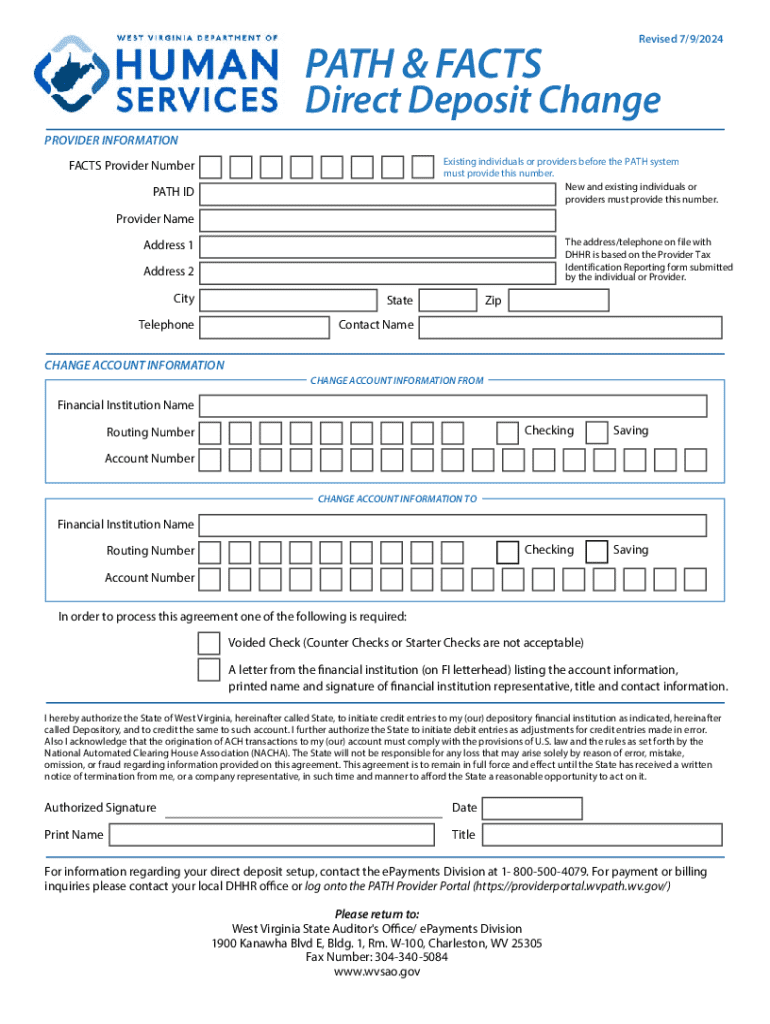
The "Electronic Payments - wvsao" form is a critical document utilized for setting up or modifying electronic payment accounts with the West Virginia State Auditor's Office (wvsao). It serves as both an instruction guide and a validation form for individuals or businesses that need to manage payrolls, vendor payments, and other financial transactions electronically. The form ensures that all merchant and financial details are accurately captured, facilitating seamless and secure transactions.
Practical Use Case Examples
- Payroll Management: Organizations use the form to automate payroll, enabling employees to receive salaries directly into their bank accounts.
- Vendor Payments: Businesses leverage the form to streamline vendor payment processes, reducing manual invoicing and enhancing efficiency.
- Tax Refund Allocation: Individuals may fill out this form for the direct deposit of state tax refunds, ensuring timely and error-free transactions.
How to Use the Electronic Payments - wvsao
The form provides a structured layout to guide users through setting up direct deposits and electronic payments. This involves the following steps:
- Gather Necessary Information: Collect essential details such as bank account numbers, routing numbers, and personal identification like Social Security numbers or Employer Identification Numbers (EIN).
- Complete Form Details: Accurately fill the sections requesting personal, banking, and sometimes employment details to ensure the effective setup of electronic payments.
- Verification: Verify the completed form by comparing the provided information with bank documents to avoid discrepancies.
- Submission: Submit the form following the appropriate channels, whether online, by mail, or in person, depending on your preference and the specific instructions detailed in the form guide.
Notable Instructions
- Ensure that the banking information entered matches exactly with the details held by your financial institution to avoid transaction rejections.
- Double-check that personal identifiers such as SSN or EIN are correct and current to ensure compliance.
Steps to Complete the Electronic Payments - wvsao
Completing the "Electronic Payments - wvsao" involves methodical input of various details. Here is how you can systematically fill out the form:
- Enter Personal Information: Input your full name, address, contact number, and any identification numbers required.
- Provide Bank Details: Accurately record the bank account details, validation against a recent bank statement or cheque is recommended for precision.
- Select Payment Type: Specify the type of electronic payments being set up or altered – payroll, vendor payments, etc.
- Authorize Payment Setup: Sign the form to authorize the State Auditor's Office to process payments electronically.
- Review and Submit: Carefully review all entries for accuracy, then submit the form through the preferred submission method.
Common Errors to Avoid
- Misaligned bank routing numbers can result in failed transactions; double-check this information before submission.
- Ensure that any required accompanying documents, such as voided checks, are attached with your form.
Why Use the Electronic Payments - wvsao
Utilizing this form benefits both individual users and businesses by streamlining financial processes. Here are the key advantages:
- Efficiency: Electronic payments reduce the need for manual processing of paper checks, speeding up transaction times.
- Security: Safeguarding measures inherent in electronic payment processes help mitigate fraud risks.
- Convenience: Users experience increased convenience through automated transactions and reduced administrative tasks.
Use Cases Demonstrating Benefits
- Employers can manage payroll more reliably and reduce errors associated with manual check issuance.
- Vendors receive payments promptly, supporting better cash flow management.
- Government transactions, such as tax refunds, are expedited, providing quicker access to funds for constituents.
Important Terms Related to Electronic Payments - wvsao
Understanding specific terminology is crucial when dealing with the "Electronic Payments - wvsao" form:
- Routing Number: A unique bank identifier that directs payment to the correct banking institution.
- Direct Deposit: The electronic transfer of funds directly into a recipient's account, bypassing the need for physical checks.
- Authorization: Consent provided by you to the wvsao to facilitate electronic payment processing.
Definitions for Clarity
- Bank Account Number: A unique number associated with your bank account that often appears on checks.
- Merchant Account: A type of bank account allowing businesses to accept payments by debit or credit card.
Legal Use of the Electronic Payments - wvsao
Adhering to legal requirements for the "Electronic Payments - wvsao" ensures compliance with state financial regulations. It involves:
- Adherence to Data Privacy Laws: The form requires you to handle personal and banking information as per legal standards to protect privacy.
- Compliance with Financial Transaction Acts: Ensures all electronic transfers and payments comply with relevant auditing standards.
Legal Precautions
- Consultation with legal advisors might be necessary if you're not familiar with financial compliance, especially for business-related electronic payment setups.
- Regularly update records and ensure that signature authorizations reflect current authority figures within your organization.
Key Elements of the Electronic Payments - wvsao
The completion and submission of the "Electronic Payments - wvsao" form involve several core components that are vital for its intended purpose:
- Personal Identification Fields: Capture essential details identifying the individual or business.
- Banking Information Section: Details relate to the bank account through which transactions will be conducted.
- Authorization and Certification: Validates the user's consent and agreement to the payment terms.
Additional Components
- Fields allowing for optional notifications or communications preferences may be included to enhance user experience.
State-Specific Rules for the Electronic Payments - wvsao
Variations may exist in how the "Electronic Payments - wvsao" is administered based on West Virginia-specific rules:
- Compliance with State Auditor Guidelines: Entrains the offices of the State Auditor to adhere strictly to the established procedures.
- Differing Requirements: Depending on your region within West Virginia, certain additional documentation or steps may be requested.
Regional Considerations
- Obtain comprehensive instructions from the West Virginia State Auditor’s Office to ensure compliance and submit all required documents tailored to state regulations.