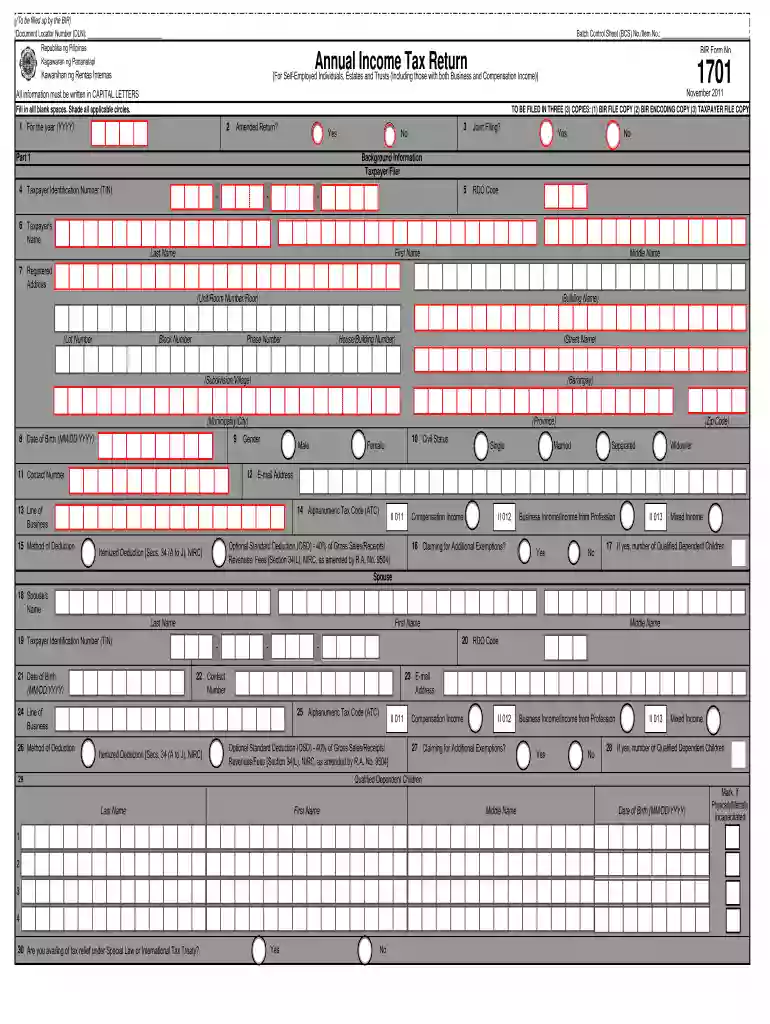
2011 form 1701-2025

Get Form
bir form 1701 2011 Preview on Page 1

Here's how it works

01. Edit your bir form 1701 2011 online
Type text, add images, blackout confidential details, add comments, highlights and more.

02. Sign it in a few clicks
Draw your signature, type it, upload its image, or use your mobile device as a signature pad.

03. Share your form with others
Send 1701 bir form via email, link, or fax. You can also download it, export it or print it out.

How to use or fill out 2011 form 1701 with our platform

Form edit decoration
9.5
Ease of Setup
DocHub User Ratings on G2
9.0
Ease of Use
DocHub User Ratings on G2
  1. Click ‘Get Form’ to open the 2011 Form 1701 in the editor.
  2. Begin by filling in the Document Locator Number (DLN) and Batch Control Sheet (BCS) No. at the top of the form.
  3. In Part 1, provide your Taxpayer Identification Number (TIN), name, registered address, date of birth, and contact information. Ensure all information is written in capital letters.
  4. Indicate your civil status and select applicable options for joint filing and additional exemptions if relevant.
  5. Proceed to Part II for tax computation. Fill in your income tax due under regular and special rates based on your taxable income.
  6. Complete any necessary schedules detailing gross compensation income and deductions as required in Parts VI through VIII.
  7. Finally, review all entries for accuracy before signing over your printed name at the bottom of the form.

Start using our platform today to easily fill out your 2011 Form 1701 for free!

See more 2011 form 1701 versions

We've got more versions of the 2011 form 1701 form. Select the right 2011 form 1701 version from the list and start editing it straight away!
Versions Form popularity Fillable & printable
2018 4.8 Satisfied (58 Votes)
2013 4.1 Satisfied (49 Votes)
2011 4.4 Satisfied (548 Votes)
1999 4.3 Satisfied (38 Votes)
be ready to get more

Complete this form in 5 minutes or less

Get form

Got questions?

We have answers to the most popular questions from our customers. If you can't find an answer to your question, please contact us.
Contact us
A Special Set of Criteria for 1701A Those who availed of the 8% flat income tax rate whose sales/receipts and other non-operating income do not exceed P3 million. You cannot file both forms since if you are earning a regular salary outside of being self-employed, you are then required to file form 1701 and not 1701A.
2. Whats the difference between 1701Q, 1701A, and 1701? FormWhat its forWhen to file 1701Q Quarterly income tax return May 15, Aug 15, Nov 15 1701A Annual return using 8% flat tax April 15 1701 Annual return using graduated tax rates April 15 May 12, 2025
How to Download and eBIRforms for offline use? Go to the official website of the Bureau of Internal Revenue (BIR) at .bir.gov.ph. Click on the eServices tab on the main menu, and select eBIRForms from the drop-down menu. Click on the Download Now button to download the eBIRForms package.
BIR Form 1701, also known as Annual Income Tax Return for Self-Employed Individuals, Estates and Trusts is a tax form which summarizes all the transactions made over the tax calendar year.
BIR Form No. 1701-MS shall be filed by individuals who are engaged in trade/business or the practice of profession including those with mixed income (i.e., those engaged in the trade/business or profession who are also earning compensation income) in accordance with Sec. 51 of the Code, as amended.
be ready to get more

Complete this form in 5 minutes or less

Get form