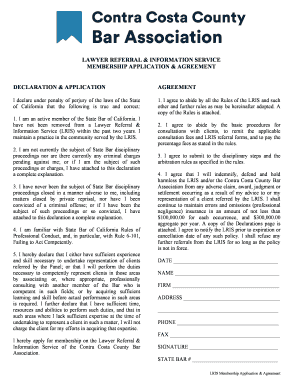
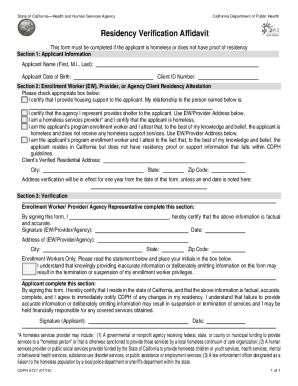
Definition & Meaning
The term "form online" refers to digital documents that are designed for interaction and submission over the internet. These forms can range from simple data entry fields to complex applications requiring attachments and signatures. The primary purpose of creating and handling forms online is to streamline data collection, improve efficiency, and reduce the logistical strain associated with paper-based processes. Digital forms are used across various sectors, including education, finance, government, and healthcare, enabling quicker turnaround times and easier data management.
Benefits of Online Forms
- Efficiency: Online forms reduce processing time and minimize human error associated with manual data entry.
- Accessibility: Forms can be accessed and completed from any device with an internet connection, enhancing flexibility for users.
- Data Management: Digital submission allows for seamless integration with databases and other software, facilitating data analysis and reporting.
How to Use the Form Online
Using an online form typically involves a sequence of steps that users must follow to ensure accurate and complete submission. First, users must access the form through a hyperlink or website portal. Once accessed, detailed instructions usually guide the user through entering the necessary information, which might involve filling out text fields, selecting options from dropdown menus, or uploading necessary documents. Users may also need to provide an electronic signature if the form necessitates authentication or consent.
Step-by-Step Usage Guide
- Access: Visit the platform or website offering the form.
- Read Instructions: Carefully go through the instructions to understand the requirement.
- Fill Out Form: Enter information in all required fields; ensure accuracy to avoid submission issues.
- Upload Documents: Attach any necessary supporting documents if prompted.
- Review and Submit: Double-check all inputs for accuracy before submission and follow through with specific submission guidelines provided by the form.
Steps to Complete the Form Online
Completing a form online involves a systematic approach to ensure all required information is provided accurately. The procedure often starts with gathering all necessary documents and personal data, such as identification details, prior to starting the form. The next step involves methodically working through each section of the form, ensuring to fill in all fields marked as required. It's often beneficial to periodically save progress on longer forms to prevent data loss in case of technical issues.
Detailed Completion Process
- Preparation: Gather all necessary documentation and information in advance.
- Initialization: Open the form via the designated online portal.
- Completion:
- Fill all mandatory fields
- Verify information for accuracy
- Address any optional fields as needed
- Submission: Submit the form according to the instructions provided, ensuring confirmation of receipt if applicable.
Important Terms Related to Form Online
Understanding the terminology associated with online forms can significantly enhance a user's ability to fill them out accurately and efficiently. Common terms include "mandatory fields," which are the sections of the form that must be completed before submission, and "captcha," a security measure to verify that a user is human. Familiarity with terms such as "electronic signature" for authentication and "attachment fields" for uploading documents can also prove beneficial.
Key Terms and their Significance
- Mandatory Fields: Sections that must be filled for successful submission.
- Captcha: A security feature to prevent automated form submissions.
- Electronic Signature: A virtual signature used for verification and consent.
- Attachment Fields: Slots for uploading supplementary documents necessary for processing.
Legal Use of the Form Online
Online forms are often used for legal purposes, including contracts, applications, and authorization documents. It is essential to understand that electronic submissions can be legally binding under laws such as the ESIGN Act, provided that they contain the necessary information and a valid electronic signature. Users must ensure that all data submitted through an online form is accurate and complete, as falsification can result in legal consequences.
Ensuring Legal Compliance
- Electronic Signatures: Legally recognized under ESIGN for agreement authenticity.
- Accuracy of Information: Critical for maintaining legal standing and avoiding disputes.
- Privacy Policies: Understanding the handling of data within the organization is essential.
Who Issues the Form
Online forms are typically issued by the organization or authority responsible for the process associated with the form. This could be a governmental entity, a corporation, an educational institution, or another official body. Each issuing party often has specific guidelines related to the form's use, submission requirements, and deadlines.
Issuing Authorities
- Government Agencies: Often issue forms for compliance, tax, or social services.
- Educational Institutions: Use forms for admissions, financial aid, and record requests.
- Corporations: Often require forms for HR, procurement, and client dealings.
- Healthcare Providers: Use forms for patient intake, authorization, and treatment records.
Required Documents
Certain forms require the submission of additional documents to complement the information provided within the form. For instance, forms related to identification or residency might need copies of identification documents or utility bills. Understanding which supporting documents are necessary beforehand can streamline the completion and submission of the form online.
Types of Required Documents
- Identification: Passports, driver's licenses, or national ID cards.
- Proof of Address: Utility bills, rental agreements, or bank statements.
- Financial Records: Pay stubs, tax returns, or bank account statements.
- Authorization Certificates: Power of attorney, consent forms, or affidavits.
Form Submission Methods (Online / Mail / In-Person)
Forms can typically be submitted in multiple methods, such as online, via mail, or in-person, depending on the requirements of the issuing body and the form type. Online submissions are often more convenient and quicker. However, some forms might still require a physical submission, especially when they involve notarization or physical document verification.
Pros and Cons of Submission Methods
- Online Submission:
- Pros: Fast, convenient, environmentally friendly.
- Cons: Technical issues can hinder submission; less suitable for those with limited internet access.
- Mail Submission:
- Pros: Tangible receipt, suitable for those without internet access.
- Cons: Slower processing times, postal delays.
- In-Person Submission:
- Pros: Direct interaction, immediate feedback on completeness.
- Cons: Time-consuming, less flexible in scheduling.