Type text, add images, blackout confidential details, add comments, highlights and more.
02. Sign it in a few clicks
Draw your signature, type it, upload its image, or use your mobile device as a signature pad.
03. Share your form with others
Send w ben e form via email, link, or fax. You can also download it, export it or print it out.
How to use or fill out W-8BEN-E with our platform
Ease of Setup
DocHub User Ratings on G2
Ease of Use
DocHub User Ratings on G2
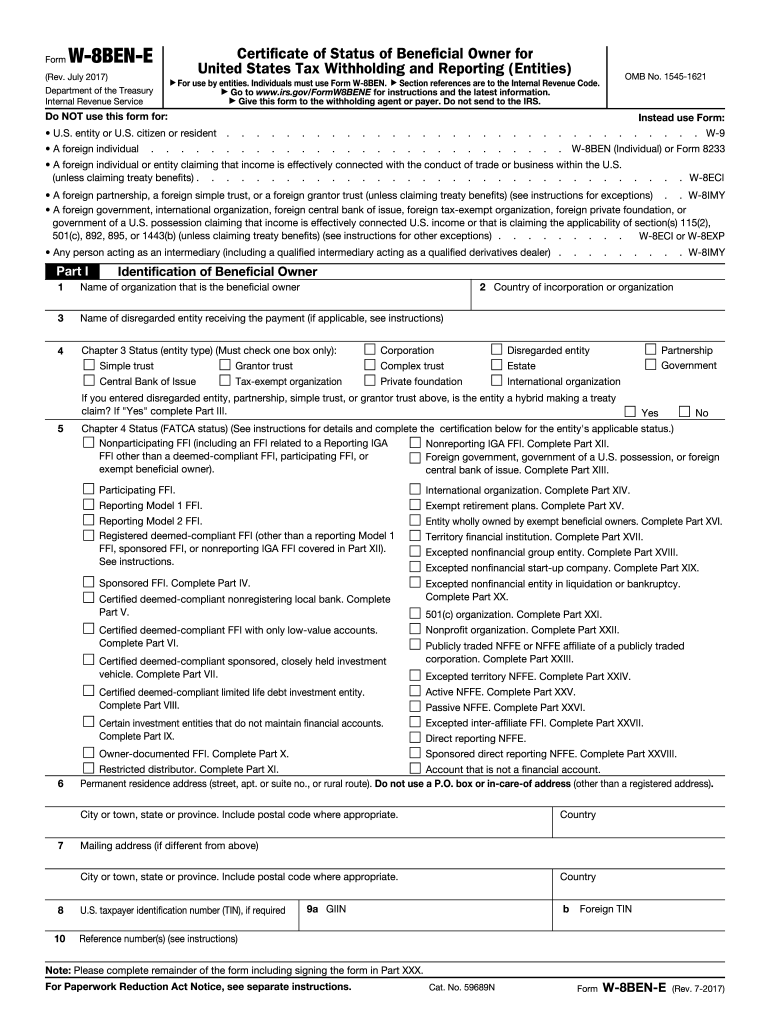
Click ‘Get Form’ to open the W-8BEN-E in the editor.
In Part I, enter the name of the organization that is the beneficial owner and its country of incorporation. Ensure accuracy as this information is crucial for tax identification.
Complete Chapter 3 Status by selecting one box that best describes your entity type, such as Corporation or Tax-exempt organization.
If applicable, provide details about any disregarded entities receiving payments in Part I. This includes their names and addresses.
Fill out Chapter 4 Status (FATCA status) by selecting the appropriate classification for your entity. Review instructions carefully to ensure compliance.
In Part III, if claiming tax treaty benefits, check all applicable boxes and provide necessary details regarding income types and withholding rates.
Finally, sign and date the form in Part XXX to certify that all information provided is accurate and complete before submitting it to your withholding agent.
Start using our platform today for free to simplify your W-8BEN-E form completion!
W-8BEN-E instructionsW-8BEN-E form 2025Download W-8BEN-EW-8BEN-E form 2024W-8BEN-E form 2025 PDF downloadW-8BEN-E latest versionFATCA status W-8BEN-EW-8BEN-E form 2023 download
Security and compliance
At DocHub, your data security is our priority. We follow HIPAA, SOC2, GDPR, and other standards, so you can work on your documents with confidence.
I DocHub that the entity identified in Part I: Is a controlled foreign corporation as defined in section 957(a);. Is not a QI, WP, or WT;. Is whollyRead more
W-8BEN-E Certificate of Entities Status of Beneficial
The W-8BEN-E is an IRS mandated form to collect correct Nonresident Alien (NRA) taxpayer information for entities for reporting purposes and to document
Apr 15, 2015 W-8BEN (Individuals), Form. W-8BEN-E (Entities), or Form 8233). Treaty-based return position dis- closure. If you take the position that aRead more
Cookie consent notice
This site uses cookies to enhance site navigation and personalize your experience.
By using this site you agree to our use of cookies as described in our Privacy Notice.
You can modify your selections by visiting our Cookie and Advertising Notice.