K ben 990 2016 form-2026

Get Form
k ben 990 2016 form Preview on Page 1

Here's how it works

01. Edit your form online
Type text, add images, blackout confidential details, add comments, highlights and more.
02. Sign it in a few clicks
Draw your signature, type it, upload its image, or use your mobile device as a signature pad.
03. Share your form with others
Send it via email, link, or fax. You can also download it, export it or print it out.

How to use or fill out k ben 990 2016 form with our platform

Form edit decoration
9.5
Ease of Setup
DocHub User Ratings on G2
9.0
Ease of Use
DocHub User Ratings on G2
  1. Click ‘Get Form’ to open the k ben 990 2016 form in the editor.
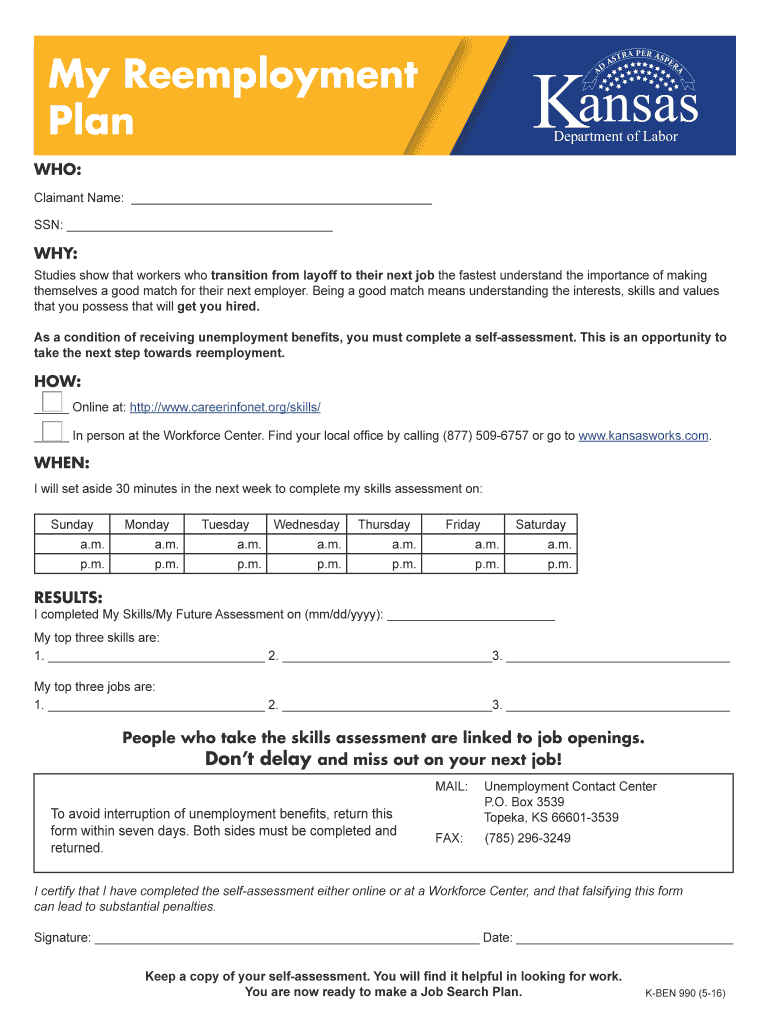
  2. Begin by entering your Claimant Name and SSN in the designated fields at the top of the form.
  3. In the 'WHEN' section, select a day of the week and time slots you will dedicate to completing your skills assessment.
  4. Fill in the date you completed your Skills/My Future Assessment and list your top three skills and jobs in the provided spaces.
  5. Sign and date the certification statement at the bottom, ensuring all information is accurate before submission.
  6. Review all entries for completeness, then save or export your filled form directly from our platform for easy submission.

Start using our platform today to streamline your k ben 990 2016 form completion for free!

See more k ben 990 2016 form versions

We've got more versions of the k ben 990 2016 form form. Select the right k ben 990 2016 form version from the list and start editing it straight away!
Versions Form popularity Fillable & printable
2018 4.8 Satisfied (97 Votes)
2017 4.3 Satisfied (138 Votes)
2016 4 Satisfied (47 Votes)
be ready to get more

Complete this form in 5 minutes or less

Get form

Got questions?

We have answers to the most popular questions from our customers. If you can't find an answer to your question, please contact us.
Contact us
Purpose of Schedule Schedule K (Form 990) is used by an organization that files Form 990 to provide certain information on its outstanding liabilities associated with tax-exempt bond issues.
A 501 (c) (3) nonprofit will always file a 990either a 990-EZ, 990-N Postcard, 990-PF (private foundation), or full 990 form, depending on their total gross receipts for the tax year. Many other 501 and nonprofit organizations file a 990.
Most charitable nonprofits that are recognized by the IRS as tax-exempt have an obligation to file IRS Form 990, which is an annual information return to be filed with the IRS by the 15th day of the 5th month after the end of the organizations accounting period.
The 990 is the tax form the Internal Revenue Service (IRS) requires all 501(c)(3) tax-exempt charitable and nonprofit organizations to submit annually.
Form 990-N (e-Postcard) is an annual notice. Form 990 is the IRS primary tool for gathering information about tax-exempt organizations, educating organizations about tax law requirements and promoting compliance. Organizations also use the Form 990 to share information with the public about their programs.

Security and compliance

At DocHub, your data security is our priority. We follow HIPAA, SOC2, GDPR, and other standards, so you can work on your documents with confidence.

Learn more
ccpa2
pci-dss
gdpr-compliance
hipaa
soc-compliance

People also ask

How to complete the Form 990-N (e-Postcard) for previous years? The Form 990-N can only be completed on the IRS website for the current year. If the organization has missed filings for previous years, it should complete these filings using an outside service provider.
Nonprofits with annual revenue of less than $200,000 and assets valued at less than $500,000 may file the Form 990-EZ, or may elect to file the Form 990. Nonprofits with annual revenue of $500,000 or more must file the Form 990.
These nonprofits may be considered public charities, private foundations, or private operating foundations, which well explain in more detail later.

Related links