







Definition & Meaning
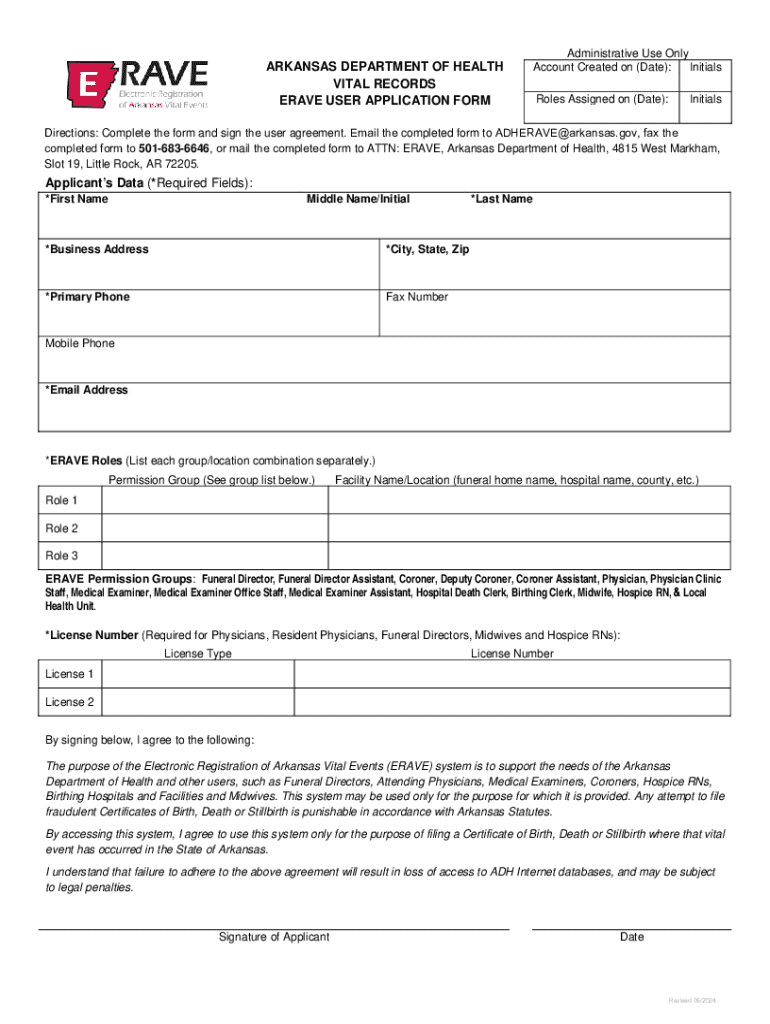
The ERAVE User Application Form from the Arkansas Department of Health is a crucial document for professionals who need access to the Electronic Registration of Arkansas Vital Events (ERAVE) system. This system is integral for handling vital records like birth, death, and stillbirth certificates. The form is designed to capture essential applicant information, ensuring that users understand their responsibilities when accessing the system and agree to comply with state regulations.
The form essentially functions as a gatekeeper, ensuring that only authorized and qualified individuals gain access to sensitive information. It serves to maintain the integrity of the vital records system by requiring user authentication and adherence to strict usage policies as set by the Arkansas Department of Health.
Steps to Complete the ERAVE User Application Form - Arkansas Department of Health
-
Gather Necessary Information: Before starting, ensure you have all required information at hand, including personal identification, professional role details, and any relevant certification numbers.
-
Personal Information Section: Fill out your full name, contact details, and physical address. Accuracy in this section is critical as it forms the basis for your identification within the system.
-
Professional Details: Specify your professional role and any associations with relevant organizations. This includes listing your job title, employer, and any professional licenses that pertain to the use of the ERAVE system.
-
Review Legal Responsibilities: The form includes detailed guidelines on the legal responsibilities associated with using the ERAVE system. Read this section thoroughly to understand your obligations.
-
Signed Agreement: Before submitting, you must sign the form to indicate your agreement to comply with state regulations. This signature is legally binding and acknowledges that you understand the terms of use.
-
Submission: Submit the completed form to the Arkansas Department of Health through the specified channels, which may include online submission, mail, or in-person delivery.
Who Typically Uses the ERAVE User Application Form - Arkansas Department of Health
-
Healthcare Providers: Doctors, nurses, and hospital administrators who handle births and deaths require access to the ERAVE system to register these events officially and to keep records updated.
-
Funeral Directors: They need to update and manage death records and obtain necessary permits for burials and related services.
-
Government Officials: Personnel within the Arkansas Department of Health and other state agencies may use the form to gain access to vital statistics needed for public health planning and response.
-
Legal Personnel: Attorneys and court officials may use the system to access certified documents required in legal proceedings.


Key Elements of the ERAVE User Application Form - Arkansas Department of Health
-
Applicant Identification: This includes fields for full name, social security number, and contact information, ensuring that all users are precisely identified.
-
Professional Credentials: Fields are designated for detailing professional qualifications and affiliations relevant to the responsibilities tied to handling vital records.
-
User Responsibilities: The form clearly outlines the ethical and legal responsibilities of system users, emphasizing the confidentiality and security of the information accessed.
-
Terms of Use Agreement: A mandatory section where users affirm their understanding and acceptance of the policies governing ERAVE system access and use.
State-Specific Rules for the ERAVE User Application Form - Arkansas Department of Health
Arkansas imposes specific rules regarding who can access the ERAVE system and under what circumstances. These regulations ensure that only qualified individuals from approved sectors can handle vital records. Key rules include:
-
Residency Requirements: Only individuals residing or practicing in Arkansas are eligible to apply.
-
Documentation Standards: Applicants must provide proof of identity and qualifications as mandated by state health regulations.
-
Compliance with Arkansas Health Laws: Users must strictly adhere to the Arkansas Department of Health's guidelines for vital record handling and sharing.
Legal Use of the ERAVE User Application Form - Arkansas Department of Health
Legal usage of the ERAVE system involves compliance with the ESIGN Act, ensuring that digital signatures and submissions are legally binding. The form stipulates that by signing, applicants accept responsibility for adhering to both state and federal laws concerning the use and dissemination of vital records.
The agreement also places a burden on users to report any misuse or breach of confidentiality immediately, maintaining the system's integrity and security.
Examples of Using the ERAVE User Application Form - Arkansas Department of Health
-
Birth Certificates: A hospital administrator uses the form to gain access to the system, allowing for the digital filing and management of birth certificates soon after delivery.
-
Death Registration: A funeral home uses the system to register deaths and manage related documentation like burial permits and death certificates.
-
Data Analysis: Public health officials maintain databases and trend analyses critical for monitoring the state's health statistics, leveraging system access granted via the application form.
Submission Methods for the ERAVE User Application Form
-
Online Submission: Users can fill out and submit the form through a secure online portal managed by the Arkansas Department of Health, offering a swift and efficient application process.
-
Mail Submission: While less common, some applicants may choose to print the form and send it via standard mail, particularly if they require physical copies for records.
-
In-Person Submission: Certain applicants may need to submit their forms in person, providing an opportunity for immediate review and assistance from department officials if needed.




