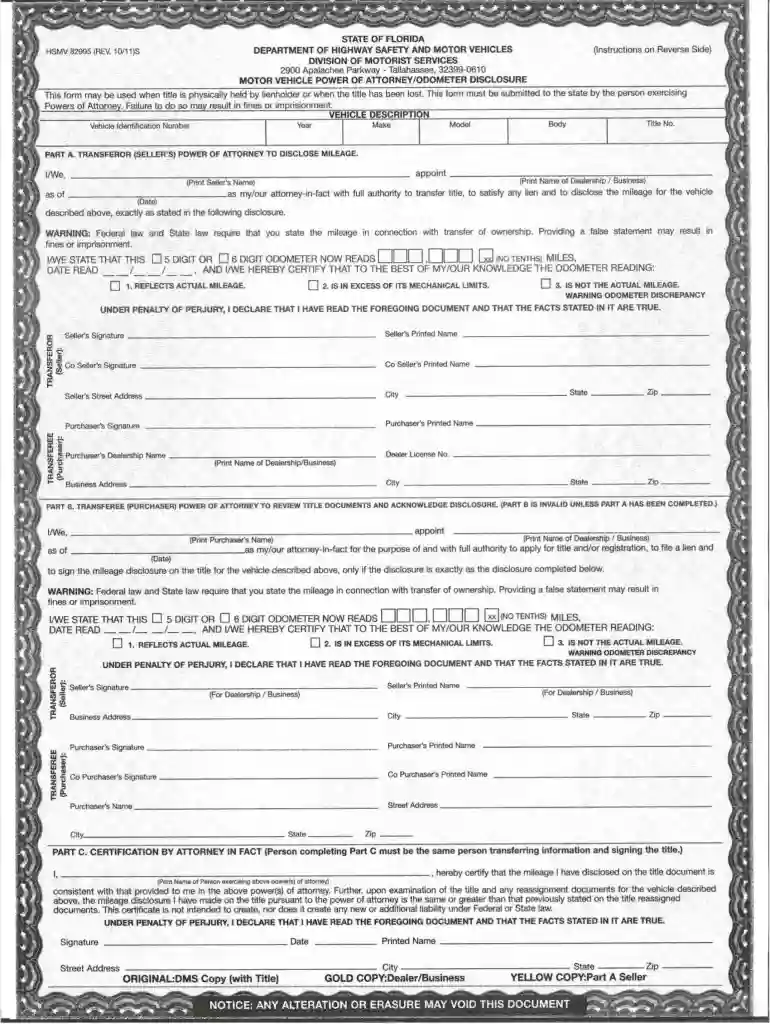
82995 2026

Get Form
82995 Preview on Page 1

Here's how it works

01. Edit your 82995 online
Type text, add images, blackout confidential details, add comments, highlights and more.

02. Sign it in a few clicks
Draw your signature, type it, upload its image, or use your mobile device as a signature pad.

03. Share your form with others
Send hsmv 82995 via email, link, or fax. You can also download it, export it or print it out.

How to use or fill out 82995 with our platform

Form edit decoration
9.5
Ease of Setup
DocHub User Ratings on G2
9.0
Ease of Use
DocHub User Ratings on G2
  1. Click ‘Get Form’ to open the 82995 document in the editor.
  2. Begin by reviewing the header section, which typically includes your personal information. Fill in your name, address, and contact details accurately.
  3. Move to the main body of the form where you will find specific fields related to your application. Ensure you read each prompt carefully and provide the required information.
  4. If there are checkboxes or multiple-choice questions, select the options that apply to you. Use our platform’s tools to easily mark these selections.
  5. Finally, review all entered information for accuracy before signing at the designated area. Utilize our platform’s signature feature for a seamless signing experience.

Start using our platform today to fill out your 82995 form online for free!

See more 82995 versions

We've got more versions of the 82995 form. Select the right 82995 version from the list and start editing it straight away!
Versions Form popularity Fillable & printable
2021 4.8 Satisfied (75 Votes)
2011 4.4 Satisfied (391 Votes)
be ready to get more

Complete this form in 5 minutes or less

Get form

Got questions?

We have answers to the most popular questions from our customers. If you can't find an answer to your question, please contact us.
Contact us

Yes, electronically drawing your signature is appropriate, but only if you use a tool that complies with industry regulations and policies. Consider DocHub, which guarantees eSignature validity under ESIGN and UETA requirements. All you need to eSign your florida dmv poa is an account with DocHub and an internet connection. Once you open your document in our editor, click Sign and choose the Draw tool.

In case your go-to email service is Gmail, it is simple to integrate your DocHub editor in your work. Edit your florida dmv power of attorney 82995 with DocHub instruments and attach it to your drafts in Gmail. See how effortless it can be to exchange papers and work together having a swift PDF editing solution at hand.

In order to be effective, a Florida power of attorney must be signed by the principal and by two witnesses, and be notarized.
If you want to transfer your vehicle or property title using an agent acting under authority of a power of attorney (POA), obtain a POA form. Fill it out, naming your agent and signing the POA as required in your state, and then let your agent do the rest.
The DHSMV form 82053, Power of Attorney for a Motor Vehicle, Mobile Home or Vessel, was revised 07/10. The newly revised power of attorney no longer requires notarization. Please make sure that the customer is signing their name and printing their name as well.

Security and compliance

At DocHub, your data security is our priority. We follow HIPAA, SOC2, GDPR, and other standards, so you can work on your documents with confidence.

Learn more
ccpa2
pci-dss
gdpr-compliance
hipaa
soc-compliance

People also ask

We digged a bit about same and last info we got is that Power of Attorney can not be used for signing transfer forms on behalf , RTO forms - if signed by any other person (other than original owner) will not acceptable by RTO Office for transferring car.
A power of attorney must be signed by the principal, by two witnesses to the principal's signature, and a notary must acknowledge the principal's signature for the power of attorney to be properly executed and valid under Florida law.
If you want to transfer your vehicle or property title using an agent acting under authority of a power of attorney (POA), obtain a POA form. Fill it out, naming your agent and signing the POA as required in your state, and then let your agent do the rest.
A Power of Attorney, like a Trust, does not need to be registered or recorded in the public records in order to be effective. It does have to be in writing, signed, witnessed and notarized.
Form HSMV 82053 Instructions Write down the date of signing the form. State the full name of the individual appointed to be the attorney-in-fact. ... Describe your item. ... Confirm you have read the document and that the statements in the form are true.

82995 form