Definition & Meaning
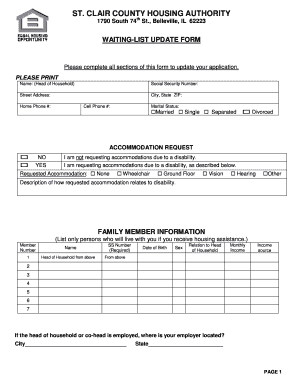
The "Dormitory Application Form - WordPress" serves as a crucial document for students seeking accommodation at educational institutions that utilize the WordPress platform for managing such applications. This form collects necessary personal, academic, and financial information to determine eligibility for dormitory housing. It integrates seamlessly with WordPress, allowing universities to streamline the application process through their existing website infrastructure.
How to Use the Dormitory Application Form - WordPress
To use the Dormitory Application Form integrated with WordPress, applicants must navigate to the relevant web page of their educational institution. Once there, they can follow these steps:
- Access the Form: Find the dormitory application section on the institution’s WordPress site.
- Fill Out Personal Information: Input necessary details, including name, date of birth, and student ID.
- Provide Academic Details: Enter information such as current year of study, program, and GPA.
- Include Financial Information: Complete sections that may require income details or financial aid status.
- Submit Required Documents: Upload documents like proof of enrollment or a certificate of good moral character.
- Review and Submit: Ensure that all fields are correctly filled and submit the form for processing.
Steps to Complete the Dormitory Application Form - WordPress
Completing the dormitory application form via WordPress involves several detailed steps to ensure accurate and successful submission:
- Login to the Student Portal: Access the student portal using credentials provided by the educational institution.
- Access the Application Form: Navigate to the 'Accommodation' section and locate the dormitory application link.
- Personal Details Section: Carefully fill in all personal details, ensuring all mandatory fields are completed.
- Upload Documentation: Attach digital copies of all required supporting documents, such as income statements or recommendation letters.
- Confirmation: Review submitted information for accuracy and completeness before clicking the 'Submit' button.
- Receive Acknowledgment: A confirmation email or screen will notify you of successful submission.
Required Documents
Applicants must prepare and submit specific documents, which typically include:
- Certificate of Good Moral Character: Verification from a previous educational institution.
- Income Tax Returns: Documentation supporting financial status or need.
- STS Results (Student Testing Scores): Scores from standardized tests required by the institution.
- Academic Transcripts: Previous semester grades to demonstrate academic standing.
- Identification Documents: Photocopy of government-issued ID or student card.
Key Elements of the Dormitory Application Form - WordPress
The dormitory application form encompasses several critical elements designed to gather comprehensive information about the applicant:
- Personal Information Fields: Collect basic details such as name, date of birth, and contact information.
- Academic Background Section: Request details about current academic status, major, and GPA.
- Financial Information Section: Fields to provide financial background, scholarships, or aid received.
- Emergency Contact Information: Include fields for emergency contact details to ensure student safety.
- Consent and Declaration Section: Requires acknowledgment of all terms and conditions outlined by the institution.
Form Submission Methods (Online/Mail/In-Person)
The dormitory application form provides multiple submission methods to accommodate applicant preferences and resource availability:
- Online Submission: Via the institution's WordPress-managed portal, offering the most convenient and quick method of submission, requiring electronic document uploads.
- Mail Submission: Applicants can print out completed forms and mail them to the institution’s housing office.
- In-Person Submission: For those who wish to submit documents directly, visiting the institution’s student affairs or housing office is possible.
Software Compatibility
The Dormitory Application Form on WordPress can be integrated with various software tools to enhance processing and management:
- DocHub: Enables editing and signing of forms online conveniently.
- Google Workspace: Allows integration for storage and document editing; forms can be accessed and updated through Google Drive.
- Adobe Acrobat: For users preferring to download and fill the form offline before submission.
Application Process & Approval Time
The dormitory application process, once submitted, follows a typical structure for evaluation and approval:
- Initial Review: Staff reviews submissions for completeness and verifies document authenticity.
- Eligibility Assessment: Evaluation of eligibility based on academic and financial criteria.
- Placement Decision: Successful applicants are informed of their dormitory placement, usually via email.
- Notification of Results: Typically communicated within two to four weeks, depending on application volume and institutional processes.
Important Terms Related to Dormitory Application Form - WordPress
Understanding key terms associated with the dormitory application is essential for applicants:
- STS Results: Standardized test scores used for evaluation.
- Income Assessment Form: Document used to calculate financial need or eligibility.
- WordPress Integration: The process of embedding the application form within a WordPress site.
- Good Moral Character Certificate: A letter affirming the applicant’s ethical behavior from past institutions.
This detailed, structured content offers comprehensive guidance on all aspects related to the "Dormitory Application Form - WordPress," ensuring applicants are well-informed and prepared for the process.