Definition & Meaning
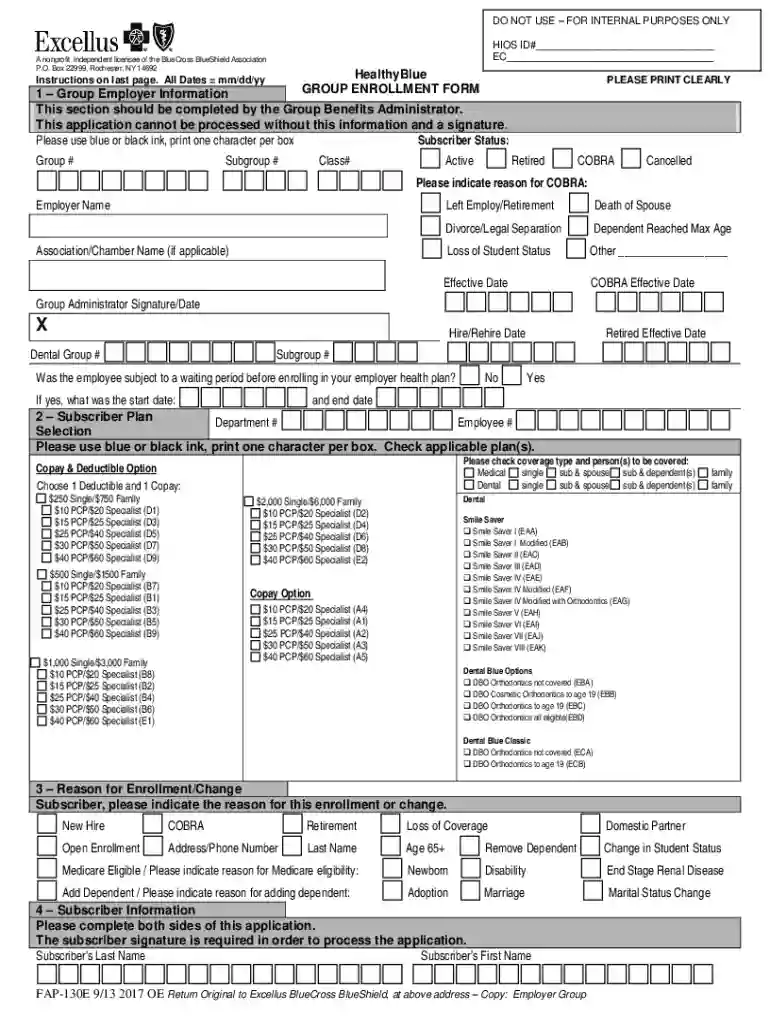
The Healthyblue Group Enrollment Form is a specialized document utilized by employers to enroll their employees and dependents in medical and dental insurance plans. As a nonprofit independent licensee of the BlueCross BlueShield Association, HealthyBlue provides this form, which is essential for ensuring that group insurance coverage is accurately and systematically processed. This enrollment form captures comprehensive data about the group employer, subscribers, dependents, and the specific coverage options selected. By submitting this form, employers initiate coverage enrollment processes that align with the healthcare provisions outlined by the BlueCross BlueShield network.
Key Elements of the Healthyblue Group Enrollment Form
Understanding the structure and components of the Healthyblue Group Enrollment Form can significantly enhance the accuracy and efficiency of its completion. The form consists of several critical sections, including:
- Group Employer Information: This section requires detailed information about the employer, including contact details, employer identification number (EIN), and business address.
- Subscriber Information: Employers must provide personal details about the employee being enrolled, including full name, date of birth, and social security number.
- Coverage Options: A crucial aspect where employers choose the types of insurance coverage, such as medical or dental plans, preferred for their employees.
- Dependent Information: The form allows for the inclusion of family members in the coverage, requiring demographic details about each dependent.
- Reason for Enrollment or Changes: This part specifies why the form is being submitted, such as new enrollment, cancellation, or change in coverage.
- Cancellation Requests: Employers can use this section to request the termination of a subscriber's coverage if necessary.
Steps to Complete the Healthyblue Group Enrollment Form
Completing the Healthyblue Group Enrollment Form correctly is vital for uninterrupted insurance coverage. Follow these detailed steps:
- Gather Necessary Information: Collect all required data about the employer, employee, and any dependents.
- Fill Out Group Employer Details: Start by filling in the company’s information, ensuring accuracy to prevent processing delays.
- Provide Subscriber and Dependent Info: Enter accurate personal information for each employee and dependent, double-checking details for compliance.
- Select Coverage Options: Review available medical and dental coverage plans, selecting the ones that best meet the organizational needs.
- State the Enrollment Reason: Clearly articulate the reason for the form submission—whether initial enrollment, a change, or cancellation.
- Review and Submit: Verify all information for accuracy and completeness before submitting the form as directed.
How to Obtain the Healthyblue Group Enrollment Form
Access to the Healthyblue Group Enrollment Form is straightforward and can be achieved through multiple channels:
- Online Platforms: Visit DocHub, a comprehensive document platform, to download the form directly or fill it out digitally.
- Insurance Provider's Website: Access the BlueCross BlueShield member portal for a downloadable PDF version.
- Employer Distribution: Often provided by HR departments at the time of employment or open enrollment periods.
- Request via Mail or Email: Contact the insurance provider to have a physical copy sent to your business address.
Legal Use of the Healthyblue Group Enrollment Form
When utilizing the Healthyblue Group Enrollment Form, employers must adhere to legal standards to ensure compliance:
- Data Privacy Laws: Protect employee and dependent information in line with privacy regulations like HIPAA.
- Accurate Representation: Ensure all information provided is true and correct, as discrepancies may lead to denial of coverage or legal implications.
- Authorized Signature: The form must be signed by an authorized representative of the employer to validate the request.
- Documentation Retention: Keep records of submitted forms as part of compliance with state and federal employment laws.
Important Terms Related to the Healthyblue Group Enrollment Form
Familiarizing yourself with specific terminology can aid in understanding and completing the Healthyblue Group Enrollment Form:
- Subscriber: The primary individual through whom the insurance coverage is being obtained, typically the employee.
- Dependent: Family members covered under the subscriber’s policy, such as spouses and children.
- Coverage Tier: Refers to the level of insurance coverage selected, encompassing variations in benefits and costs.
- Enrollment Period: The designated timeframe during which employees can enroll or make changes to their insurance plans.
- Premium: The cost of the insurance coverage, often shared between employers and employees.
Application Process & Approval Time
The application process for the Healthyblue Group Enrollment Form involves several stages, each critical for ensuring timely approval and activation of coverage:
- Initial Submission: The employer/HR team submits the properly filled-out form along with any supplementary documents.
- Verification Stage: Insurance providers verify the information provided, checking for completeness and accuracy.
- Approval Notification: Once verified, a notification is sent confirming the approval of coverage and effective date.
- Processing Timeframe: Typically takes a few business days, though this can vary depending on the provider and enrollment period demand.