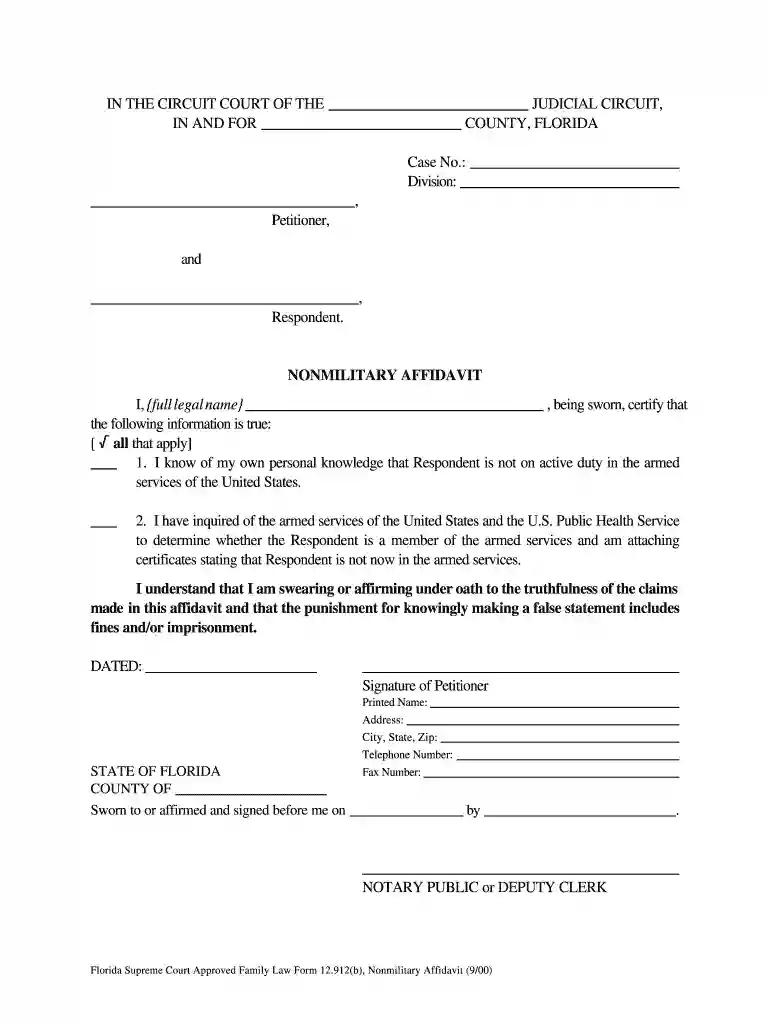
12 912b 2000 form Preview on Page 1

12 912b 2000 form-2026

Here's how it works

  • 01. Edit your form online

    Type text, add images, blackout confidential details, add comments, highlights and more.

  • 02. Sign it in a few clicks

    Draw your signature, type it, upload its image, or use your mobile device as a signature pad.

  • 03. Share your form with others

    Send it via email, link, or fax. You can also download it, export it or print it out.

How to use or fill out 12 912b 2000 form with our platform

Form edit decoration
9.5
Ease of Setup
DocHub User Ratings on G2
9.0
Ease of Use
DocHub User Ratings on G2
  1. Click ‘Get Form’ to open the 12 912b 2000 form in the editor.
  2. Begin by entering your full legal name in the designated field at the top of the form.
  3. In the section regarding military service, check the appropriate box to confirm that you know whether the respondent is on active duty.
  4. If applicable, attach any certificates from the armed services confirming that the respondent is not currently serving.
  5. Complete all required fields, ensuring accuracy and clarity. Remember to type or print in black ink if you are printing it out.
  6. Sign and date the affidavit at the bottom of the form before a notary public or deputy clerk.
  7. Finally, file the original form with the clerk of the circuit court along with your Motion for Default and keep a copy for your records.

Start using our platform today to easily fill out your forms online for free!

See more 12 912b 2000 form versions

We've got more versions of the 12 912b 2000 form form. Select the right 12 912b 2000 form version from the list and start editing it straight away!

VersionsForm popularityFillable & printable
20154.8 Satisfied (220 Votes)
20154.9 Satisfied (182 Votes)
20004.2 Satisfied (41 Votes)

be ready to get more

Complete this form in 5 minutes or less

Got questions?

We have answers to the most popular questions from our customers. If you can't find an answer to your question, please contact us.

In a divorce, each spouse prepares a financial affidavit, which could take many hours to do. The financial affidavit requires you to get your tax returns, checkbooks, bank statements, pay stubs, and bills so you can accurately list them on the form.
After filing, an affidavit is examined for its accuracy and adherence to legal requirements. It then becomes part of official court records and is accessible to relevant parties. Attorneys may use the affidavit to understand the merit of a case, cross-examine witnesses, and challenge or prove claims.
Rule 12.285 of the Florida Family Law Rules of Procedure establishes automatic and mandatory financial disclosures for parties in family law cases. This rule is designed to: Ensure full financial transparency between spouses or parents. Prevent hidden assets, debts, or income from being excluded from court decisions.
Financial affidavits allow the court and the parties to evaluate the entire financial situation of both parties when making property settlements as a part of a divorce.
An affidavit is a sworn statement put in writing. When you use an affidavit, youre claiming that the information within the document is true and correct to the best of your knowledge. Like taking an oath in court, an affidavit is only valid when you make it voluntarily and without any coercion.

Security and compliance

At DocHub, your data security is our priority. We follow HIPAA, SOC2, GDPR, and other standards, so you can work on your documents with confidence.

People also ask

What Happens After Filing a Financial Affidavit? Once you file your financial affidavit, the other party will review it with their attorney. You will have an opportunity to review their financial disclosure with your attorney. The court will also review the financial affidavits.
The main purpose of a financial affidavit is to provide the court with an explanation of a partys financial circumstances. Without this information, the court would be unable to make financial orders or orders concerning property distribution.
If you believe that this page should be taken down, please follow our DMCA take down process here