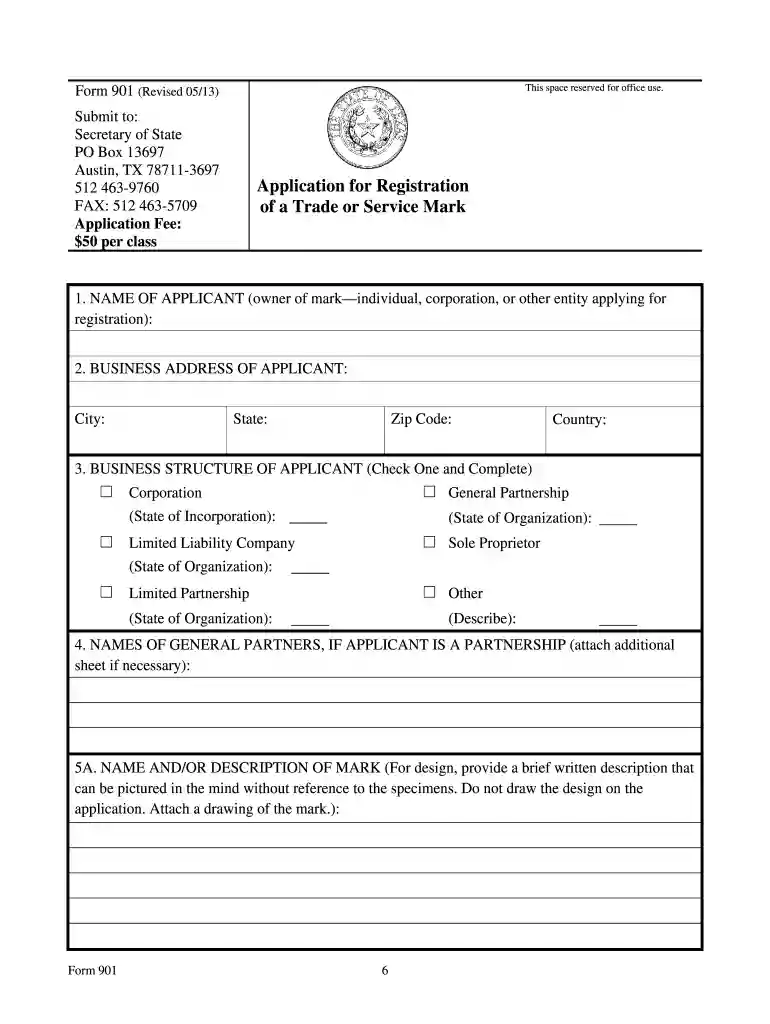
sos form Preview on Page 1

Sos form 901 2026

Here's how it works

  • 01. Edit your sos form online

    Type text, add images, blackout confidential details, add comments, highlights and more.

  • 02. Sign it in a few clicks

    Draw your signature, type it, upload its image, or use your mobile device as a signature pad.

  • 03. Share your form with others

    Send form 901 via email, link, or fax. You can also download it, export it or print it out.

How to use or fill out sos form 901 with our platform

Form edit decoration
9.5
Ease of Setup
DocHub User Ratings on G2
9.0
Ease of Use
DocHub User Ratings on G2
  1. Click ‘Get Form’ to open the sos form 901 in the editor.
  2. Begin by entering the applicant's name in Item 1. This should be the individual or entity that owns the mark.
  3. In Item 2, provide the complete business address of the applicant. Ensure accuracy for correspondence purposes.
  4. For Item 3, select the type of business organization and specify the state of incorporation if applicable.
  5. In Item 5A, describe your mark as it appears in your samples. If color is a feature, indicate this in Item 5B and detail colors in Items 5C and 5D.
  6. Complete Items 7A and 7B by listing classes of goods or services associated with your mark, including dates of first use.
  7. Attach three specimens supporting your claims in Item 10, ensuring at least one specimen per class is included.
  8. Finally, sign and date the application in Item 12 before submitting it through our platform for processing.

Start filling out your sos form 901 today for free using our editor!

See more sos form versions

We've got more versions of the sos form form. Select the right sos form version from the list and start editing it straight away!

VersionsForm popularityFillable & printable
20134.8 Satisfied (21 Votes)

be ready to get more

Complete this form in 5 minutes or less

Security and compliance

At DocHub, your data security is our priority. We follow HIPAA, SOC2, GDPR, and other standards, so you can work on your documents with confidence.

texas 901

DV-901 Confidential Information ATTACHMENT TO ORDER

ATTENTION PROTECTED PERSON: This form should not be filed with the court. Complete this form and send it to the wireless service provider (service provider),Read more

Learn more
Texas Business Organizations Manual [2020 Revisions] - Page 1171

Application for Registration of an Entity Name (SOS Form 502), 3-6. Application for Registration of a Trade or Service Mark (SOS Form 901), 22-1. Application

Learn more
If you believe that this page should be taken down, please follow our DMCA take down process here