Type text, add images, blackout confidential details, add comments, highlights and more.
02. Sign it in a few clicks
Draw your signature, type it, upload its image, or use your mobile device as a signature pad.
03. Share your form with others
Send electronic form d via email, link, or fax. You can also download it, export it or print it out.
How to use or fill out atiga form d with our platform
Ease of Setup
DocHub User Ratings on G2
Ease of Use
DocHub User Ratings on G2
Click ‘Get Form’ to open atiga form d in the editor.
Begin by entering your personal information in the designated fields, including your name, address, and contact details. Ensure accuracy for seamless processing.
Next, navigate to the section that requires specific data related to your application. Fill in all required fields carefully, as incomplete information may delay your submission.
Review any additional sections that may require signatures or dates. Use the signing tools available in our platform to add your signature electronically.
Once all fields are completed, double-check for any errors or missing information before saving your changes. This ensures that your form is ready for submission.
Start using our platform today to fill out atiga form d online for free!
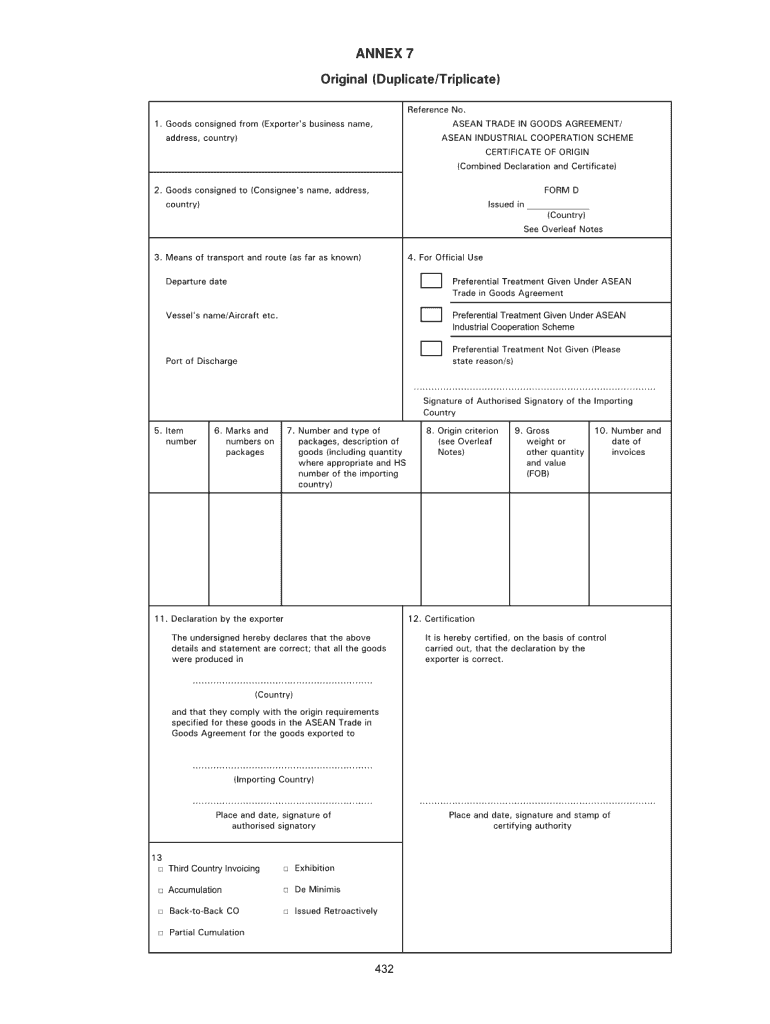
Atiga form d sampleAtiga form d pdfAtiga form d templateAtiga form d pdf downloadAtiga form d onlineForm D Certificate of Origin countryAtiga form d downloadE-Form D
Security and compliance
At DocHub, your data security is our priority. We follow HIPAA, SOC2, GDPR, and other standards, so you can work on your documents with confidence.
A Proposal for a New Court System for the ASEAN Trade in
by NR Gucciardo 2023 The Association of Southeast Asian Nations (ASEAN) formed the ASEAN Trade in Goods Agreement (ATIGA) to facili- tate trade liberalization between the blocsRead more
Cookie consent notice
This site uses cookies to enhance site navigation and personalize your experience.
By using this site you agree to our use of cookies as described in our Privacy Notice.
You can modify your selections by visiting our Cookie and Advertising Notice.