
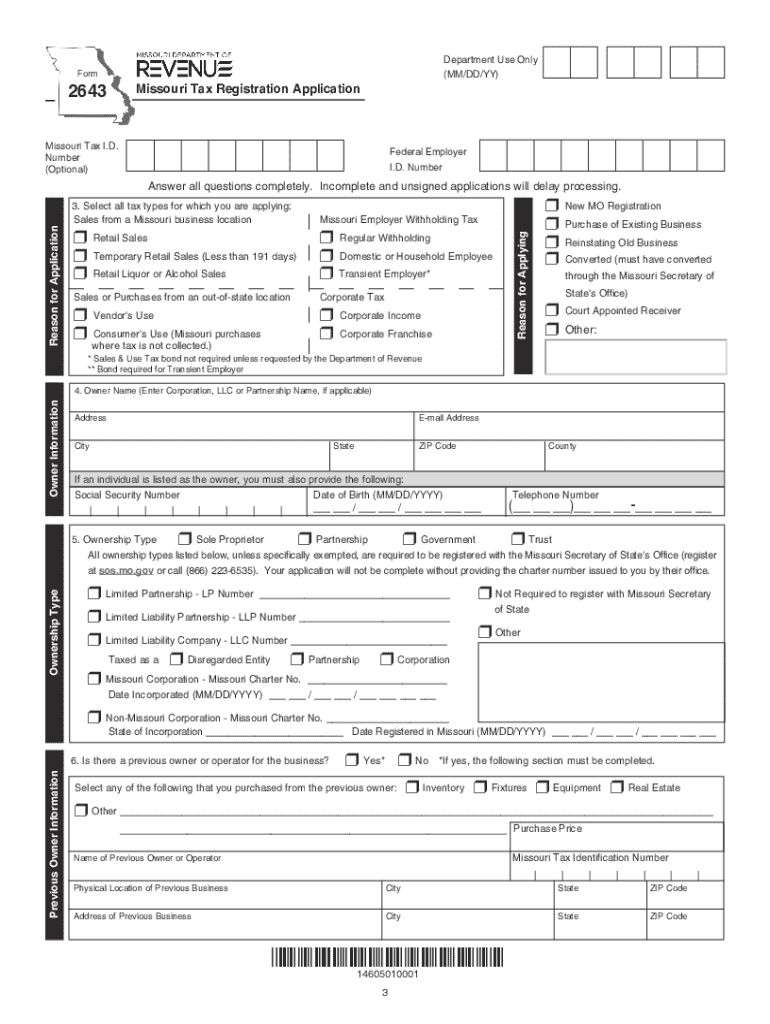







Definition and Purpose of the 2643 - Application for Registration
The 2643 - Application for Registration is a form used primarily for the registration of businesses or entities for tax purposes. Typically, it is utilized by businesses to register for various state tax types, such as sales tax, use tax, and withholding tax. Understanding the primary function of this form is crucial as it enables the correct and lawful operation of a business within its specified state. Businesses may need to apply for multi-state registration if their operations span across different states, each with unique tax obligations.
Key Elements of the Form
- Business Information: Essential details about the business, including legal name, trade name, and business address, must be provided.
- Ownership Details: Information regarding the business owners, including their names, addresses, and ownership percentages, is required.
- Tax Type Registration: Indicate the types of taxes for which the entity is registering, such as sales tax or withholdings.
- Previous Ownership: If applicable, details of any previous ownership when acquiring an existing business must be disclosed to avoid liabilities for unpaid taxes.
How to Use the 2643 - Application for Registration
Businesses seeking to comply with state tax laws use this form to officially register and establish a tax account. The process begins by downloading the form from the relevant state's Department of Revenue website. Once completed, the form is submitted along with any required supplemental documentation.
Steps to Complete the Form
- Download and Print: Obtain the form from the state revenue department’s official website.
- Complete Business Info: Enter all necessary business information, ensuring accuracy to avoid delays.
- Select Tax Types: Decide which tax types apply to your business and fill in the required sections.
- Owner Information: Provide detailed information on each business owner.
- Review for Accuracy: Carefully review the form for any errors or omissions.
- Submit the Form: Follow the state-specific instructions for submission, which may include mailing or online options.
Required Documents
Essential Documentation
- Proof of Business Address: Such as a utility bill or lease agreement.
- Owner Identification: Copies of government-issued ID for each owner.
- Federal Employer Identification Number (FEIN): Required if the business has employees.
- Certificate of No Tax Due: When applicable, especially for those purchasing an existing business.
Who Typically Uses the 2643 - Application for Registration


Business Types
- LLCs: Limited Liability Companies operating within the state.
- Corporations: C-Corps and S-Corps needing to register with the state tax authority.
- Partnerships: Business partnerships that require a tax account for state compliance.
Other Entities
Non-profit organizations and trusts may also use this form to gain tax-exempt status recognition, if applicable within the state guidelines.
Legal Use and Compliance
Failure to properly register using the 2643 form can result in legal complications, including fines and penalties. Businesses are required by law to register for state taxes before commencing operations.
Penalties for Non-Compliance
- Fines: Monetary penalties may be imposed for late registration.
- Interest on Unpaid Taxes: Accruing interest if taxes are unpaid due to unregistered status.
- Legal Action: Persistent non-compliance could result in legal proceedings against the business entity.
Differences and Variations of the Form
Some states may have variations of the 2643 form with different registration requirements or processes. It's critical to check with the specific state’s Department of Revenue for any nuanced differences or additional requirements.
Digital vs. Paper Version
The form may be available in both digital and paper formats. While digital signatures and online submissions are often acceptable and more efficient, some states still require paper submissions for certain types of registrations. Ensure you choose the method that aligns with state guidelines.
Software Compatibility
Programs like TurboTax or QuickBooks may have features that facilitate the data entry and submission of tax forms, including handling the 2643 - Application for Registration. These tools can streamlining the registration process by integrating business financial data directly into the form.
State-by-State Differences
Each state in the U.S. may have specific requirements or modified versions of this form. For instance, a state might have unique tax codes or require additional types of information such as industry-specific registrations. Always verify the state requirements before accessing or submitting the form.
This comprehensive guide is designed to inform businesses of all necessary steps and considerations while completing the 2643 - Application for Registration to ensure smooth and compliant operation within their respective state’s tax laws.




