Dot nd gov forms 2011-2026

Get Form
dot nd Preview on Page 1

Here's how it works

01. Edit your dot nd online
Type text, add images, blackout confidential details, add comments, highlights and more.

02. Sign it in a few clicks
Draw your signature, type it, upload its image, or use your mobile device as a signature pad.

03. Share your form with others
Send dot nd gov via email, link, or fax. You can also download it, export it or print it out.

How to use or fill out dot nd gov forms 2011 with our platform

Form edit decoration
9.5
Ease of Setup
DocHub User Ratings on G2
9.0
Ease of Use
DocHub User Ratings on G2
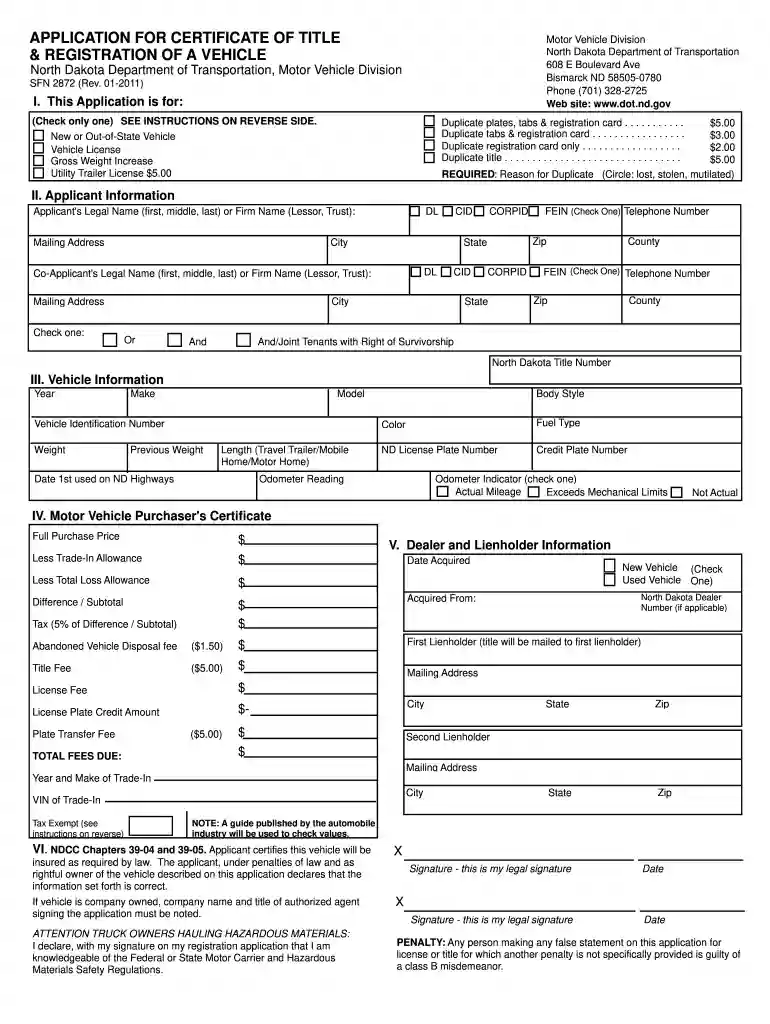
  1. Click ‘Get Form’ to open the Application for Certificate of Title & Registration of a Vehicle in the editor.
  2. Begin by selecting the type of application you are submitting in Section I. Check only one box that applies, such as 'New or Out-of-State Vehicle' or 'Duplicate title'.
  3. In Section II, fill out your applicant information completely. Include your legal name, mailing address, and contact details. If applicable, provide co-applicant information.
  4. Proceed to Section III to enter vehicle details including year, make, model, and VIN. Ensure you accurately report the odometer reading and select the appropriate mileage indicator.
  5. Complete Section IV by detailing the purchase price and any allowances. Calculate tax based on the subtotal and include any applicable fees.
  6. In Section V, provide dealer and lienholder information if relevant. Make sure all fields are filled out correctly.
  7. Sign and date the application in Section VI to certify that all information is correct before submission.

Start using our platform today for free to streamline your form completion process!

See more dot nd gov forms 2011 versions

We've got more versions of the dot nd gov forms 2011 form. Select the right dot nd gov forms 2011 version from the list and start editing it straight away!
Versions Form popularity Fillable & printable
2021 4.8 Satisfied (31 Votes)
2018 4.4 Satisfied (168 Votes)
2014 4.4 Satisfied (369 Votes)
2011 4.1 Satisfied (61 Votes)
be ready to get more

Complete this form in 5 minutes or less

Get form

Got questions?

We have answers to the most popular questions from our customers. If you can't find an answer to your question, please contact us.
Contact us
Process of Title Transfer Visit a DMV Office: Both parties should go to a local North Dakota Department of Transportation (NDDOT) office to submit their documents in person. Pay Fees: Pay the required fees to finalize the transfer. Receive New Title: The buyer receives a new title reflecting the change of ownership.
If no record of a previous certificate of title is found, the motor vehicle division will issue a North Dakota certificate of title to the applicant upon receipt of: a. A notarized bill of sale.
This system is for purchasing temporary motor vehicle registration. Nonresidents gainfully employed in this state and driving vehicles that are not registered with the state of North Dakota are subject to temporary registration for a minimum of 6 months.
Category 1: Proof of Identification U.S. Birth Certificate (state certified; government issued) U.S. Territory Birth Certificate. Valid, unexpired U.S. Passport or U.S Passport Card. Report of Birth Abroad issued by the U.S. Department of State. Certificate of Naturalization. Certificate of Citizenship.

Security and compliance

At DocHub, your data security is our priority. We follow HIPAA, SOC2, GDPR, and other standards, so you can work on your documents with confidence.

Learn more
ccpa2
pci-dss
gdpr-compliance
hipaa
soc-compliance
be ready to get more

Complete this form in 5 minutes or less

Get form