







Definition & Meaning
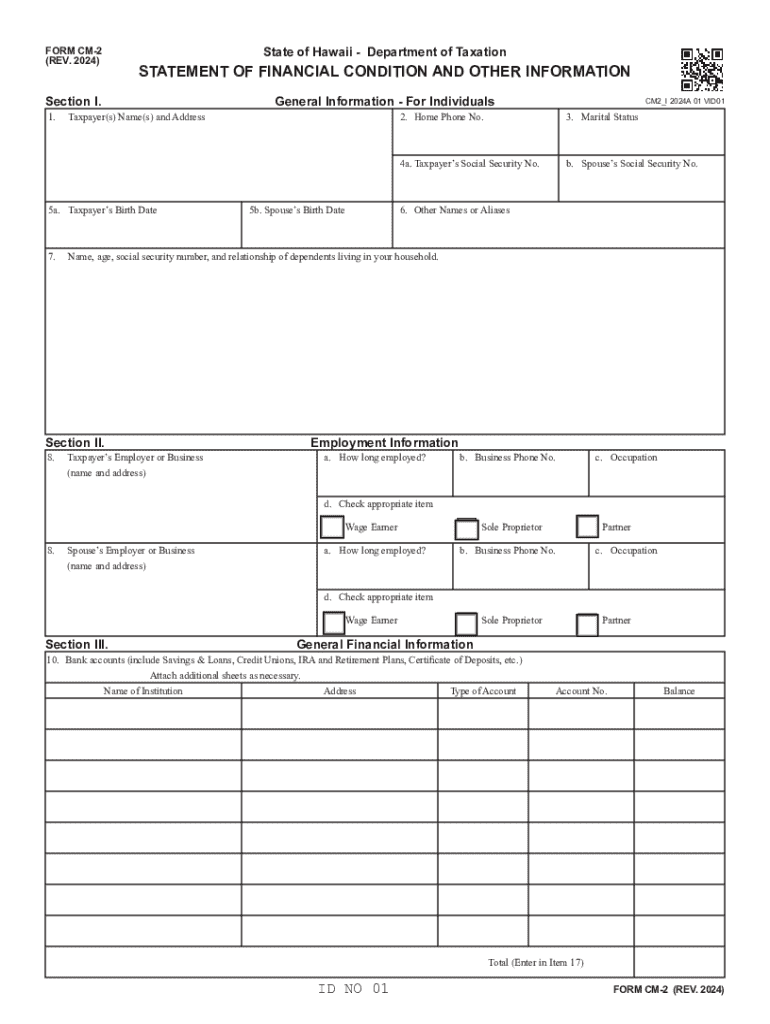
The CM-2 (Rev 2024), Statement of Financial Condition and Other Information, is a document used primarily in the State of Hawaii for individuals to report their financial status to the Department of Taxation. This form requires a comprehensive declaration of one's financial situation, including assets, liabilities, income, and expenses. The purpose of this form is to provide the department with a detailed picture of the taxpayer's financial condition, helping to ensure accurate tax assessments and compliance with state tax laws.
Key Elements of the CM-2 (Rev 2024)
The CM-2 form comprises several key sections that organize the financial data of the individual. These sections include:
- Personal Information: Requires basic identity data such as name, address, and Social Security number.
- Employment Details: Requires the taxpayer's current employment information, including employer name and job title.
- Assets Declaration: Lists all owned assets, including cash, investments, real estate, and personal property.
- Liabilities Section: Captures the total liabilities such as loans, credit card debts, and mortgages.
- Income and Expense Analysis: Details monthly or annual income sources and typical monthly expenses.
- Certification Section: Requires the taxpayer's signature to authenticate the information provided.
Steps to Complete the CM-2 (Rev 2024)
- Gather Necessary Documents: Collect financial documents, such as bank statements, pay stubs, and loan records.
- Enter Personal and Employment Information: Fill in the personal and employment details section using precise and updated data.
- List Assets and Liabilities: Provide an accurate account of all assets and liabilities. Ensure all figures are up-to-date.
- Detail Income and Expenses: Calculate and enter average monthly income and expenses for accuracy.
- Review and Certify: Double-check all entries for accuracy, sign the form in the certification section, then prepare for submission.
Eligibility Criteria
Individuals required to file the CM-2 form often include those with complex financial situations or significant changes in their financial status. These criteria can vary, but typically involve:
- Changes in income levels
- New significant assets acquisition
- Large financial liabilities incurred
- Changes in employment status
- Those involved in state tax disputes or audits


Required Documents
Completing the CM-2 form necessitates various supporting documents to validate the provided information:
- Copies of recent pay stubs or employment contracts
- Bank statements showing current account balances
- Loan and mortgage documentation
- Records of any investment or property ownership
- Current bills to verify expense claims
State-specific Rules for the CM-2 (Rev 2024)
The CM-2 form is specifically used within the jurisdiction of Hawaii and reflects the state's tax policies. Key points include:
- Guidelines align with the Hawaii Department of Taxation's requirements, different from other states.
- Detailed financial disclosure is emphasized to support fair tax assessments.
- Variations in reporting methods and document requirements may apply compared to similar forms in other states.
How to Obtain the CM-2 (Rev 2024)
The CM-2 form can be acquired through several avenues:
- Online Download: Available on the Hawaii Department of Taxation's official website for direct download.
- Mail Request: Can be requested via mail by contacting the department and specifying the need for the CM-2 form.
- Tax Offices: Physical copies can be picked up at local tax offices within Hawaii.
Form Submission Methods
Taxpayers have multiple options for submitting the completed CM-2 form:
- Online Submission: Can often be filed directly through the state's official tax website.
- Mail: Physical copies of the completed form can be sent via postal service to the designated mailing address.
- In-Person: Completed forms can be submitted at local tax offices for those preferring direct interaction with tax officials.
Penalties for Non-Compliance
Failing to file the CM-2 form accurately or timely can result in several penalties:
- Potential fines or interest charges on any outstanding tax amounts
- Legal complications or audits by the state's tax department
- Reputational risks with future financial and tax dealings in Hawaii




