01. Edit your form online
Type text, add images, blackout confidential details, add comments, highlights and more.

Type text, add images, blackout confidential details, add comments, highlights and more.

Draw your signature, type it, upload its image, or use your mobile device as a signature pad.

Send it via email, link, or fax. You can also download it, export it or print it out.
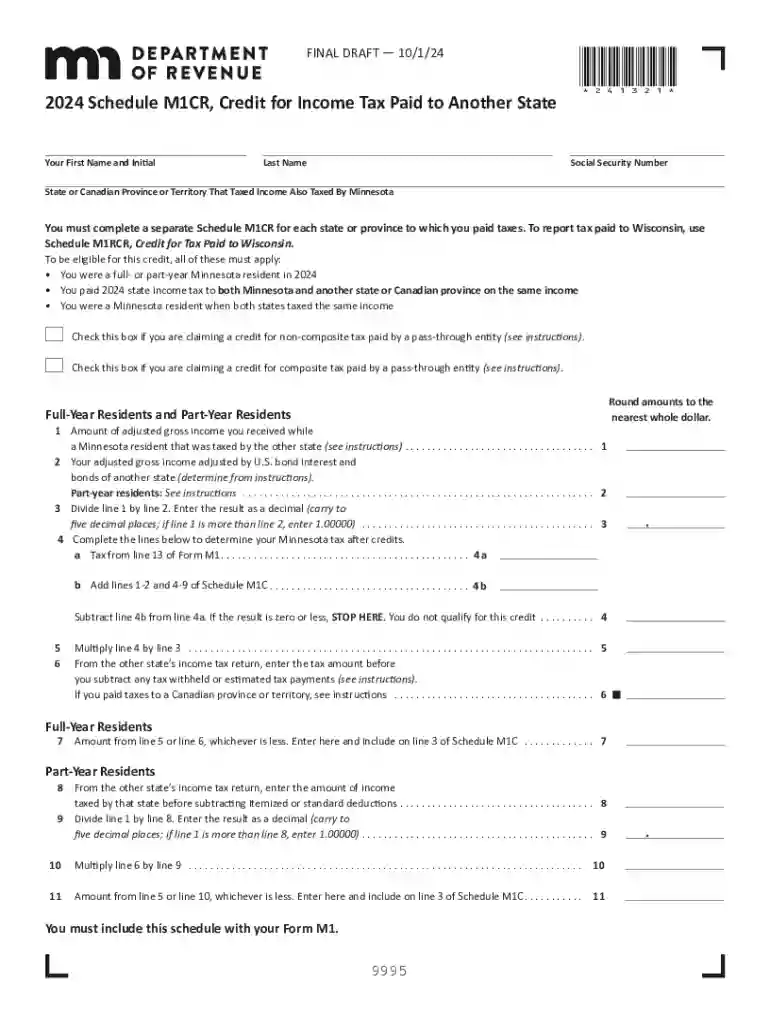
The 2024 M1CR form is utilized by Minnesota residents to claim a credit for income tax paid to another state or Canadian province. This form helps avoid double taxation for individuals who reside in Minnesota but earn income and pay taxes in another jurisdiction. By filing this form, taxpayers can reduce their overall tax liability by claiming credits equivalent to the taxes paid outside Minnesota. The form is organized to capture crucial information needed to verify the eligibility of the claimant and the authenticity of the tax credit requested.
To effectively use the 2024 M1CR form, it is essential to follow the guidelines outlined in it. Taxpayers must first gather all pertinent information about the taxes they have paid to another state. The form requires detailed input regarding the taxpayer’s income, the states in which taxes have been paid, and the specific amounts. After completing the form, it must be submitted along with any supporting documentation that verifies the taxes paid. This may include state tax returns and payment receipts. Properly completing these steps ensures that the form accurately reflects the taxpayer's financial transactions.
Eligibility for the 2024 M1CR form primarily depends on the taxpayer’s residency status in Minnesota and income earned in another jurisdiction. Full-year and part-year residents who have paid income taxes to another state can claim this credit. Part-year residents must be particularly mindful of the eligibility period that aligns with their residency in Minnesota. It is also important for taxpayers involved in dual residency situations to review the specific residency rules for determining eligibility accurately.


There are distinct rules established by Minnesota when claiming a credit for income taxes paid to another state. These rules might vary depending on factors such as the type of income, payment methods, and jurisdictional regulations of the state where taxes were initially paid. Minnesota may adjust the credit based on the upper limit or threshold prescribed for similar credits. Taxpayers are advised to consult state-specific guidelines or a tax professional if their circumstances are complicated by differing state laws or unique income situations.
Consider a scenario where a Minnesota resident earns commission income in Wisconsin. The individual pays income taxes on this revenue to Wisconsin. By completing the 2024 M1CR form, the taxpayer can claim a tax credit against their Minnesota tax liability. This ensures they are not taxed twice on the same income. Another instance could be a part-year resident who moves from Minnesota to Iowa but worked in both states during the same fiscal year. The form would help them sort out their tax obligations related to income earned while residing in Minnesota.
The submission of the 2024 M1CR form necessitates supplemental documentation for verification purposes. Essential documents include:
These documents provide essential corroboration of claims made within the form and are crucial for processing the request effectively.
The filing deadline for the 2024 M1CR form coincides with the standard Minnesota income tax deadline, which is April 15. If taxpayers require an extension, they must submit Form M13, Request for Extension, by the same deadline. Extensions grant additional time to file but not to pay taxes owed. It is critical that taxpayers ensure all forms, including the M1CR and supporting documents, are in order and submitted timely to prevent penalties or interest for late filing.
We've got more versions of the 2024 M1CR, Credit for Income Tax Paid to Another State 2024 M1CR, Credit for Income Tax Paid to Anot form. Select the right 2024 M1CR, Credit for Income Tax Paid to Another State 2024 M1CR, Credit for Income Tax Paid to Anot version from the list and start editing it straight away!
At DocHub, your data security is our priority. We follow HIPAA, SOC2, GDPR, and other standards, so you can work on your documents with confidence.