




Here's how it works

01. Edit your nj w 4p form online
Type text, add images, blackout confidential details, add comments, highlights and more.

02. Sign it in a few clicks
Draw your signature, type it, upload its image, or use your mobile device as a signature pad.

03. Share your form with others
Send new jersey w 4p via email, link, or fax. You can also download it, export it or print it out.
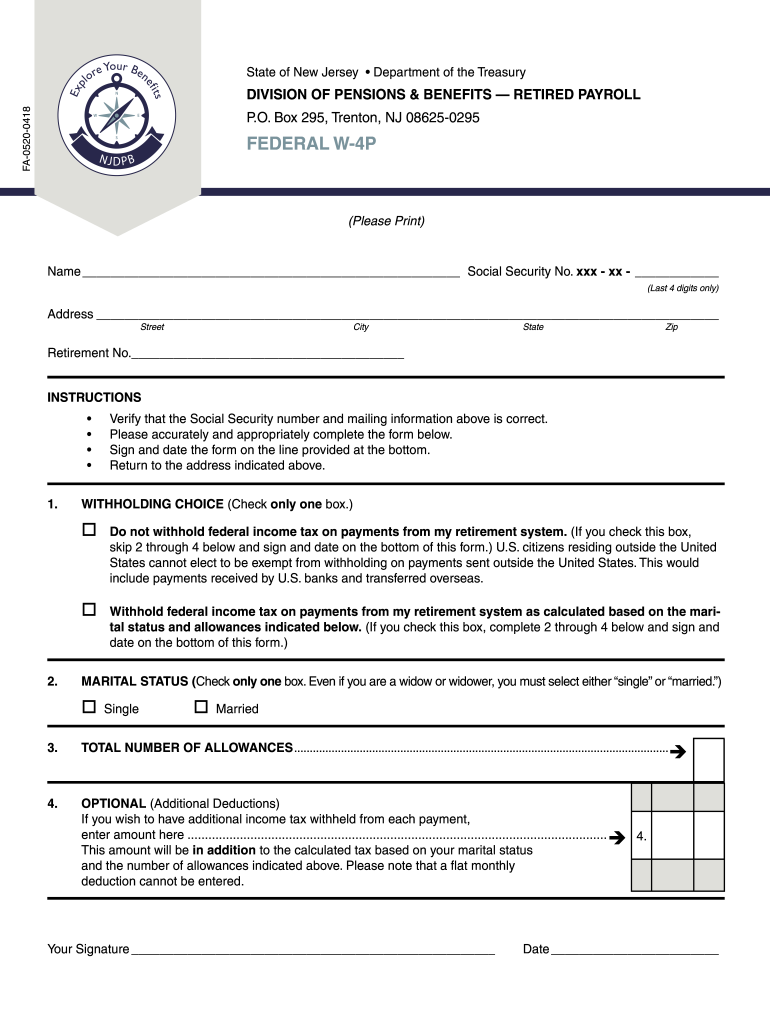
How to use or fill out federal W-4P form with our platform

- Click ‘Get Form’ to open the federal W-4P form in the editor.
- Begin by entering your name and the last four digits of your Social Security number in the designated fields. Ensure that this information is accurate.
- Fill in your address, including street, city, state, and zip code. Double-check for any typos to avoid issues with correspondence.
- Input your retirement number in the appropriate field. This is crucial for processing your form correctly.
- In the WITHHOLDING CHOICE section, select one option: either choose not to withhold federal income tax or opt for withholding based on your marital status and allowances.
- For MARITAL STATUS, check either 'Single' or 'Married'. This selection will affect your tax calculations.
- Indicate the total number of allowances you wish to claim in the provided space.
- If you want additional deductions, specify that amount in the OPTIONAL section. Remember that this will be added to your calculated tax.
- Finally, sign and date the form at the bottom before submitting it to ensure it is valid.
Start using our platform today for free to easily complete and submit your federal W-4P form!
Fill out federal 4p form online
It's free
It's free
Security and compliance
At DocHub, your data security is our priority. We follow HIPAA, SOC2, GDPR, and other standards, so you can work on your documents with confidence.
Learn more


