




01. Edit your form online
Type text, add images, blackout confidential details, add comments, highlights and more.

Type text, add images, blackout confidential details, add comments, highlights and more.

Draw your signature, type it, upload its image, or use your mobile device as a signature pad.

Send it via email, link, or fax. You can also download it, export it or print it out.
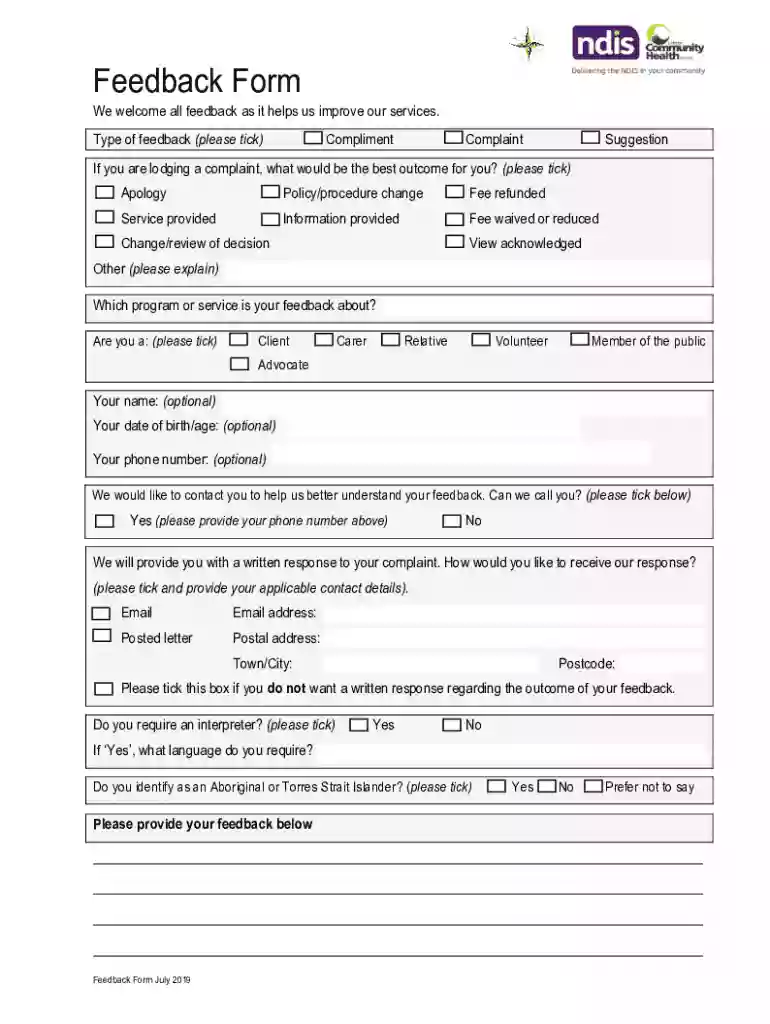
Feedback forms serve as a valuable tool for businesses and organizations to collect insights from customers regarding their experiences with products or services. These forms are designed to capture compliments, complaints, suggestions, and other feedback from clients, users, or any stakeholders involved. Structured efficiently, feedback forms ensure comprehensive collection of relevant information, enabling a business to improve customer service and satisfy client needs.
To leverage feedback forms effectively, follow these guidelines:
Include Clear Instructions: Begin each feedback form with straightforward instructions to ensure respondents understand how to fill it out.
Use Simple Language: Use plain, accessible language to encourage honest and detailed responses.
Cover Key Areas: Ensure the form includes key sections such as service satisfaction, suggestions for improvement, and reasons behind any dissatisfaction.
Incorporate Open-ended Questions: Open-ended questions will allow respondents to elaborate on their experiences, providing richer insights.
Make Fields Required: Consider marking critical fields as mandatory to ensure essential data is collected consistently.
An effective feedback form contains several essential components to ensure it performs optimally:
Introduction Section: Briefly explain the purpose of the form and reassure users of confidentiality and data protection practices.
Personal Information: Sections that collect names, contact information, and feedback preferences, facilitating follow-up when necessary.
Feedback Type Options: Allow users to classify their input as a compliment, complaint, or suggestion, depending on their experience.
Outcome Preferences: Provide users with options regarding what outcomes they desire in response to their feedback.
Next Steps and Timeline: Outline the response process and approximate timelines for resolutions when feedback warrants a follow-up.
Read Instructions: Start by carefully reading any guidelines to understand the form completion process.
Fill Out Personal Details: Accurately enter your personal information and preferred communication channels.
Provide Detailed Feedback: Select the appropriate type of feedback and provide detailed information about your experience.
Submit the Form: Ensure all required fields are completed before submitting the form in the specified manner.
Feedback forms find their use in various scenarios across different industries:
Retail Outlets: Customers provide insights on shopping experiences, product quality, and service levels.
Healthcare Services: Patients share feedback on treatment quality, wait times, and staff professionalism.
Restaurants: Diners evaluate food quality, service speed, and ambiance to guide future enhancements.
Feedback forms exist in digital and paper formats:
Digital Forms: Often used for ease of distribution and collection; they include online links or integrations with platforms like DocHub.
Paper Forms: Ideal for in-person settings, offering a tangible method for collecting feedback directly on-site.
DocHub provides a robust platform to create and manage feedback forms online. It integrates seamlessly with major software tools used in customer service and data management, enhancing efficiency and accessibility:
Google Workspace: Direct imports and exports of documents via Google Drive ensure a seamless workflow.
CRM Systems: Compatibility with customer relationship management software allows for easy syncing of collected feedback data.
Feedback forms are versatile tools utilized by various stakeholders:
Business Owners: Gain a deeper understanding of customer satisfaction and areas for improvement.
Customer Service Teams: Address complaints efficiently and work proactively to resolve issues.
Product Development Teams: Gather valuable insights to guide future enhancements and innovation efforts.
Different business types can benefit from feedback forms:
Service-oriented Companies: Businesses focusing on service, including hospitality and healthcare, rely on feedback to refine offerings.
Product-based Companies: Use feedback to understand product performance and adapt to customer needs.
Educational Institutions: Collect student and parent feedback to improve curriculum and school operations.
We've got more versions of the 7 Samples of Feedback Forms for Customers That Actually Work - GetF8 Examples of Positive Feedback t form. Select the right 7 Samples of Feedback Forms for Customers That Actually Work - GetF8 Examples of Positive Feedback t version from the list and start editing it straight away!
| Versions | Form popularity | Fillable & printable |
|---|---|---|
| 2019 | 4.9 Satisfied (35 Votes) |
At DocHub, your data security is our priority. We follow HIPAA, SOC2, GDPR, and other standards, so you can work on your documents with confidence.


