Definition & Meaning
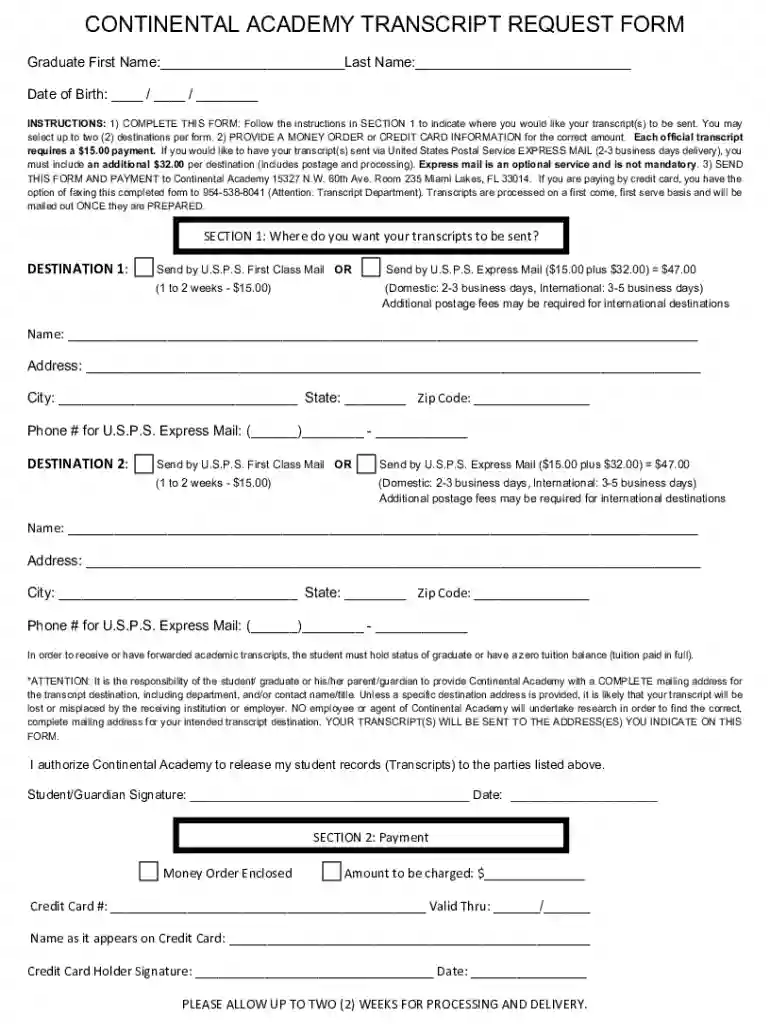
The CA TRF docx is a Transcript Request Form used primarily by graduates of Continental Academy. It is designed to streamline the process of requesting and sending academic transcripts to designated institutions or individuals. The form captures essential information such as personal details of the graduate, destinations for the transcripts, and payment instructions. These elements ensure that the request is processed accurately and efficiently, corresponding to the specific needs of the applicant.
Key Components
- Personal Information: The form requires graduates to provide their full name, contact information, and student identification number, ensuring the accurate identification and processing of the transcript request.
- Transcript Destinations: Applicants must specify the precise mailing addresses for each destination to which they wish their transcripts to be sent, guaranteeing timely and correct delivery.
- Payment Details: The form includes sections for payment information, covering fees for standard or express mailing of the transcripts.
How to Use the CA TRF docx
Using the CA TRF docx entails filling out several critical sections to ensure that the transcript request is processed smoothly and accurately. Here’s how you can effectively utilize the form:
Step-by-Step Instructions
- Personal Information Section: Begin by entering all required personal information, including your full name as it appears on your school records, your student ID, and your contact information.
- Transcript Destinations: Clearly list the complete mailing addresses for all intended recipients of your transcripts to prevent delivery delays or errors.
- Select Delivery Method: Choose between standard and express mail options, based on the urgency of your need. Indicate your selection on the form.
- Payment Information: Fill out the payment section to cover processing fees. Ensure that all payment details are accurate to avoid transaction issues.
- Review and Submit: Carefully review all entered information for accuracy. Submit the form according to the provided instructions, either via mail or in-person delivery, if applicable.
Steps to Complete the CA TRF docx
Completing the CA TRF docx accurately is crucial for timely transcript processing. Follow the outlined steps to ensure comprehensive completion of the form:
Detailed Instructions
- Gather Necessary Information: Before filling out the form, collect all required details, including student ID, addresses for transcript destinations, and payment methods.
- Complete Each Section: Methodically fill out each section, checking for typographical errors that might cause delays.
- Contact Details: Verify contact numbers and email addresses to ensure communication in case of processing issues.
- Delivery Preference: Specify whether you prefer standard or expedited transcript delivery, noting that additional fees may apply for faster service.
- Final Checks: Conduct a thorough final review to catch any missed or incorrectly entered information. Corrections are much easier at this stage.
Different Users
- Graduates: Individuals who have completed their studies and require transcripts for further education or employment opportunities.
- Current Students: Those needing to transfer academic records for scholarship applications or school transfers.
- Educational Institutions: Schools or colleges that facilitate transcript requests on behalf of their students.
- Employers: Organizations that require verified academic records for employment validation.
Important Terms Related to CA TRF docx
Understanding the CA TRF docx involves familiarizing oneself with several important terms associated with the document:
Relevant Terminology
- Transcript: An official record of a student’s academic performance, including courses taken and grades received.
- Standard Mail: Regular postal delivery option, typically less costly and slower than express services.
- Express Mail: A faster, often more expensive, delivery service used for urgent transcript requests.
- Fees: Charges associated with the processing and delivery of transcripts.
Legal Use of the CA TRF docx
The CA TRF docx must be used in compliance with all relevant legal guidelines to maintain its integrity and authenticity:
Legal Considerations
- ESIGN Act Compliance: Ensure that any electronic signatures on the form adhere to the Electronic Signatures in Global and National Commerce Act, validating their legality.
- Data Privacy: All personal information provided must be handled and processed in accordance with data protection and privacy laws.
- Accurate Representation: Misrepresentation of information on the form is illegal and can lead to penalties or invalidation of the transcript request.
Key Elements of the CA TRF docx
Several core elements are integral to the effective use of the CA TRF docx:
Essential Components
- Personal Identification Information: Required for verifying the identity of the person requesting the transcript.
- Mailing Address for Transcripts: Clear and full addresses to which transcripts should be sent.
- Payment Instructions: Details necessary for the processing of transcript request fees.
- Authorization Signature: Acknowledgment and consent from the applicant to release academic records.
Form Submission Methods (Online / Mail / In-Person)
The CA TRF docx offers multiple submission methods, catering to different preferences and facilitating flexible processing:
Available Submission Methods
- Online Submission: Some institutions may offer digital platforms for submitting the CA TRF docx, streamlining the process and reducing paper use.
- Mail Submission: Traditional submission via postal service, with considerations for delivery times.
- In-Person Submission: Direct handover of the form at designated institutional offices for immediate processing confirmation.
Adhering to these comprehensive guidelines ensures that the CA TRF docx is completed, submitted, and processed accurately, allowing graduates to use their academic transcripts effectively for future academic or professional pursuits.