




01. Edit your cms 40b online
Type text, add images, blackout confidential details, add comments, highlights and more.

Type text, add images, blackout confidential details, add comments, highlights and more.

Draw your signature, type it, upload its image, or use your mobile device as a signature pad.

Send medicare part b form via email, link, or fax. You can also download it, export it or print it out.
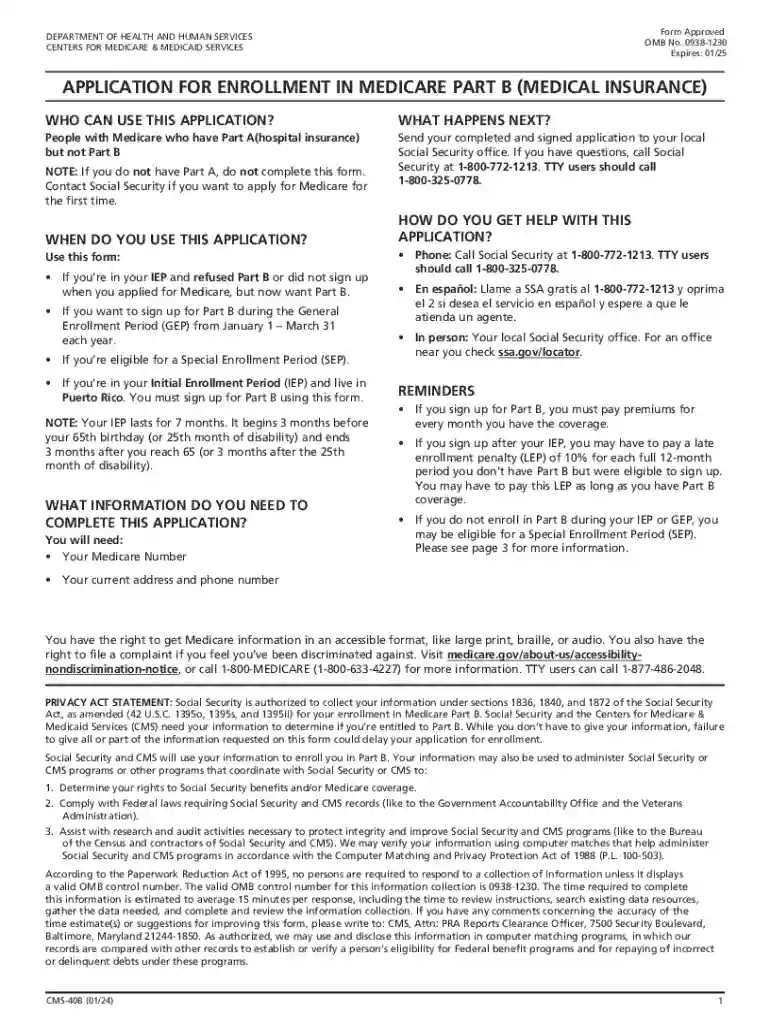
Medicare Form 40B, also known as the Application for Enrollment in Medicare Part B (Medical Insurance), is a crucial document provided by the Centers for Medicare & Medicaid Services. It serves as an enrollment form for individuals who have Medicare Part A but need to apply for Part B. The form facilitates the process of obtaining medical insurance, which covers outpatient care, preventive services, ambulance services, and durable medical equipment.
Medicare Part B is optional, and the decision to enroll requires consideration of individual healthcare needs and financial circumstances. Understanding the details encapsulated in Form 40B is essential for new retirees or people changing from private insurance, ensuring coverage continuity and avoiding gaps in healthcare provisions.
The Medicare Form 40B fillable version streamlines the process of applying for Part B. First, obtain the fillable form online from trusted sources like the official Medicare website or authorized platforms like DocHub. Use compatible software to fill out the form directly on your computer, ensuring accuracy and legibility.
Upon completion, review the entered information. It is crucial to validate each section meticulously, as inaccuracies could delay the approval process. Once satisfied, print the form and sign it by hand, as electronic signatures may not be accepted. Submit the completed form along with any required documents to the Social Security office through mail or in person.
To access the Medicare Form 40B fillable document, visit the official website of the Centers for Medicare & Medicaid Services or trusted platforms like DocHub. These sources provide secure and convenient downloads of the fillable PDF format. The fillable version allows you to complete the form electronically and make necessary edits before printing.
Ensure your system has a PDF reader to interact with the document seamlessly. The fillable form can be accessed anytime, offering flexibility and convenience for applicants. Keep in mind that while the form can be completed online, submission typically requires a printed copy to be physically signed and delivered.
Download and Save the Form: Acquire the fillable form from an official source and save it on your device.
Open with Compatible Software: Use a PDF reader or editor to open the form.
Fill in Personal Information: Enter your full name, Medicare number, and contact details in the designated fields.
Specify Enrollment Details: Indicate your enrollment reason, such as Special Enrollment Period, and provide any required justifications.
Include Employment Information: If enrolling during the Special Enrollment Period due to employment-based insurance, provide details of the employer.
Review for Accuracy: Double-check all entries for accuracy and completeness.
Print and Sign: Once the form is thoroughly reviewed, print and physically sign where indicated.
Submit the Form: Mail or deliver the completed form to the Social Security Administration along with any required supporting documents.
The Medicare Form 40B fillable is primarily used by individuals who are already enrolled in Medicare Part A and wish to apply for Part B. This includes:
Understanding the target users helps in identifying eligibility and timing for enrollment, ensuring all necessary coverage is secured.


The legal utilization of Medicare Form 40B ensures compliance with federal healthcare regulations, providing a valid mechanism for Part B enrollment. Legally binding, the form must be completed with exact information and submitted in accordance with Social Security Administration requirements.
This document also serves as evidence of your intent to receive Medicare benefits, ensuring coverage becomes effective without unnecessary delays. Misuse or falsification of information on this form could lead to penalties, making accurate completion essential.
When submitting Medicare Form 40B, enclose pertinent documents such as:
Ensure all accompanying documents are current and photocopied as required before submitting alongside your application form.
Medicare Form 40B offers multiple submission methods:
Mail: The traditional method involves mailing the signed form along with supporting documents. Use a tracked mailing service for security.
In-Person: Delivering the form at a local Social Security office allows for immediate processing and confirmation.
Online: Although the form can be filled out electronically, direct online submission is typically not available, necessitating printing and mailing for the final steps.
Selection of submission method should consider personal convenience, mail reliability, and proximity to service centers.
We've got more versions of the cms 40b form. Select the right cms 40b version from the list and start editing it straight away!
At DocHub, your data security is our priority. We follow HIPAA, SOC2, GDPR, and other standards, so you can work on your documents with confidence.


