




01. Edit your form online
Type text, add images, blackout confidential details, add comments, highlights and more.

Type text, add images, blackout confidential details, add comments, highlights and more.

Draw your signature, type it, upload its image, or use your mobile device as a signature pad.

Send it via email, link, or fax. You can also download it, export it or print it out.
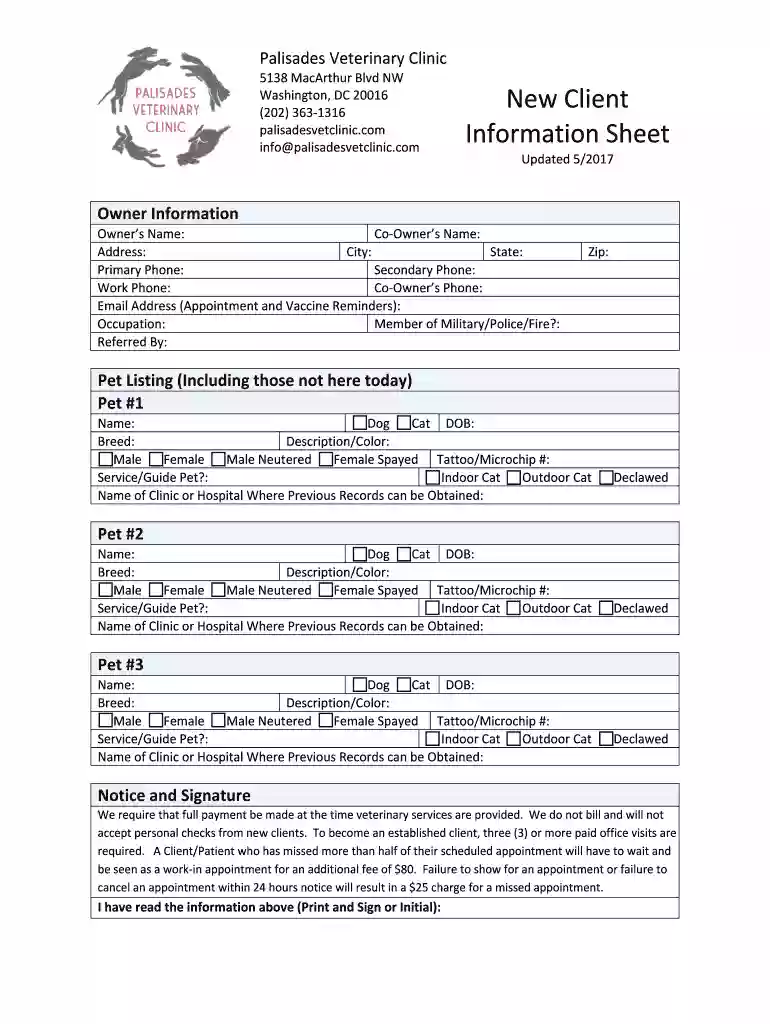
The "PVC-New-Client-Information-Sheet docx" serves as a comprehensive document utilized by the Palisades Veterinary Clinic to collect essential details from new clients. This document is specifically designed to streamline the onboarding process for pet owners, ensuring that both personal and pet-related information is systematically gathered. The form includes sections for basic contact information, detailed pet descriptions, and acknowledgments of clinic policies. By consolidating critical data, the clinic can provide tailored services and maintain accurate records, enhancing the overall client experience and operational efficiency.
New clients of the Palisades Veterinary Clinic need to accurately fill out the PVC-New-Client-Information-Sheet docx to initiate their relationship with the clinic. The form can be completed electronically in DocHub, allowing for ease of use and quick submission. Users should follow the step-by-step guidelines to ensure all the required fields are accurately completed. Using the fillable fields functionality in DocHub, clients can efficiently navigate through sections, inputting information directly into the digital form. This method reduces errors and the inconvenience of handwritten documentation.
The PVC-New-Client-Information-Sheet docx is organized to capture a wide array of critical details:
The primary users of the PVC-New-Client-Information-Sheet docx are new clients of the Palisades Veterinary Clinic. These include pet owners seeking veterinary services for the first time with the clinic. Additionally, it is utilized by clinic staff to ensure all necessary client data is collected efficiently for optimal service provision. The document is crucial in establishing a comprehensive client profile, facilitating smooth future interactions, and maintaining high standards of care.


Using this form is pivotal for both the clients and the clinic. For clients, it ensures that their pets' health needs are met effectively through comprehensive record keeping. For the clinic, having detailed information allows for personalized care, efficient communication, and streamlined administrative processes. Proper use of the form mitigates risks related to miscommunication and enhances client trust and satisfaction.
Consider a scenario where a client with multiple pets visits the clinic for the first time. By filling out the PVC-New-Client-Information-Sheet docx, the client can provide detailed information about each pet, including unique medical needs or preferences. This ensures that the clinic’s staff can prepare appropriately for each pet's visit, resulting in customized care and a more satisfying experience for both the pet owner and the clinic.
The form includes sections where clients must acknowledge understanding and agreement to the clinic’s operational policies. These acknowledgments are legally significant as they denote the client's consent to services under stated conditions. Ensuring that clients are aware of cancellation policies and payment structures protects the clinic from potential disputes. As such, it is essential that clients carefully review these sections before signing the form electronically.
We've got more versions of the PVC-New-Client-Information-Sheet docx form. Select the right PVC-New-Client-Information-Sheet docx version from the list and start editing it straight away!
At DocHub, your data security is our priority. We follow HIPAA, SOC2, GDPR, and other standards, so you can work on your documents with confidence.
The information provided in this Info Sheet is for MSC Industrial Supply only. Information will vary on a contract by contract basis. CATEGORY AWARDS
The Cisco QSFP-40G to SFP or SFP+ Adapter (QSA) Module offers 10 Gigabit Ethernet and 1 Gigabit Ethernet connectivity for QSFP 40G ports. It allows smooth and
The purpose of form TCEQ-20699 is to docHub the identification and prevention of cross connections, potential contaminant hazards, and illegal lead materials


