




01. Edit your form online
Type text, add images, blackout confidential details, add comments, highlights and more.

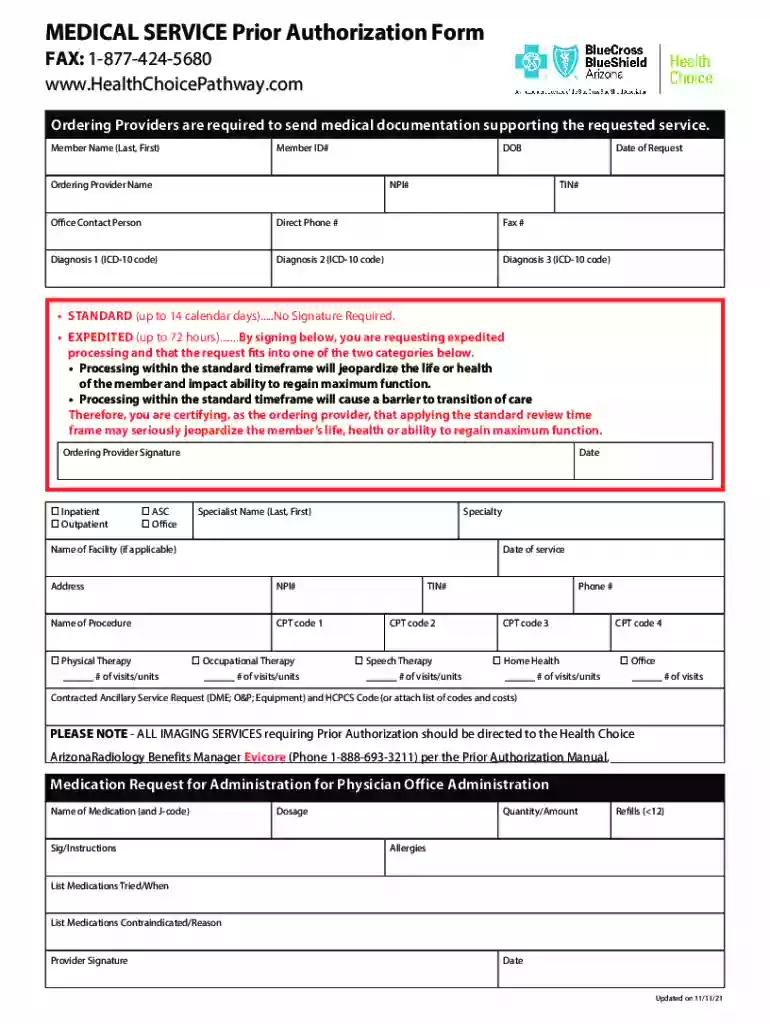
Type text, add images, blackout confidential details, add comments, highlights and more.

Draw your signature, type it, upload its image, or use your mobile device as a signature pad.

Send it via email, link, or fax. You can also download it, export it or print it out.
A form is a structured document used for gathering information or fulfilling specific requirements. In an online context, it refers to digital versions that can be completed and submitted via the internet. These forms are essential in various industries, including healthcare, finance, and legal sectors, allowing users to provide necessary data conveniently.
Online forms can range from simple data entry fields to complex, interactive documents containing multiple sections and mandatory fields. They facilitate smoother workflows in processes like tax filings, registration, and authorization requests by minimizing manual paperwork and streamlining data collection.
Using an online form typically involves several steps:
Accessing the Form: Users begin by navigating to the webpage or platform where the form is hosted.
Filling Out Required Fields: The form will include fields that must be completed, which can include text boxes, drop-down menus, and checkboxes. It's important to accurately fill each portion to ensure proper processing.
Reviewing the Information: Once all fields are completed, it's advisable to review the details for accuracy. Many platforms offer a preview or summary before final submission.
Submitting the Form: After verification, submit the form by clicking the designated button or link, which transmits the data to the form issuer for further action.
Online forms are designed for user-friendliness, providing a clear interface that guides users through each step, reducing the likelihood of errors and ensuring completeness.
Completing an online form efficiently involves a systematic approach:
Preparation: Gather all necessary information beforehand, such as identification numbers, personal details, and any required documentation.
Login or Account Setup: Some forms necessitate user registration or login to access and submit the form.
Navigation: Use the interface tools, such as next and back buttons, to move through the form. Keep an eye out for any navigation aids or instructions provided.
Attention to Mandatory Fields: Look out for asterisks or notes indicating required fields and ensure they are filled out.
Attachment of Documents: If the form allows, attach any additional documents by following upload prompts, ensuring they meet file type and size requirements.
Finalize Submission: Check the completed form for errors, complete any remaining sections, and submit it. Confirmation, often via email, will be sent, verifying the form's successful submission.
Familiarity with key terms ensures accurate completion and submission of online forms:
Form Fields: These are sections within the form requiring user input, such as text boxes for addresses or dropdown menus for selection options.
Validation Protocols: Rules built into the form to ensure the data entered is logical and within expected parameters, such as email format checks.
Submission Confirmation: An acknowledgment that the form has been successfully submitted, often involving a tracking number or receipt.
Electronic Signature: A digital representation of a signature, used to authenticate the identity of the form submitter and approve its contents.
Understanding these terms ensures users can effectively interact with online forms, reducing the potential for errors or misinterpretations.
Online forms must adhere to specific legal standards to ensure their validity and security:
Data Protection Compliance: Compliance with regulations such as the General Data Protection Regulation (GDPR) or local privacy laws is necessary to protect personal information.
Secured Signatures: Electronic signatures must meet criteria under legal frameworks such as the ESIGN Act or UETA in the United States, ensuring they are legally binding.
Encryption and Data Security: Strong encryption protocols must be in place to protect data during transmission, often using SSL encryption to safeguard sensitive information.
Legal standards ensure that forms maintain integrity, confidentiality, and compliance with relevant legislation, critical for users' trust and adherence to regulatory requirements.
An online form typically contains the following elements:
User Instructions: Guidance on what information is needed and how to fill out each section.
Field Labels and Placeholders: Labels identify each field's purpose, while placeholders provide example input formats.
Validation Messages: These often appear when a user attempts to submit incorrect or incomplete fields, guiding them to make required corrections.
Submission Button: A clear call to action that, when clicked, submits the form for processing.
These components are crucial for a streamlined user experience, helping to ensure data is accurately captured and effectively processed.
Forms can be submitted through several methods:
Online Submissions: Forms are filled and submitted directly through a website or platform, offering immediacy and efficiency.
Mail Submissions: Users download or receive the form, fill it out manually, and mail it to the designated address, a slower process but necessary for certain circumstances.
In-Person Submissions: Forms are completed manually and delivered to a set location, often required for documents needing physical verification or witnessing.
The choice of submission method depends on form type, user preference, and specific requirements set by the issuing entity.
Comparison between online and paper forms includes:
Convenience: Online forms allow for easy editing, automatic error checks, and instant submission, whereas paper forms require manual entry and postage.
Environmental Impact: Digital forms reduce paper usage and physical storage needs, offering an eco-friendly alternative.
Tracking and Management: Digital forms can be easily tracked and managed using databases, streamlining record-keeping and historical searches, unlike paper forms that require physical space and are prone to loss.
Opting for digital over paper forms increases efficiency and offers practical environmental and logistical benefits.
Different taxpayers face unique scenarios when dealing with forms:
Self-Employed Individuals: Often need to submit forms involving taxes, deductions, and business expenses, making accuracy crucial for compliance and financial management.
Retirees: Forms may pertain to retirement benefits, healthcare, and income declarations. Simplified access to these forms aids in maintaining compliance with changing financial circumstances.
Students: Education forms, financial aid applications, and income-related documentation are common requirements, often met through straightforward online processes, easing multitasking alongside educational commitments.
Understanding these scenarios helps tailor the digital form experience to each user's unique needs and requirements, ensuring seamless interaction and compliance with obligations.


Failing to adhere to form-related obligations can lead to penalties:
Monetary Fines: Non-compliance often results in financial penalties, which can increase based on the severity or duration of non-compliance.
Legal Repercussions: Ongoing failure to comply with legal forms can result in legal action, affecting individuals' or businesses' legal standing.
Denial of Services or Benefits: For forms related to benefits or essential services, non-compliance may lead to denial or revocation of such services.
Timely and accurate form submission is crucial to avoid these penalties, ensuring compliance with regulations and mitigating potential risks.
Various entities and individuals utilize online forms regularly:
Businesses: For internal operations such as HR onboarding, tax reporting, and client agreements.
Government Agencies: For collecting citizen information for programs, taxes, and services, increasing accessibility and efficiency.
Individuals: Engage with forms for services like healthcare appointments, financial applications, or educational admissions.
The widespread use of online forms underscores their versatility and importance across multiple contexts, supporting diverse functional and administrative needs.

We've got more versions of the Medical Service Prior Authorization Form form. Select the right Medical Service Prior Authorization Form version from the list and start editing it straight away!
| Versions | Form popularity | Fillable & printable |
|---|---|---|
| 2021 | 4.8 Satisfied (198 Votes) |
At DocHub, your data security is our priority. We follow HIPAA, SOC2, GDPR, and other standards, so you can work on your documents with confidence.
Create powerful online forms with pre-fill, AI, and multi-step workflow features. Try our easy-to-use online form builder with enterprise-level
Q: Is the accident report form available on the Internet? A: Yes. The Motor Vehicle Accident Report Form is now available in fillable PDF format. Visit our


