




01. Edit your form online
Type text, add images, blackout confidential details, add comments, highlights and more.

Type text, add images, blackout confidential details, add comments, highlights and more.

Draw your signature, type it, upload its image, or use your mobile device as a signature pad.

Send it via email, link, or fax. You can also download it, export it or print it out.
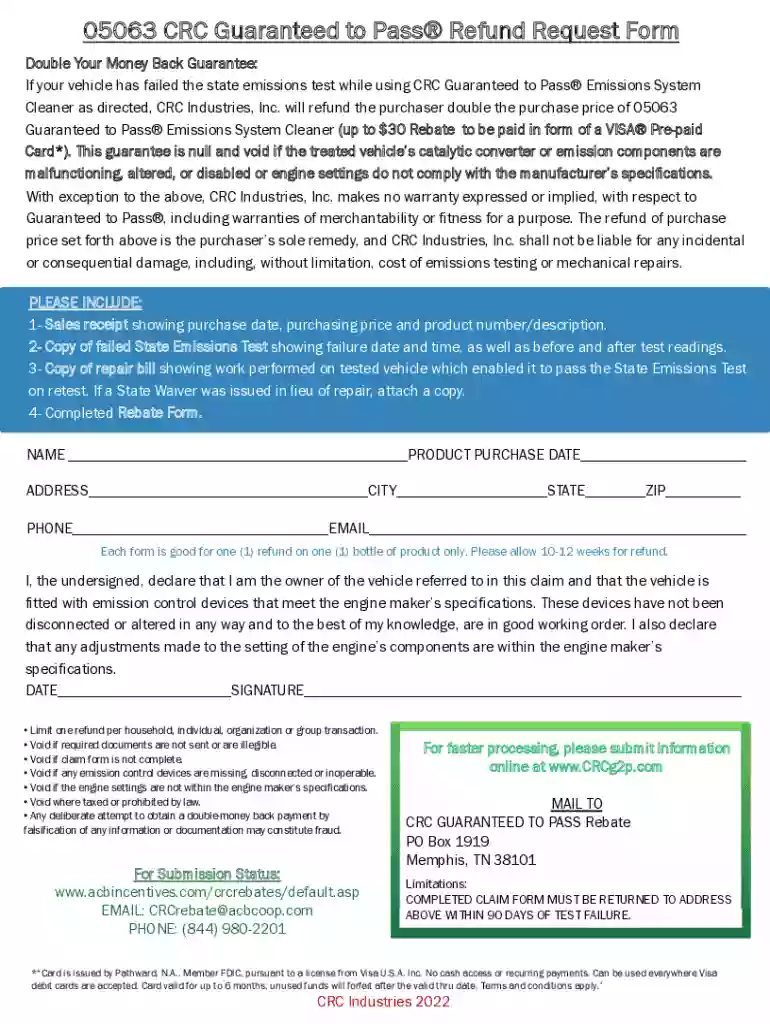
The CRC Industries - Fillable Online Refund Request Form is designed to facilitate the refund process for customers who have used CRC Guaranteed to Pass® Emissions System Cleaner but did not pass a state emissions test. This form offers a straightforward approach to claiming the double your money back guarantee. By completing this form, you ensure all administrative processes are adhered to and expedite the refund claim resolution. Additionally, it serves as an organized way to track and manage refund requests, ensuring customers who meet all eligibility requirements receive their entitled funds.
Gather Necessary Information: Collect details such as your name, contact information, proof of purchase, and emission test results. These are crucial to verify your claim.
Access the Form: Visit the official CRC Industries website or a trusted document management service like DocHub to locate and download the fillable form.
Fill in the Details: Enter all required information into the corresponding fields. Ensure accuracy to facilitate a smooth process.
Attach Required Documentation: Include copies of the purchase receipt and the emissions test certificate. These documents substantiate your claim and must be legible.
Submission: Depending on the instructions, submit your completed form through the specified method—either online through a document management portal or via mail.
Confirmation: Await confirmation of receipt from CRC Industries.
To qualify for a refund under the CRC Guaranteed to Pass® program, several conditions must be met. The product must be used as directed, and the vehicle must fail the emissions test. The form must be submitted within 90 days post-test failure, and necessary documentation must accompany the claim, including proof of purchase and a valid test report. Claims that do not meet these criteria may not be approved, so it's vital to adhere strictly to the outlined requirements.


The form can be accessed on the CRC Industries website or through document management platforms such as DocHub. These platforms offer additional features for completing, saving, and tracking your form submission digitally, ensuring you have a copy for your records and peace of mind through seamless cloud storage options.
Refund eligibility and emissions standards may vary by state. Some states have more stringent emissions requirements, potentially affecting the validity of a test and subsequent refund processing. It's essential to understand local emissions regulations to ensure compliance and better anticipate the outcome of your refund request. CRC Industries typically adheres to national standards but reviewing state-specific details can prevent potential setbacks.
The form can be submitted in several ways:
For convenience and efficiency, many users prefer the digital version accessible through platforms like DocHub. The digital form allows for easy edits, secure storage, and quick submission. In contrast, the paper version requires physical completion and mail-based submission, which may lead to longer processing times. For those comfortable with technology, the digital method provides a streamlined experience with reduced risk of error.
We've got more versions of the CRC Industries - Fillable Online Refund Request Form form. Select the right CRC Industries - Fillable Online Refund Request Form version from the list and start editing it straight away!
At DocHub, your data security is our priority. We follow HIPAA, SOC2, GDPR, and other standards, so you can work on your documents with confidence.
WIOA reforms planning requirements, previously governed by the Workforce Investment Act of 1998 (WIA), to foster better alignment of Federal investments in job
Find forms and publications needed to do business with the Oregon Department of Revenue here. Note: It is important to download and save the form to your


