




01. Edit your form online
Type text, add images, blackout confidential details, add comments, highlights and more.

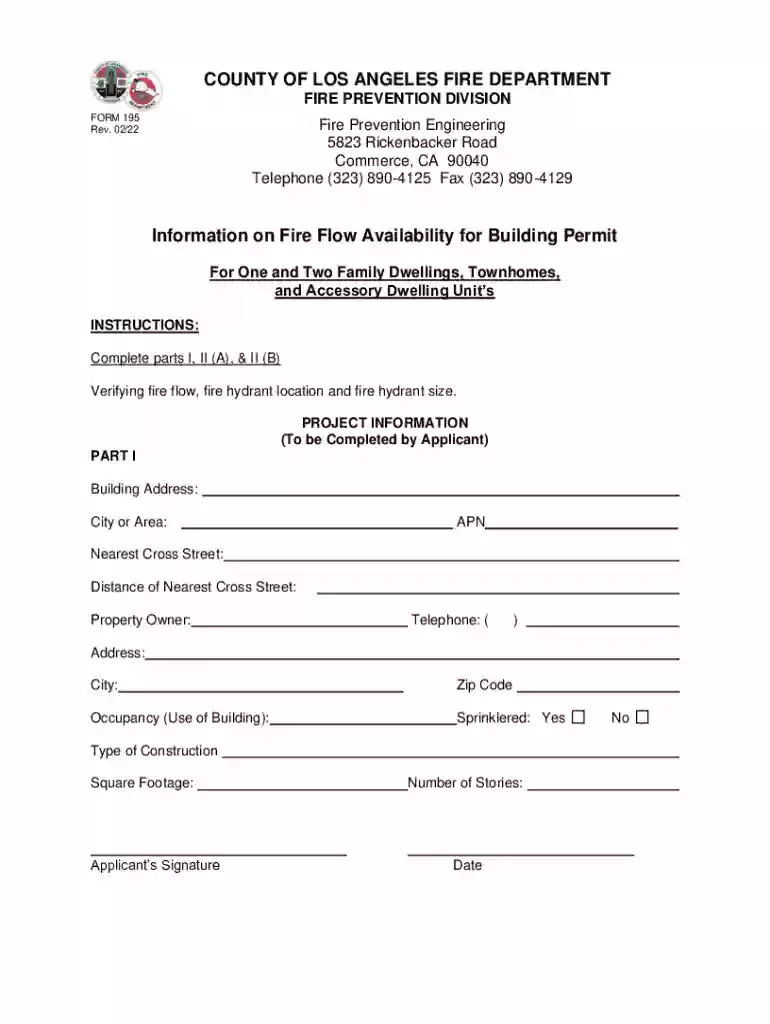
Type text, add images, blackout confidential details, add comments, highlights and more.

Draw your signature, type it, upload its image, or use your mobile device as a signature pad.

Send it via email, link, or fax. You can also download it, export it or print it out.
The term "form online" refers to the digitized version of a form that can be accessed, completed, and submitted through the internet. This can include various document types such as applications, tax forms, legal agreements, and surveys. Going online with forms streamlines processes by allowing users to input data directly into fields electronically, thereby eliminating the need for paper copies and improving efficiency. Online forms are often designed with user-friendly interfaces to ensure easy navigation and completion across different devices, from desktops to smartphones.
Using a form online involves accessing the document through a web platform designed to facilitate its completion and submission. Here are the steps typically involved:
Access the Form: Locate the form through a relevant website or online portal. This could be through a company's site, government portal, or document management platform like DocHub.
Fill Out Required Fields: Input data into the form fields, which may include text boxes, checkboxes, and dropdown menus. Interactive templates guide users to enter information in each designated area.
Add Attachments: If necessary, attach supplementary documents by uploading files directly from your computer or cloud storage services.
Review the Form: Carefully check all entered data for accuracy. Many online form platforms provide options to save progress, allowing users to edit before final submission.
Submit the Form: Click the submit button to send the form electronically. A confirmation email or message often follows, verifying receipt by the recipient or institution.
Completing a form online involves several essential steps that ensure accurate and secure data submission:
Identify the Purpose: Understand the intent and requirements of the form, whether for legal purposes, tax filings, or application processes.
Gather Information: Collect any necessary personal or business information and documents beforehand, such as identification numbers, financial details, or authorization letters.
Understand Instructions: Carefully read all instructions provided on the form. Pay attention to mandatory fields that must be completed to proceed.
Check Data Entry: Use features like autofill carefully and verify that data pre-entered or copied is up-to-date and correct.
Utilize Form Tools: Make use of available tools on the platform, such as spell checks or validation prompts, to ensure form completeness and accuracy.
Save and Preview: Save your progress frequently and use preview functions to see what the form will look like upon submission.
Submit Form: Follow prompts to submit the form. Confirmation of successful submission usually follows.
Opting to complete forms online presents numerate advantages over traditional paper methods. Here are a few:
Legal considerations are crucial when using forms online, particularly concerning compliance and data protection:
ESIGN Act Compliance: Electronic signatures on online forms are legally binding in the United States under the ESIGN Act, provided the necessary steps for consent and authentication are met.
Data Protection: Secure platforms, like those using SSL encryption and secure authentication protocols, ensure data is protected throughout the form submission process.
Audit Trail: Many systems keep an audit trail of document interactions, offering transparency and a record of legal compliance activities related to document handling.
Privacy Policies: Users should ensure the platforms they use for submitting forms comply with privacy laws and standards to protect personal information.
Several key elements typically define an effective online form:
Intuitive Design: Forms are often structured in a straightforward, logical manner, guiding the user through the completion process seamlessly.
Responsive Interface: Accessible on various devices, from desktop computers to mobile phones, to ensure users can complete forms whenever needed.
Interactive Fields: Includes various input options, such as text fields, radio buttons, checkboxes, and dropdown menus, to facilitate comprehensive input of data.
Instructional Guides: Many forms include hover-over tips or side instructions to assist users with specific sections they may find confusing.
Confirmation and Receipt: Immediately after submission, users usually receive a confirmation number or email, providing peace of mind that their form was received correctly.
When completing a form online with state-level implications, understanding jurisdiction-specific guidelines is critical:
State-Mandated Forms: Some forms, such as tax or legal forms, may have variations depending on the state in which they must be filed, reflecting state-specific legislation or requirements.
Compliance Deadlines: States might have differing submission deadlines which must be adhered to avoid penalties.
Variations in Terminology: The same form may have different terms or titles in different states. Familiarity with these variations ensures accurate and timely form completion.
Electronic Signatures: While generally recognized, requirements for electronic signatures might vary by state, which users should verify to ensure validity.
For a smooth and complete online form submission, gathering the necessary documents beforehand is essential:
Identification Proof: Valid ID may be needed for verification. This could be a driver’s license, passport, or social security number.
Financial Documentation: Often required for tax forms or financial applications, such as bank statements or tax records.
Supporting Documents: Depending on the form's purpose, additional documents like letters of recommendation, business licenses, or proof of residence may be needed.
Digital Copies: All supporting documents should be available in digital format for easy uploading and submission along with the form.
This level of thoroughness in gathering needed documents ensures forms are complete and processed without delays, enhancing the overall efficiency and experience of online form submissions.
We've got more versions of the Los Angeles Fire Flow Availability Form 195 form. Select the right Los Angeles Fire Flow Availability Form 195 version from the list and start editing it straight away!
At DocHub, your data security is our priority. We follow HIPAA, SOC2, GDPR, and other standards, so you can work on your documents with confidence.
This page lists the USCIS forms that are currently available to file online. Visit the File Online page to learn about the benefits of filing a form using
Create powerful online forms with pre-fill, AI, and multi-step workflow features. Try our easy-to-use online form builder with enterprise-level
Q: Is the accident report form available on the Internet? A: Yes. The Motor Vehicle Accident Report Form is now available in fillable PDF format. Visit our


