Payment authorization form template 2026

Get Form
payment authorization form Preview on Page 1

Here's how it works

01. Edit your payment authorization form online
Type text, add images, blackout confidential details, add comments, highlights and more.

02. Sign it in a few clicks
Draw your signature, type it, upload its image, or use your mobile device as a signature pad.

03. Share your form with others
Send credit card payment authorization via email, link, or fax. You can also download it, export it or print it out.

How to use or fill out payment authorization form template with our platform

Form edit decoration
9.5
Ease of Setup
DocHub User Ratings on G2
9.0
Ease of Use
DocHub User Ratings on G2
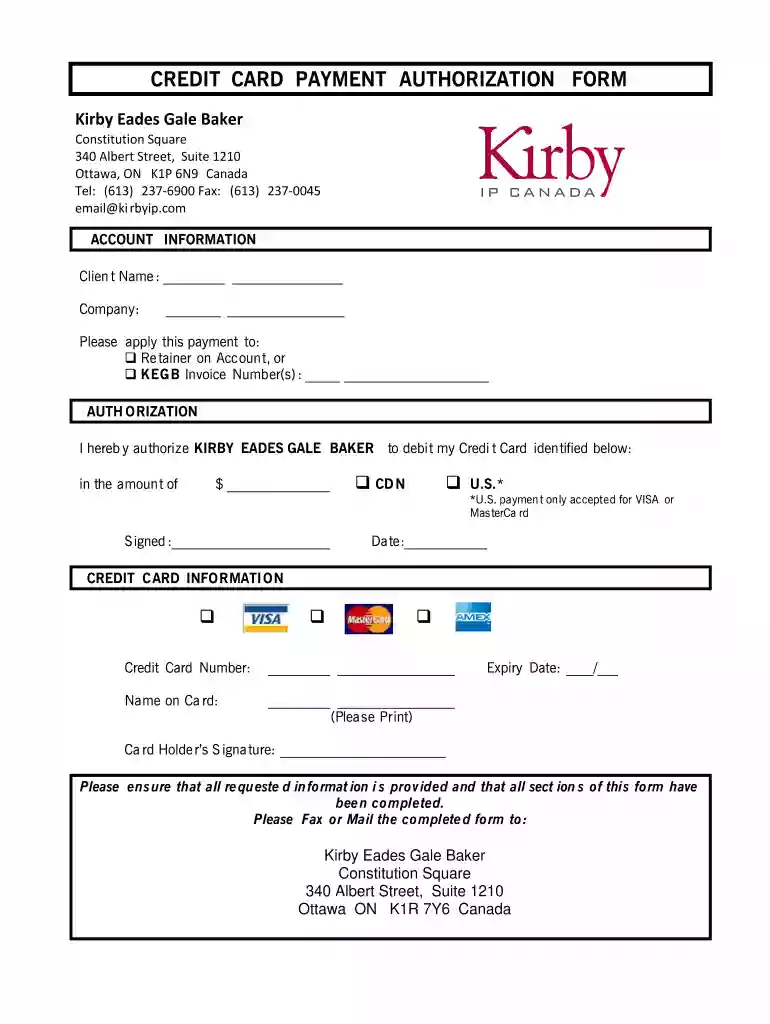
  1. Click ‘Get Form’ to open the payment authorization form template in the editor.
  2. Begin by entering your Client Name and Company in the designated fields. This information is crucial for identifying your account.
  3. Indicate how you would like the payment applied by selecting either 'Retainer on Account' or specifying the KEG B Invoice Number(s). Ensure this section is clear to avoid any processing delays.
  4. In the Authorization section, fill in the amount you wish to authorize for debit. Make sure to specify whether it’s in CDN or U.S. dollars, as U.S. payments are only accepted for VISA or MasterCard.
  5. Complete the Credit Card Information section by entering your Credit Card Number, Name on Card, and Expiry Date. Double-check these details for accuracy.
  6. Finally, sign and date the form in the appropriate fields. Review all entries to ensure completeness before submission.

Start using our platform today to easily complete your payment authorization form online for free!

See more payment authorization form template versions

We've got more versions of the payment authorization form template form. Select the right payment authorization form template version from the list and start editing it straight away!
Versions Form popularity Fillable & printable
2003 4.9 Satisfied (53 Votes)
be ready to get more

Complete this form in 5 minutes or less

Get form

Got questions?

We have answers to the most popular questions from our customers. If you can't find an answer to your question, please contact us.
Contact us
Yes. The Automated Clearing House network , also called ACH, may be used to transfer funds to individuals or businesses in the United States or abroad.
An Automated Clearing House (ACH) authorization is a payment authorization that gives the lender permission to electronically take money from your bank, credit union, or prepaid card account when your payment is due. You can revoke this authorization.
To complete an ACH authorization form, essential information includes the account holders details, bank account information, transaction specifics, and a signed authorization statement.
A free credit card authorization form has the following fields: Cardholder name. Credit card type, such as Visa, Mastercard, American Express, or Discover. Card number. Expiration date. The cardholders billing address. Merchants business information. A general message authorizing charges.
5 steps to write a letter of authorization. Identify the parties involved. Specify the authority granted. Define the duration of the agreement. Include any necessary details. Sign the document.

Security and compliance

At DocHub, your data security is our priority. We follow HIPAA, SOC2, GDPR, and other standards, so you can work on your documents with confidence.

Learn more
ccpa2
pci-dss
gdpr-compliance
hipaa
soc-compliance

People also ask

The first step in using an ACH authorization form is to request this form from your bank or financial institution, or by downloading a template from the internet. Its important to make sure the ACH bank form you use is up-to-date and compliant with regulations.

credit card payment authorization template