




01. Edit your form online
Type text, add images, blackout confidential details, add comments, highlights and more.

Type text, add images, blackout confidential details, add comments, highlights and more.

Draw your signature, type it, upload its image, or use your mobile device as a signature pad.

Send it via email, link, or fax. You can also download it, export it or print it out.
The term "form online" refers to any document that can be accessed, filled out, and submitted through an internet-based platform. These forms exist across a range of industries, including government, education, healthcare, and business, providing convenience and efficiency over traditional paper forms. They allow users to input information digitally, facilitating easy data collection, processing, and storage. This technology enables immediate form processing, significantly reducing the wait time associated with physical submissions.
Digital forms may be interactive or static, featuring fields where users can input necessary information such as names, addresses, and contact details. They might also include dropdown menus, checkboxes, and options for uploading documents. The rising importance of digital forms highlights the need for robust security measures to protect sensitive information during these online transactions.
Completing a form online involves several straightforward steps that utilize the digital interface capabilities of platforms like DocHub. This step-by-step guide helps ensure accuracy and efficiency in form submission.
Access the Form: Start by navigating to the relevant website or portal hosting the form. Platforms like DocHub offer easy import options from cloud services, making it simple to find the form you need.
Read Instructions: Thoroughly review the instructions accompanying the form to understand the necessary details and requirements. This step helps avoid errors that could delay processing.
Fill out Required Fields: Enter your information in the mandatory fields, usually marked with an asterisk (*) or highlighted to denote importance. Ensure that all necessary data is provided accurately.
Add Digital Signatures: Use the electronic signature tools if the form requires a signature. Platforms like DocHub allow you to draw, type, or upload your signature for legal and binding authentication.
Review and Edit: Carefully review the completed form, checking for any errors or omissions. Use editing tools to adjust text or annotations as needed.
Submit the Form: Once satisfied with the form, click the submit button to send it to the recipient. You might receive a confirmation email or message indicating successful submission.
Obtaining a form online typically involves accessing it directly from a particular website or document management platform. Depending on the type of form, here are some methods to acquire it:
Government Websites: For tax forms or official documents, visit government websites like the IRS or local state departments. These sites often have dedicated sections for downloading forms.
Educational Portals: Schools and universities provide enrollment and application forms through their online portals. Logging into the student account often leads directly to these required documents.
Document Management Platforms: Utilize platforms like DocHub, which offer a wide range of form templates accessible through search and direct import from integrated cloud storage solutions.
When using online forms, software compatibility is key to ensuring the seamless execution of tasks. Platforms like DocHub integrate with widely-used software suites, allowing users to open, edit, and save forms:
Google Workspace: DocHub’s seamless integration with Google Workspace means forms can be imported from and exported back to Google Drive, enhancing collaboration and workflow.
Other Integrated Services: Compatibility with platforms such as Dropbox and OneDrive provides users with flexible options for form access and storage, facilitating a smooth document management process.
These compatibilities help maintain continuity across various software and streamline the process of completing and submitting forms online, saving time and effort.
Understanding the essential elements of a form online ensures accurate and efficient completion. Whether for business, government, or personal use, these elements are integral to its function:
Input Fields: Spaces provided for users to enter specific information, such as names, dates, and addresses. These fields guide users in providing structured data.
Check Boxes and Radio Buttons: Used to select options or indicate agreement with terms or conditions.
Electronic Signature Fields: Locations within the form where users can add their digital signatures, ensuring that electronic submissions are legally binding.
Instruction Sections: Provide guidelines or additional context to users, outlining how to complete each section properly.
These components ensure that the forms serve their intended purpose of collecting accurate and complete data effortlessly.
Forms online hold significant legal standing when executed correctly. For users in the U.S., understanding these rights and obligations ensures compliance with pertinent laws:
Legal Framework: The use of electronic forms is governed by laws such as the ESIGN Act, which grants e-signatures the same weight as handwritten ones. When using platforms like DocHub, the security and legality of signatures are assured.
Requirements: Specific forms may require additional steps for legal compliance. For instance, certain government or tax forms must meet authentication standards before submission.
Being informed about these requirements enhances the safe and legitimate use of forms online, ensuring they meet legal standards.
Familiarity with key terms associated with online forms enhances understanding and prevents misinterpretation:
SSL Encryption: A security protocol used to protect data during transmission, ensuring that sensitive information remains encrypted and secure.
OAuth 2.0: An authentication protocol used to support secure single sign-on and attribute exchange. It's a fundamental feature for accessing various digital platforms.
Fillable Fields: Interactive fields within a form that users complete, ranging from text boxes to checkboxes and dropdown menus.
Understanding these terms is critical for navigating form completion effectively, especially when engaging with platforms facilitating digital document management.
Online forms are used in various scenarios, each offering a case study in its application and advantages:
Tax Filings: Individuals and businesses use online forms to submit tax returns efficiently. The automated calculations and predefined data fields reduce errors and streamline the filing process.
Healthcare Enrollment: Patients use online forms for registering with healthcare providers or updating personal and insurance information, promoting faster processing and enhanced patient record management.
Job Applications: Companies adopt digital forms for job applications, making it easier for potential employees to submit information and documents electronically. This process facilitates efficient candidate tracking and recruitment.
In each scenario, the convenience and speed offered by online forms improve the user's experience while ensuring that data is collected reliably.
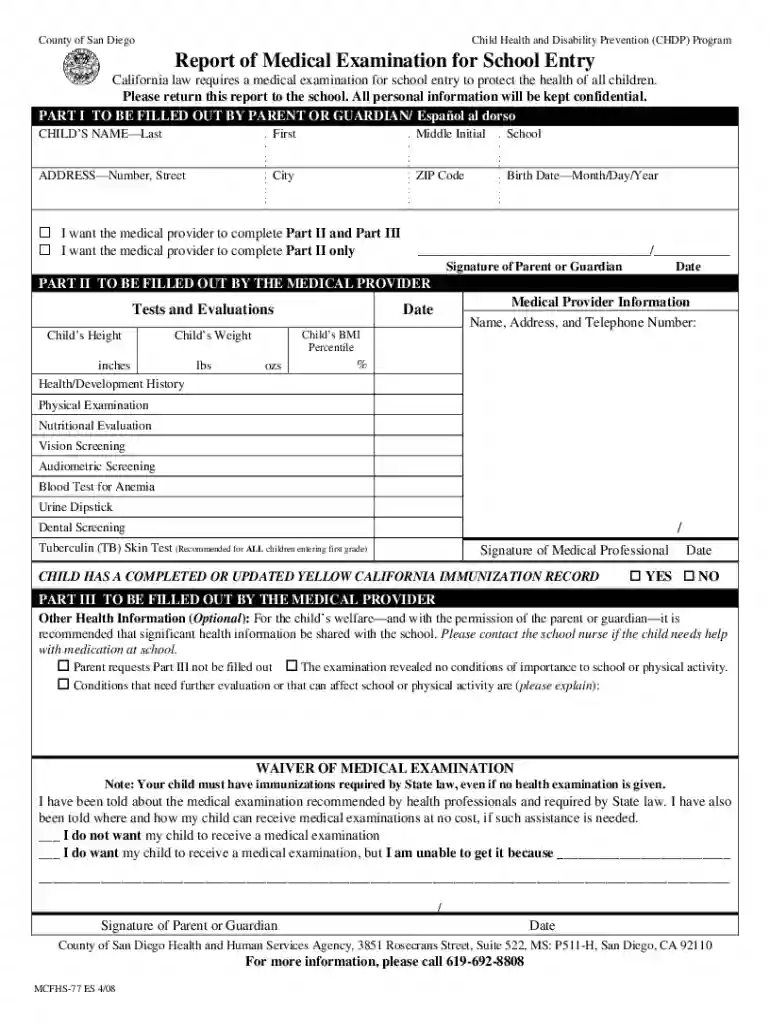
We've got more versions of the California School Entry Medical Examination Report form. Select the right California School Entry Medical Examination Report version from the list and start editing it straight away!
At DocHub, your data security is our priority. We follow HIPAA, SOC2, GDPR, and other standards, so you can work on your documents with confidence.
The health exam may be given up to 18 months before or within 90 days after entering first grade. Report of Health Examination for School (916) 971-7700 Phone
California law requires a health examination on school entry. Please have this report filled out by a health examiner and return it to the school.


