Type text, add images, blackout confidential details, add comments, highlights and more.
02. Sign it in a few clicks
Draw your signature, type it, upload its image, or use your mobile device as a signature pad.
03. Share your form with others
Send lds2221a via email, link, or fax. You can also download it, export it or print it out.
How to use or fill out lds2221a with our platform
Ease of Setup
DocHub User Ratings on G2
Ease of Use
DocHub User Ratings on G2
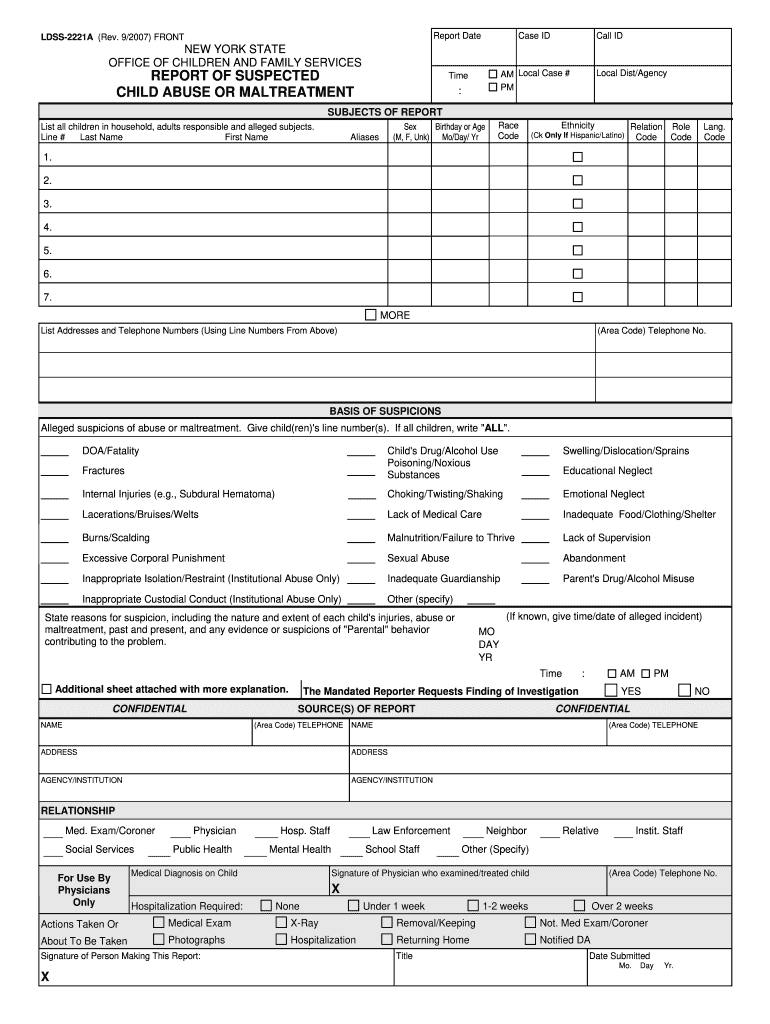
Click ‘Get Form’ to open the LDSS-2221A in the editor.
Begin by entering the Report Date, Case ID, and Call ID at the top of the form. Ensure accuracy as these details are crucial for tracking.
In the 'SUBJECTS OF REPORT' section, list all children and adults involved. Fill in their last names, first names, sex, birthday or age, aliases, race code, ethnicity code, relation role code, and language code using the provided line numbers.
Next, detail the 'BASIS OF SUSPICIONS'. Clearly state any alleged suspicions of abuse or maltreatment. Reference specific child line numbers if applicable.
Complete the 'SOURCE(S) OF REPORT' section by providing your name, contact information, and relationship to the case. This is essential for follow-up.
Finally, sign and date the form at the bottom before submitting it as instructed. If additional space is needed for explanations, attach an extra sheet.
Start filling out your LDSS-2221A form online for free today!
Lds2221a exampleLds2221a pdfLds2221a sampleWhere to send LDSS-2221A formLdss 2221a when to fileLdss 2221a form how to fill outLDSS-2221A form be filedWhat should a mandated reporter do before reporting
Security and compliance
At DocHub, your data security is our priority. We follow HIPAA, SOC2, GDPR, and other standards, so you can work on your documents with confidence.
Cookie consent notice
This site uses cookies to enhance site navigation and personalize your experience.
By using this site you agree to our use of cookies as described in our Privacy Notice.
You can modify your selections by visiting our Cookie and Advertising Notice.