Type text, add images, blackout confidential details, add comments, highlights and more.
02. Sign it in a few clicks
Draw your signature, type it, upload its image, or use your mobile device as a signature pad.
03. Share your form with others
Send cem2501 via email, link, or fax. You can also download it, export it or print it out.
How to use or fill out CEM2501: Fringe Benefits Statement - CEM2501-1 with Our Platform
Ease of Setup
DocHub User Ratings on G2
Ease of Use
DocHub User Ratings on G2
Click ‘Get Form’ to open the CEM2501: Fringe Benefits Statement in the editor.
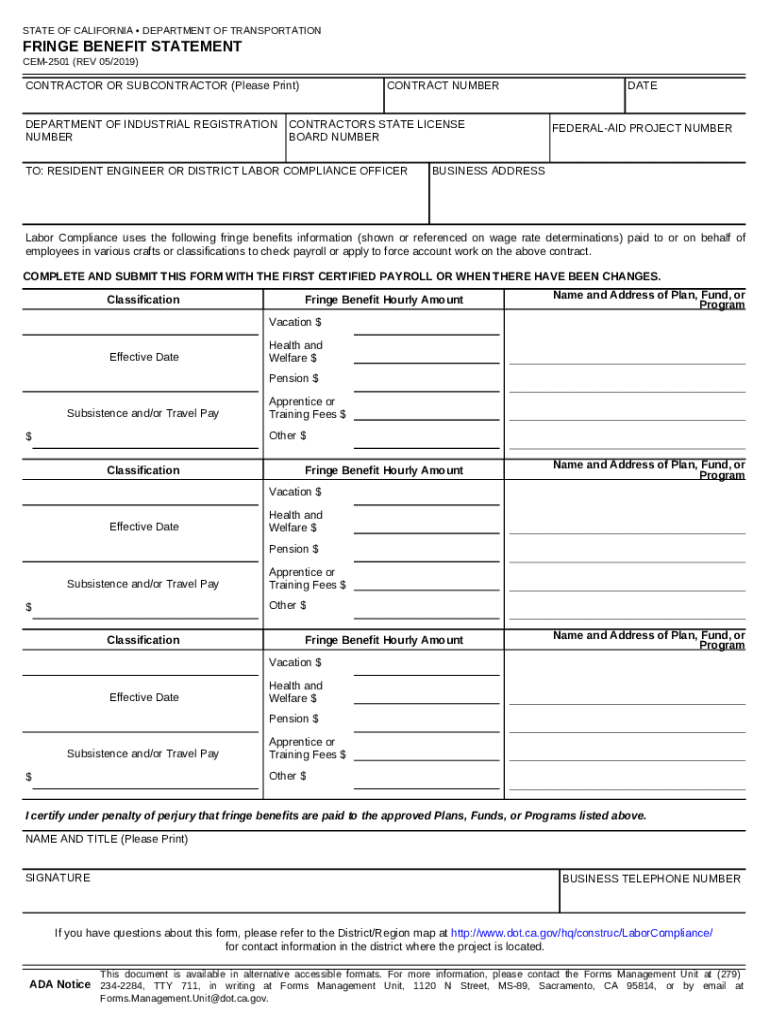
Begin by filling in the 'Contractor or Subcontractor' section. Clearly print your name and provide the contract number, ensuring accuracy for compliance.
Next, enter your Department of Industrial Registration Contractors State License Number and Board Number. This information is crucial for verification purposes.
In the 'Fringe Benefit Hourly Amount' section, list each classification along with its corresponding fringe benefit amounts such as Vacation, Health and Welfare, Pension, and any other applicable benefits.
For each benefit listed, include the name and address of the plan, fund, or program associated with it. Make sure to note the effective date for clarity.
Finally, certify your entries by printing your name and title, signing the document, and providing your business telephone number before submitting it with your first certified payroll.
Start using our platform today to easily complete your CEM2501 form online for free!
Fill out CEM2501: Fringe Benefits Statement - CEM2501-1 online It's free
See more CEM2501: Fringe Benefits Statement - CEM2501-1 versions
We've got more versions of the CEM2501: Fringe Benefits Statement - CEM2501-1 form. Select the right CEM2501: Fringe Benefits Statement - CEM2501-1 version from the list and start editing it straight away!
DOT CEM2501: Fringe Benefits Statement Page 1 The document you are trying to load requires DocHub Reader 8 or higher. You may not have the DocHub Reader installed
Cookie consent notice
This site uses cookies to enhance site navigation and personalize your experience.
By using this site you agree to our use of cookies as described in our Privacy Notice.
You can modify your selections by visiting our Cookie and Advertising Notice.