Forms Georgia Tax Tribunal 2026

Get Form
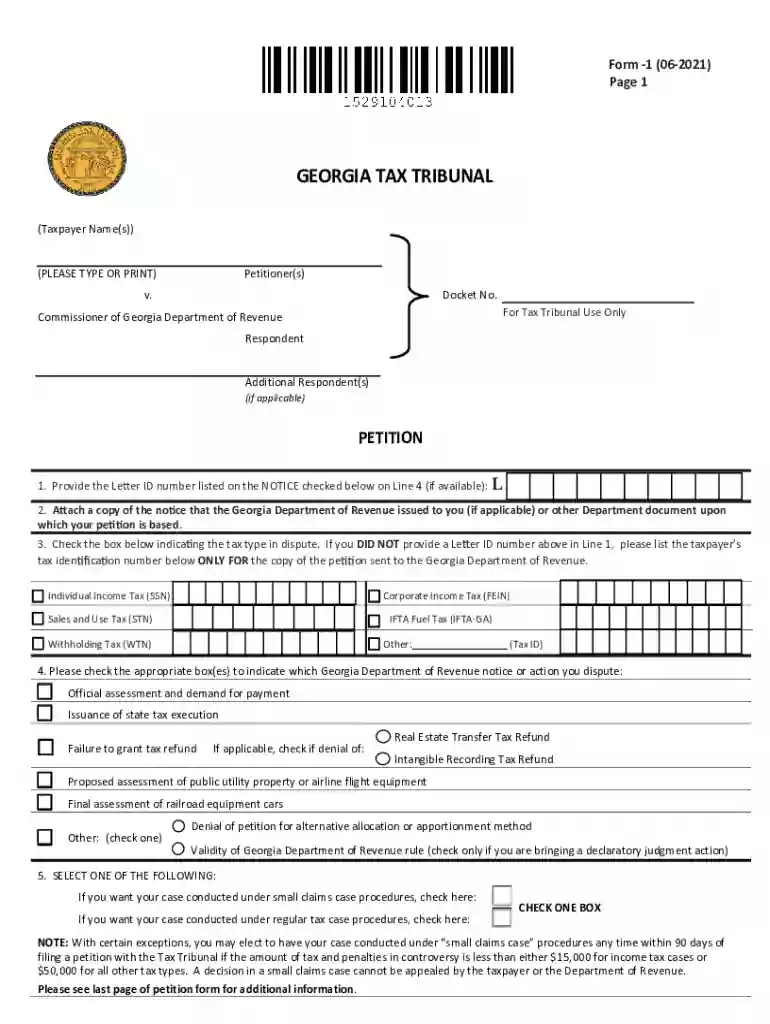
ga tax court Preview on Page 1

Here's how it works

01. Edit your ga tax court online
Type text, add images, blackout confidential details, add comments, highlights and more.

02. Sign it in a few clicks
Draw your signature, type it, upload its image, or use your mobile device as a signature pad.

03. Share your form with others
Send department georgia revenue via email, link, or fax. You can also download it, export it or print it out.

How to use or fill out Forms Georgia Tax Tribunal with our platform

Form edit decoration
9.5
Ease of Setup
DocHub User Ratings on G2
9.0
Ease of Use
DocHub User Ratings on G2
  1. Click ‘Get Form’ to open the Forms Georgia Tax Tribunal in the editor.
  2. Begin by entering your name(s) as the petitioner(s) at the top of the form. Ensure that you type or print clearly.
  3. In Line 1, provide the Letter ID number from your notice if available. If not, leave it blank.
  4. Attach a copy of any relevant notice from the Georgia Department of Revenue, if applicable.
  5. Select the tax type in dispute by checking the appropriate box. If you did not provide a Letter ID, list your taxpayer identification number for submission.
  6. Indicate which notice or action you are disputing by checking the corresponding box(es).
  7. In Section 6 and 7, explain why you disagree with the notice and state your supporting facts separately.
  8. Complete your petition by signing and providing your mailing address. Ensure all required fields are filled out accurately before submission.

Start using our platform today to streamline your Forms Georgia Tax Tribunal experience for free!

See more Forms Georgia Tax Tribunal versions

We've got more versions of the Forms Georgia Tax Tribunal form. Select the right Forms Georgia Tax Tribunal version from the list and start editing it straight away!
Versions Form popularity Fillable & printable
2021 4.7 Satisfied (51 Votes)
2014 4.9 Satisfied (353 Votes)
2013 4.3 Satisfied (59 Votes)
be ready to get more

Complete this form in 5 minutes or less

Get form

Got questions?

We have answers to the most popular questions from our customers. If you can't find an answer to your question, please contact us.
Contact us
U.S. States that Require State Tax Withholding Forms Alabama. Arizona. Arkansas. California. Connecticut. District of Columbia. Georgia. Hawaii.
Form GA 500: This is personal income return form is designed for Georgia Residents, Nonresidents and Part-year Residents to report their annual income to the State.
Disputing an Official Assessment You may file an appeal either with the Georgia Tax Tribunal or in the appropriate superior court within 30 days from the issued date on the official assessment.
These 2023 forms and more are available: Georgia Form 500/500EZ Personal Income Tax for Residents. Georgia Form IT-303 Extension. Georgia Form IND-CR Individual Credit Form.
You are required to fill out a W-4 when you start a new job, but you do not have to fill out a new W-4 form every year if you already have one on file with your employer. However, its a good idea to check on your tax withholding at least annually and as your life changes.

Security and compliance

At DocHub, your data security is our priority. We follow HIPAA, SOC2, GDPR, and other standards, so you can work on your documents with confidence.

Learn more
ccpa2
pci-dss
gdpr-compliance
hipaa
soc-compliance
be ready to get more

Complete this form in 5 minutes or less

Get form

People also ask

How can we help? Georgia Call Center. 1-800-GEORGIA. contact online. Send a Message. hours. Monday to Friday.
You generally complete Internal Revenue Service (IRS) Form W-4, Employees Withholding Certificate, at the start of any new job. The form is crucial in determining your balance due or refund each tax season.
The Georgia Form G-4, Employees Withholding Allowance Certificate, must be completed so that you know how much state income tax to withhold from your new employees wages.

department revenue