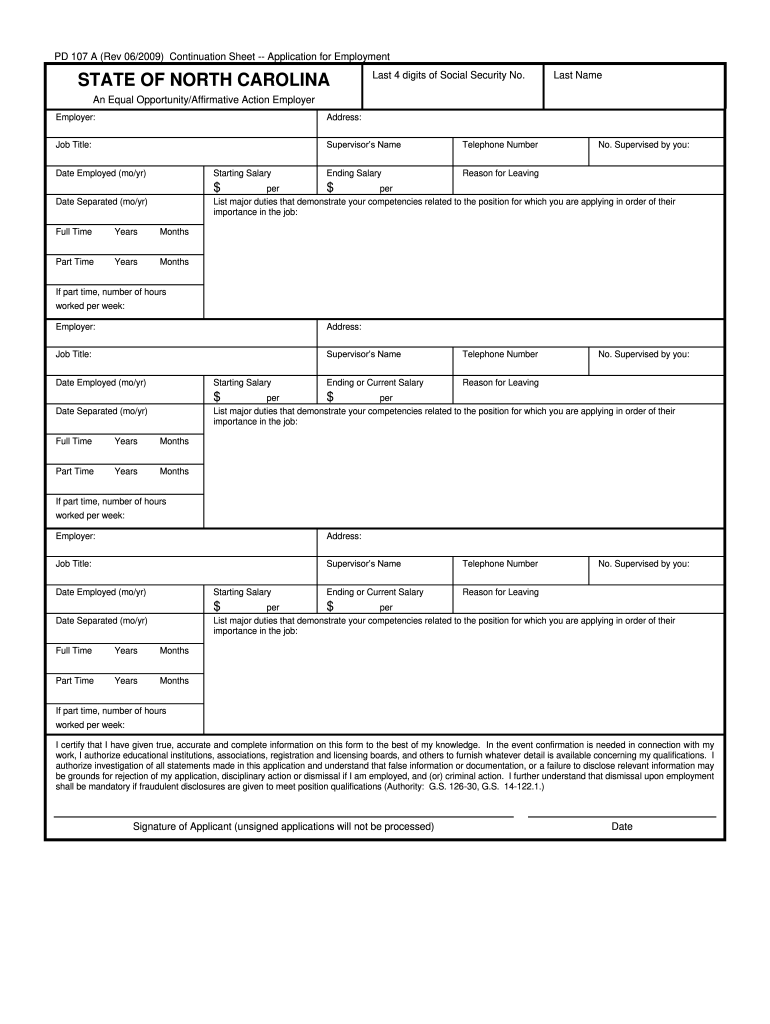
State application pd 107 2026

Get Form
state application pd 107 Preview on Page 1

Here's how it works

01. Edit your state application pd 107 online
Type text, add images, blackout confidential details, add comments, highlights and more.
02. Sign it in a few clicks
Draw your signature, type it, upload its image, or use your mobile device as a signature pad.
03. Share your form with others
Send 107 state application via email, link, or fax. You can also download it, export it or print it out.

How to use or fill out state application pd 107 with our platform

Form edit decoration
9.5
Ease of Setup
DocHub User Ratings on G2
9.0
Ease of Use
DocHub User Ratings on G2
  1. Click ‘Get Form’ to open the state application PD 107 in the editor.
  2. Begin by entering your Last Name and the last four digits of your Social Security Number at the top of the form.
  3. Fill in the Employer's name, address, and job title for each position you have held. Ensure accuracy as this information is crucial for your application.
  4. Provide details about your supervisor’s name and telephone number, along with your starting and ending salary for each job listed.
  5. Indicate the reason for leaving each position and specify whether it was full-time or part-time, including the number of hours worked per week if applicable.
  6. In the section provided, list major duties that demonstrate your competencies related to the position you are applying for, prioritizing them by importance.
  7. Finally, review all entries for accuracy before signing and dating the application at the bottom. Remember that unsigned applications will not be processed.

Start filling out your state application PD 107 online for free today!

See more state application pd 107 versions

We've got more versions of the state application pd 107 form. Select the right state application pd 107 version from the list and start editing it straight away!
Versions Form popularity Fillable & printable
2009 4.9 Satisfied (43 Votes)
be ready to get more

Complete this form in 5 minutes or less

Get form

Got questions?

We have answers to the most popular questions from our customers. If you can't find an answer to your question, please contact us.
Contact us
We are unable to accept official transcripts through fax or attached to an email. High school counselors can submit official transcripts through Common App, Coalition on Scoir App or slate.org. Arranging for records/transcripts to be sent to NC State is the responsibility of the applicant and not NC State.
Once submitting your application, youll receive login credentials to wolfPAW, our applicant portal. Thats where youll track your application status, manage documents and get your final admissions decision.
View Your Decision You will be notified of your admission decision on your wolfPAW account. If you completed your application on time and submitted all required materials by the deadline, you will receive a decision on the notification date corresponding to the application deadline for the semester you applied for.
The timing of decisions for fall admission is roughly January-February for PhD applicants, and February-April for Masters applicants who applied by December 15. Masters applicants who apply later than that should expect a decision within approximately one month of completing their application.
NC State University typically releases its regular decision admissions decisions in late March. If you applied for Early Action, you should have received your decision in mid-January to early February. Keep in mind these dates are approximate and can change slightly from year to year!

Security and compliance

At DocHub, your data security is our priority. We follow HIPAA, SOC2, GDPR, and other standards, so you can work on your documents with confidence.

Learn more
ccpa2
pci-dss
gdpr-compliance
hipaa
soc-compliance