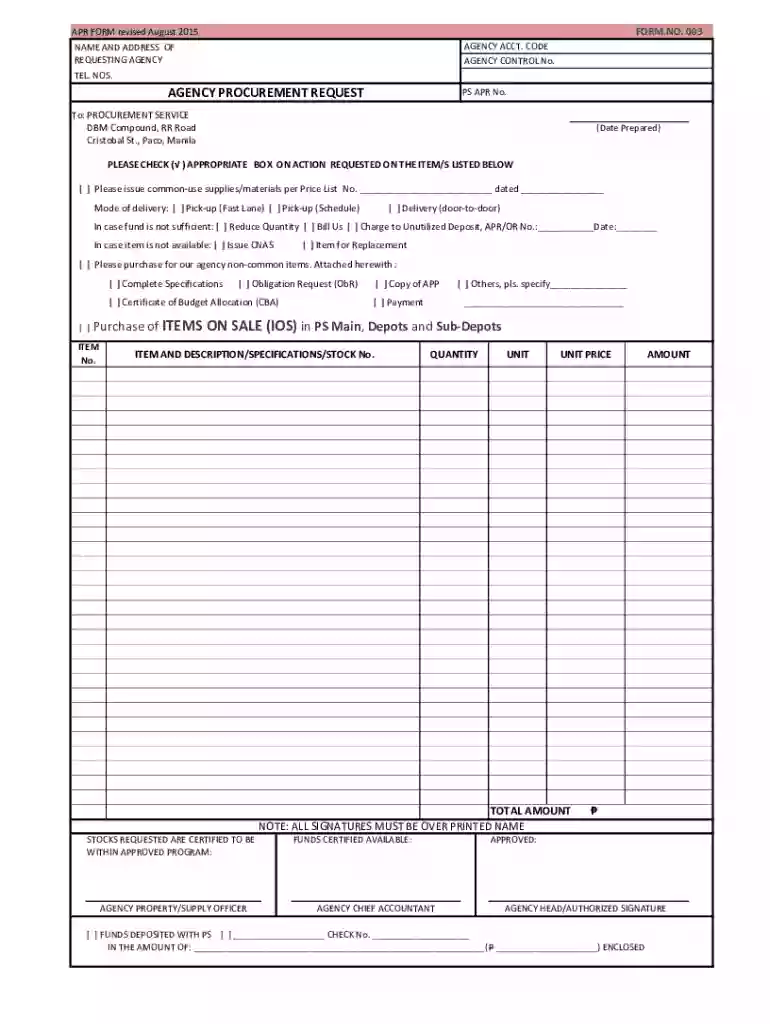
Agency Procurement Request (PS) - BLANKPDF 2026

Get Form
philippines service agency procurement Preview on Page 1

Here's how it works

01. Edit your philippines service agency procurement online
Type text, add images, blackout confidential details, add comments, highlights and more.

02. Sign it in a few clicks
Draw your signature, type it, upload its image, or use your mobile device as a signature pad.

03. Share your form with others
Send it via email, link, or fax. You can also download it, export it or print it out.

How to use or fill out Agency Procurement Request (PS) - BLANKPDF with our platform

Form edit decoration
9.5
Ease of Setup
DocHub User Ratings on G2
9.0
Ease of Use
DocHub User Ratings on G2
  1. Click ‘Get Form’ to open the Agency Procurement Request (PS) - BLANKPDF in the editor.
  2. Begin by entering the AGENCY ACCT. CODE and AGENCY CONTROL No. at the top of the form, ensuring accuracy for proper tracking.
  3. Fill in the NAME AND ADDRESS OF REQUESTING AGENCY along with your contact TEL. NOS. to facilitate communication.
  4. In the ACTION REQUESTED section, check the appropriate box for your request regarding common-use supplies/materials, specifying delivery mode if necessary.
  5. If funds are insufficient, indicate your preference by checking one of the options provided for quantity reduction or billing.
  6. For non-common items, attach required documents such as Complete Specifications and Certificate of Budget Allocation by checking the corresponding boxes.
  7. List each ITEM with its DESCRIPTION/SPECIFICATIONS, QUANTITY, UNIT, UNIT PRICE, and TOTAL AMOUNT in the designated table.
  8. Ensure all signatures are over printed names in their respective sections before finalizing your request.

Start using our platform today to streamline your document editing and procurement processes for free!

See more Agency Procurement Request (PS) - BLANKPDF versions

We've got more versions of the Agency Procurement Request (PS) - BLANKPDF form. Select the right Agency Procurement Request (PS) - BLANKPDF version from the list and start editing it straight away!
Versions Form popularity Fillable & printable
2015 4.9 Satisfied (47 Votes)
2015 4.2 Satisfied (50 Votes)
2007 4.7 Satisfied (46 Votes)
be ready to get more

Complete this form in 5 minutes or less

Get form

Got questions?

We have answers to the most popular questions from our customers. If you can't find an answer to your question, please contact us.
Contact us

Sign in to your DocHub account and add your Agency Procurement Request (PS) - BLANKPDF to our editor using one of its upload options - from your device, cloud storage, secure URL, or your DocHub folders if you have already processed your form before. Open our editor, click the Sign button in the top toolbar, and decide on your signing method. You can upload an image of your handwritten signature, draw it, enter your name, or use a QR code instead.

You can complete and eSign your Agency Procurement Request (PS) - BLANKPDF online, even on a tight deadline. All you need to access top-notch editing instruments on any device is a DocHub account, which you can register in a couple of moments. When you register, add your document or find what you are searching for in our catalog, complete it utilizing the editing instruments you want, and put your electronic signature on it at the end.

There are 4 main types of procurement: direct, indirect, goods, and services. Each type represents a different way organizations acquire the goods and services needed to operate effectively. Understanding these types is essential for reducing risks, improving efficiency, and strengthening supplier relationships.
Agency-to-Agency Procurement is defined as the procurement of infrastructure projects, consulting services and goods from another agency of the Government of the Philippines (GOP), such as the Procurement Service, Department of Budget and Management (PS-DBM), which is tasked with a centralized procurement of Common-Use
Procurement Agencies means entities that purchase Existing Services on behalf of End Users but not for resale at a profit.

Security and compliance

At DocHub, your data security is our priority. We follow HIPAA, SOC2, GDPR, and other standards, so you can work on your documents with confidence.

Learn more
ccpa2
pci-dss
gdpr-compliance
hipaa
soc-compliance

People also ask

A Procurement request is an internal document or digital form that formalizes an employees intention to acquire a good or service. Purpose: To clearly communicate a departments needs to the hierarchy (manager, management, Procurement department) in order to obtain the necessary approvals.
The 3 Ps of procurement refer to three organizational components that outline the entire process, namely people, paperwork, and process.
AGENCY PROCUREMENT REQUEST Agency Procurement Request (APR) This form shall be used/accomplished by agencies for ordering both. common use and non- common use supplies/materials/equipment and. shall be submitted to the Agency Servicing Division (ASD). Action desired should be properly marked on the appropriate.

Related links