Petition for Annulment (PDF) 2026

Get Form
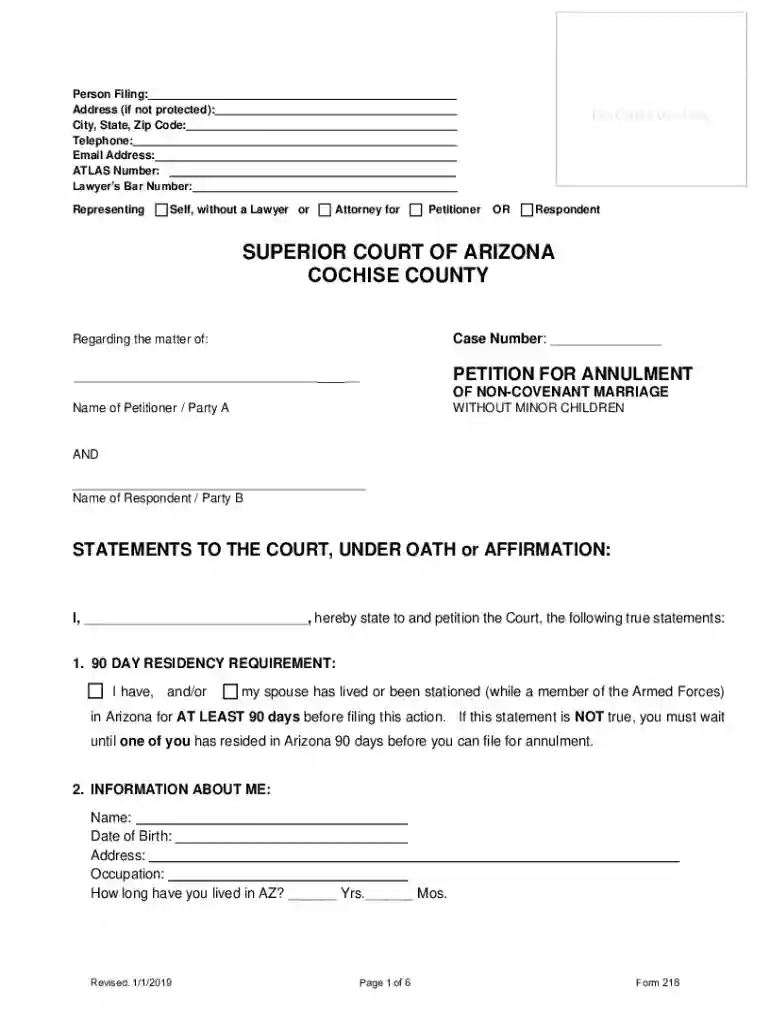
Petition for Annulment (PDF) Preview on Page 1

Here's how it works

01. Edit your form online
Type text, add images, blackout confidential details, add comments, highlights and more.

02. Sign it in a few clicks
Draw your signature, type it, upload its image, or use your mobile device as a signature pad.

03. Share your form with others
Send it via email, link, or fax. You can also download it, export it or print it out.

How to use or fill out Petition for Annulment (PDF) with DocHub

Form edit decoration
9.5
Ease of Setup
DocHub User Ratings on G2
9.0
Ease of Use
DocHub User Ratings on G2
  1. Click ‘Get Form’ to open the Petition for Annulment in our editor.
  2. Begin by filling in your personal information, including your name, address, and contact details. Ensure accuracy as this information is crucial for court records.
  3. Provide details about your spouse, including their name and residency information. This section is essential for establishing jurisdiction.
  4. In the marriage information section, specify the date and location of your marriage. Indicate whether it was a covenant marriage and attach any necessary documentation if there are discrepancies.
  5. Address the children and pregnancy section by checking the appropriate boxes based on your situation. This helps clarify any parental responsibilities.
  6. Select the grounds for annulment that apply to your case. You must check at least one reason and provide a brief explanation if necessary.
  7. Complete the property and debt sections by indicating what was acquired before and during the marriage. Be thorough to avoid future disputes.
  8. Finally, review all entries for accuracy before signing under oath. Use our platform’s features to ensure everything is correctly filled out.

Start using our editor today to complete your Petition for Annulment easily and efficiently!

See more Petition for Annulment (PDF) versions

We've got more versions of the Petition for Annulment (PDF) form. Select the right Petition for Annulment (PDF) version from the list and start editing it straight away!
Versions Form popularity Fillable & printable
2019 4.8 Satisfied (36 Votes)
2017 4.9 Satisfied (60 Votes)
be ready to get more

Complete this form in 5 minutes or less

Get form

Got questions?

We have answers to the most popular questions from our customers. If you can't find an answer to your question, please contact us.
Contact us

With DocHub, you can easily sign your Petition for Annulment (PDF) or any other paperwork on iOS, even without setting up extra programs. You can access your DocHub account from any internet-connected browser and fill out and sign your form in any way you like with just a couple of clicks.

With DocHub, you have several convenient ways to edit your Petition for Annulment (PDF) online. You can drag and drop the form and edit it directly at the DocHub website or use our browser extension to fill out your form right away. Additionally, you can edit your PDF on your smartphone, as DocHub is compatible with all the available mobile platforms.

Annulment basics One of the spouses is married to another person (bigamy) You got married when you were under 18 and it wasnt legal to do so. Your spouse tricked you to get you to agree to marry them.
Legal reasons a judge can annul your marriage If your marriage is void, the judge will annul your marriage. If you thought your former spouse was dead or theyd been missing for at least 5 years (and you didnt know they were alive), then its not considered bigamy for you to have married again.
What are the Grounds for an Annulment in Arizona? In Arizona, the grounds for annulment include fraud, bigamy, lack of consent due to mental incapacity or intoxication, underage marriage, and .
be ready to get more

Complete this form in 5 minutes or less

Get form