




Here's how it works



How to use or fill out Volunteer Membership Application - Caroline County Fire with our platform

- Click ‘Get Form’ to open the Volunteer Membership Application in the editor.
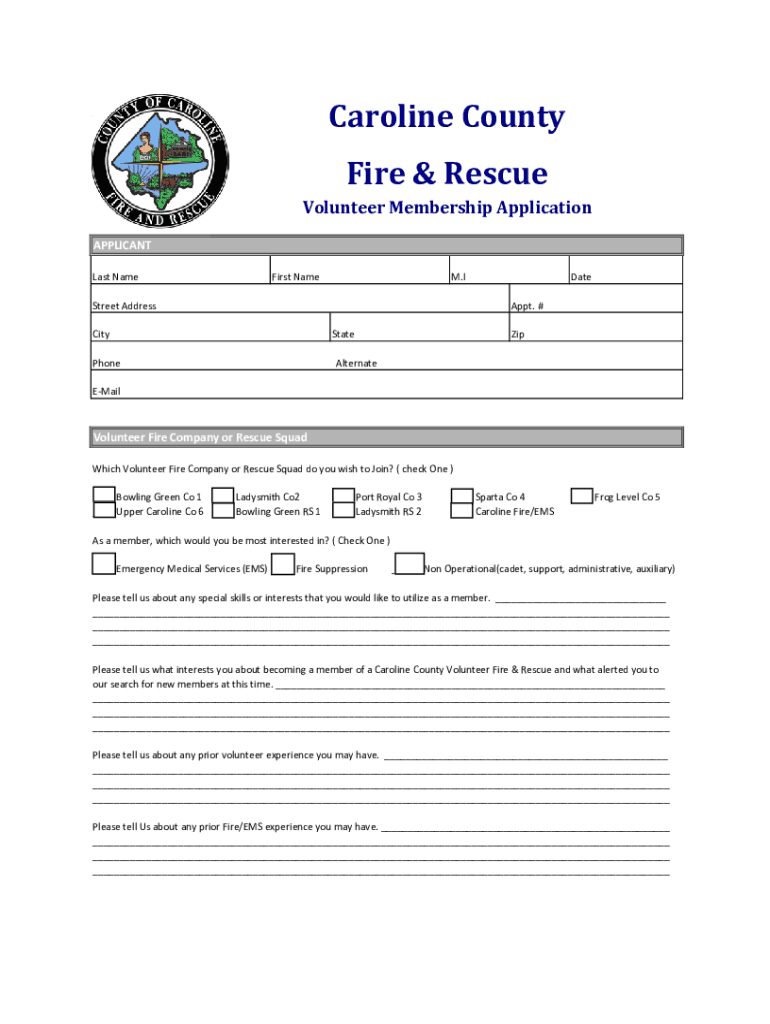
- Begin by filling in your personal information in the 'APPLICANT' section, including your last name, first name, middle initial, appointment number, address, phone number, and email.
- Select the Volunteer Fire Company or Rescue Squad you wish to join by checking one of the options provided.
- Indicate your area of interest as a member by checking one of the options under 'As a member, which would you be most interested in?'.
- Provide details about any special skills or interests you have that could benefit the organization in the designated section.
- Complete sections regarding prior volunteer experience and education. Be thorough in detailing your background and qualifications.
- Review and sign the certification and agreement statement at the end of the application to confirm accuracy and understanding of requirements.
Start filling out your application today for free using our platform!
It's free
See more Volunteer Membership Application - Caroline County Fire versions
| Versions | Form popularity | Fillable & printable |
|---|---|---|
| 2021 | 4.8 Satisfied (220 Votes) |
Got questions?
How can I send my Volunteer Membership Application - Caroline County Fire for eSignature?
Upload your Volunteer Membership Application - Caroline County Fire to DocHub (once you’ve created an account for this). If you need to fill out fields in it, use appropriate tools from the upper pane. For instance, add Signature Fields, assign each to specific person, and click on Sign → Request signatures from others. Personalize your message for your recipients and click Send Request. You can also send your document by fax or as a Signing link instead of using email (you’ll find these options by navigating to the Menu → Send)
How do you create an e-signature for the Volunteer Membership Application - Caroline County Fire on iOS?
In addition to a comprehensive toolset for editing PDFs on mobile phones, DocHub allows you to sign your Volunteer Membership Application - Caroline County Fire along the way. Open our editor in your browser, make changes using DocHub’s toolset, and finish your editing by eSigning the finished form.
Security and compliance
At DocHub, your data security is our priority. We follow HIPAA, SOC2, GDPR, and other standards, so you can work on your documents with confidence.
Learn more


