Si 350 2026

Get Form
wss westport Preview on Page 1

Here's how it works

01. Edit your wss westport online
Type text, add images, blackout confidential details, add comments, highlights and more.

02. Sign it in a few clicks
Draw your signature, type it, upload its image, or use your mobile device as a signature pad.

03. Share your form with others
Send it via email, link, or fax. You can also download it, export it or print it out.

How to use or fill out si 350 with our platform

Form edit decoration
9.5
Ease of Setup
DocHub User Ratings on G2
9.0
Ease of Use
DocHub User Ratings on G2
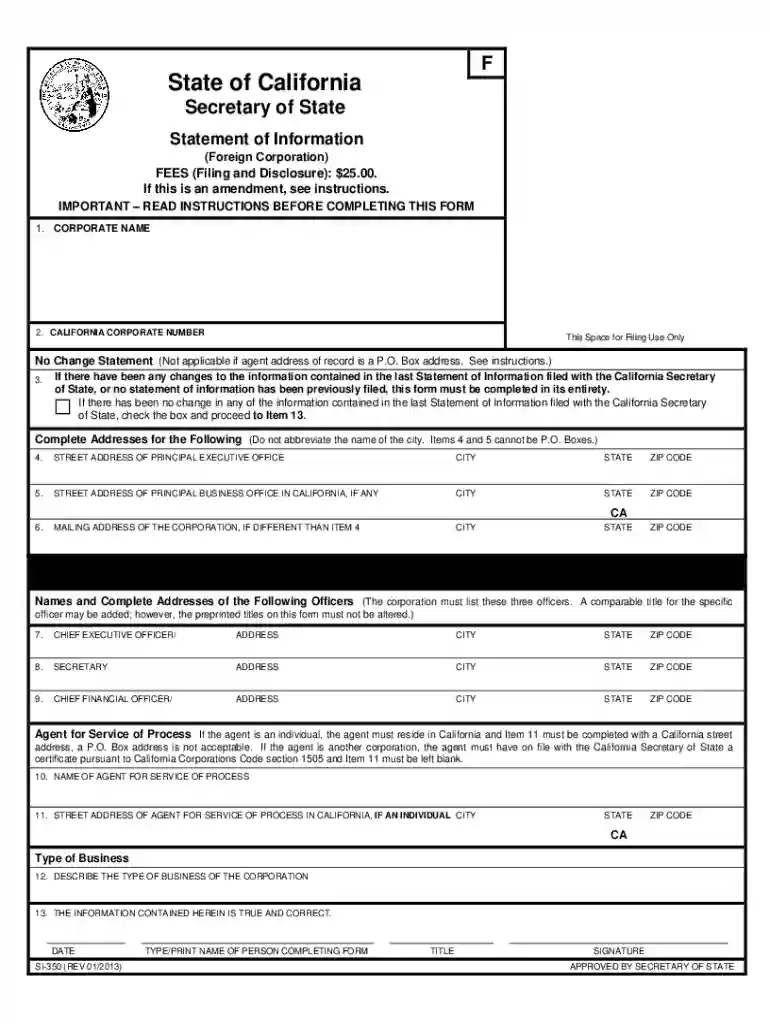
  1. Click ‘Get Form’ to open the SI-350 in the editor.
  2. In Item 1, enter the corporation's name exactly as recorded with the California Secretary of State.
  3. For Item 2, input the corporation number issued by the California Secretary of State.
  4. If there are no changes from the last Statement of Information, check the box in Item 3 and proceed to Item 13. Otherwise, complete all sections.
  5. In Item 4, provide the complete street address of the principal executive office without abbreviations or P.O. Box addresses.
  6. Complete Items 5 and 6 with relevant addresses if applicable, ensuring no P.O. Boxes are used.
  7. Fill in Items 7-9 with names and addresses of key officers: CEO, Secretary, and CFO.
  8. Designate an agent for service of process in Item 10 and provide their address in Item 11 if they are an individual.
  9. Describe the business type in Item 12 and ensure all information is accurate before signing in Item 13.

Start filling out your SI-350 form online for free today!

be ready to get more

Complete this form in 5 minutes or less

Get form

Got questions?

We have answers to the most popular questions from our customers. If you can't find an answer to your question, please contact us.
Contact us

Sure, you’ll find numerous applications for this on the web. Nevertheless, if you need to eSign your si 350 without installing additional software, DocHub is the optimum choice you can make. This powerful editor works on mobile devices just like on desktops. Open our editor in any internet browser, register or log in to your account, and start processing your forms.

You may find and modify your si 350 online with the help of DocHub. Its straightforward but feature-rich design enables you to begin effective work immediately after you register your account. Create your profile and add your document, and then our interface will guide you through our stress-free form completion experience.

In California a business's annual report is called the Statement of Information. It's a required filing that keeps the state updated with information about participants in the company. It must be filed on time, and the penalty for being late is hefty: $250, versus the filing fee of up to $25.
A Statement of Information must be filed either every year for California stock, cooperative, credit union, and all qualified out-of-state corporations or every two years (only in odd years or only in even years based on year of initial registration) for California nonprofit corporations and all California and ...
Corporations. California law requires your Statement of Information to include: The name of your corporation and the Secretary of State's file number. Contact information for all directors serving at the time of filing.

Security and compliance

At DocHub, your data security is our priority. We follow HIPAA, SOC2, GDPR, and other standards, so you can work on your documents with confidence.

Learn more
ccpa2
pci-dss
gdpr-compliance
hipaa
soc-compliance
be ready to get more

Complete this form in 5 minutes or less

Get form

People also ask

In California a business's annual report is called the Statement of Information. It's a required filing that keeps the state updated with information about participants in the company. It must be filed on time, and the penalty for being late is hefty: $250, versus the filing fee of up to $25.
In California, the annual filing (Statement of Information) is not due on a specific date. Rather, it must be filed every two-years during a six-month\u201dfiling window\u201d, which is based on the month the LLC was formed. If the LLC was formed in an even year, the form is due every even year.
In California a business's annual report is called the Statement of Information. It's a required filing that keeps the state updated with information about participants in the company. It must be filed on time, and the penalty for being late is hefty: $250, versus the filing fee of up to $25.
In California, the annual filing (Statement of Information) is not due on a specific date. Rather, it must be filed every two-years during a six-month\u201dfiling window\u201d, which is based on the month the LLC was formed. If the LLC was formed in an even year, the form is due every even year.
Every California and registered foreign limited liability company must file a Statement of Information with the California Secretary of State, within 90 days of registering with the California Secretary of State, and every two years thereafter during a specific 6-month filing period based on the original registration ...

Related links