Forwardhealth - breast pump order 2026

Get Form
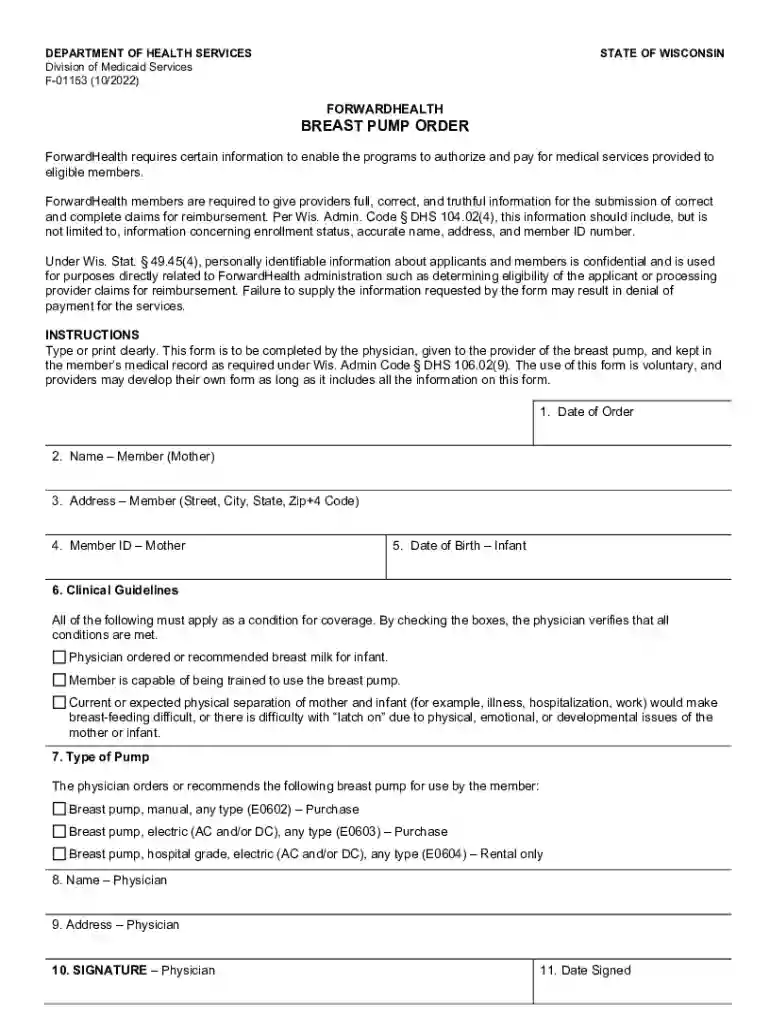
forwardhealth - breast pump order Preview on Page 1

Here's how it works

01. Edit your form online
Type text, add images, blackout confidential details, add comments, highlights and more.

02. Sign it in a few clicks
Draw your signature, type it, upload its image, or use your mobile device as a signature pad.

03. Share your form with others
Send it via email, link, or fax. You can also download it, export it or print it out.

How to use or fill out forwardhealth - breast pump order with our platform

Form edit decoration
9.5
Ease of Setup
DocHub User Ratings on G2
9.0
Ease of Use
DocHub User Ratings on G2
  1. Click ‘Get Form’ to open it in the editor.
  2. Begin by entering the 'Date of Order' in the designated field. This is crucial for tracking the order timeline.
  3. Next, fill in the 'Name – Member (Mother)' section with the full name of the mother who will be using the breast pump.
  4. Provide the complete 'Address – Member' including street, city, state, and zip code to ensure accurate delivery.
  5. Enter the 'Member ID – Mother' which is essential for identification within ForwardHealth's system.
  6. Input the 'Date of Birth – Infant' to confirm eligibility and ensure proper care for your child.
  7. Review and check all applicable 'Clinical Guidelines' boxes to verify that conditions for coverage are met as per physician recommendations.
  8. Select the appropriate 'Type of Pump' based on physician orders, ensuring you choose between manual, electric, or hospital-grade options.
  9. Complete the 'Name – Physician' and 'Address – Physician' fields to identify who authorized this order.
  10. Finally, have the physician sign and date the form to validate it before submission.

Start filling out your forwardhealth - breast pump order today using our platform for free!

See more forwardhealth - breast pump order versions

We've got more versions of the forwardhealth - breast pump order form. Select the right forwardhealth - breast pump order version from the list and start editing it straight away!
Versions Form popularity Fillable & printable
2022 4.7 Satisfied (33 Votes)
2009 4.9 Satisfied (49 Votes)
be ready to get more

Complete this form in 5 minutes or less

Get form

Got questions?

We have answers to the most popular questions from our customers. If you can't find an answer to your question, please contact us.
Contact us
Most insurance companies will cover one pump per pregnancy, so many of our pumps are covered partially or fully. However, wearable pumps like Elvie are considered upgrade items, meaning that an additional out-of-pocket cost will be required.
you cant order a pump thru insurance until 30 days prior to your due date. Generally you need to be about 35 - 36 weeks before insurance will cover the cost.
To request a pump, call the phone number on your health plan ID card, or you may contact one of the national network providers below. You will need a physician prescription to get a pump. Make sure to note that you will not be reimbursed for a pump purchased at a retail store.

Security and compliance

At DocHub, your data security is our priority. We follow HIPAA, SOC2, GDPR, and other standards, so you can work on your documents with confidence.

Learn more
ccpa2
pci-dss
gdpr-compliance
hipaa
soc-compliance
be ready to get more

Complete this form in 5 minutes or less

Get form