Tax return 2026

Get Form
taxable calculation Preview on Page 1

Here's how it works

01. Edit your taxable calculation online
Type text, add images, blackout confidential details, add comments, highlights and more.

02. Sign it in a few clicks
Draw your signature, type it, upload its image, or use your mobile device as a signature pad.

03. Share your form with others
Send tax withholding via email, link, or fax. You can also download it, export it or print it out.

How to use or fill out tax return with our platform

Form edit decoration
9.5
Ease of Setup
DocHub User Ratings on G2
9.0
Ease of Use
DocHub User Ratings on G2
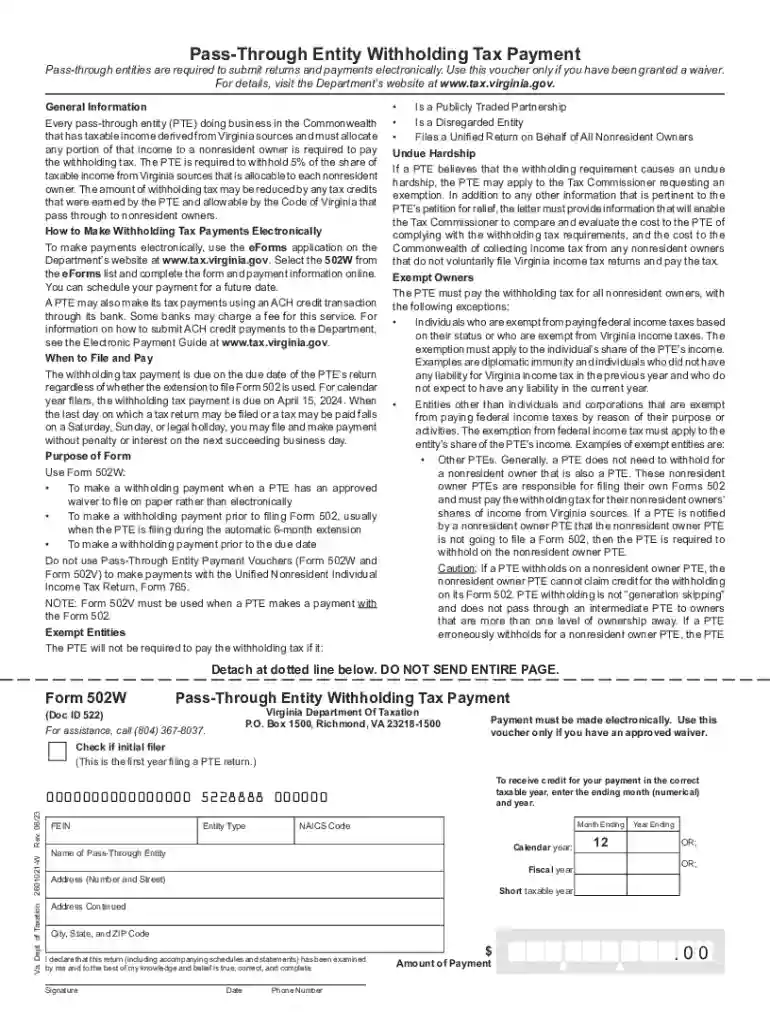
  1. Click ‘Get Form’ to open the Pass-Through Entity Withholding Tax Payment form in the editor.
  2. Begin by entering your entity's FEIN, entity type, and NAICS code. Ensure you select the correct entity type from the provided codes.
  3. Fill in the name and address of the Pass-Through Entity (PTE), including city, state, and ZIP code.
  4. Calculate the withholding amount by determining the taxable income of nonresident owners. Multiply this income by 5% and adjust for any applicable tax credits.
  5. Enter the total amount of payment in the designated block and ensure all information is accurate before proceeding.
  6. Finally, sign and date the form, providing your phone number for any follow-up communication.

Start using our platform today to simplify your tax return process for free!

See more tax return versions

We've got more versions of the tax return form. Select the right tax return version from the list and start editing it straight away!
Versions Form popularity Fillable & printable
2023 4.8 Satisfied (59 Votes)
2022 4.8 Satisfied (56 Votes)
2021 4.9 Satisfied (35 Votes)
2020 4.4 Satisfied (215 Votes)
2019 4.3 Satisfied (136 Votes)
2018 4.4 Satisfied (252 Votes)
2011 4.3 Satisfied (162 Votes)
be ready to get more

Complete this form in 5 minutes or less

Get form

Got questions?

We have answers to the most popular questions from our customers. If you can't find an answer to your question, please contact us.
Contact us
The Brazilian tax year covers the period from 1 January to 31 December.
ITR stands for Income Tax Return​. It is a prescribed form through which the particulars of income earned by a person in a financial year and taxes paid on such income are communicated to the Income-tax Department.
The Special Department of Federal Revenue of Brazil (Portuguese: Secretaria Especial da Receita Federal do Brasil), most commonly referred to as Receita Federal (RFB), is the Brazilian federal revenue service agency and a secretariat of the Ministry of the Economy.
A tax return means filing a document to report income and calculate tax liability. A tax refund is the reimbursement of excess taxes paid.
A tax return is a document filed with a tax authority that reports income, expenses, and other relevant financial information. On tax returns, taxpayers calculate their tax liability, schedule tax payments, or request refunds for the overpayment of taxes.

People also ask

Brazils tax rates are progressive, ranging from 0% to 27.5%. Brazil has double taxation treaties with several countries, which can affect how foreign citizens are taxed on their income. Its important to be aware that non-compliance with the tax regulations can lead to penalties, including fines and interest charges.
Individuals residing in Brazil, who anually earn income above the limits informed by the Federal Revenue Service (Receita Federal), are legally obliged to submit the Brazilian income tax return, known as the Imposto de Renda de Pessoa Fsica (IRPF).
The Brazilian Tax Year Tax returns are completed in the following March and April. For example, the year commencing 1st January 2023 and ending 31 December 2023 is called Ano-Calendrio 2023. The tax return for that year should be submitted between March and April 2024, under the Exerccio 2024.

tax income taxable