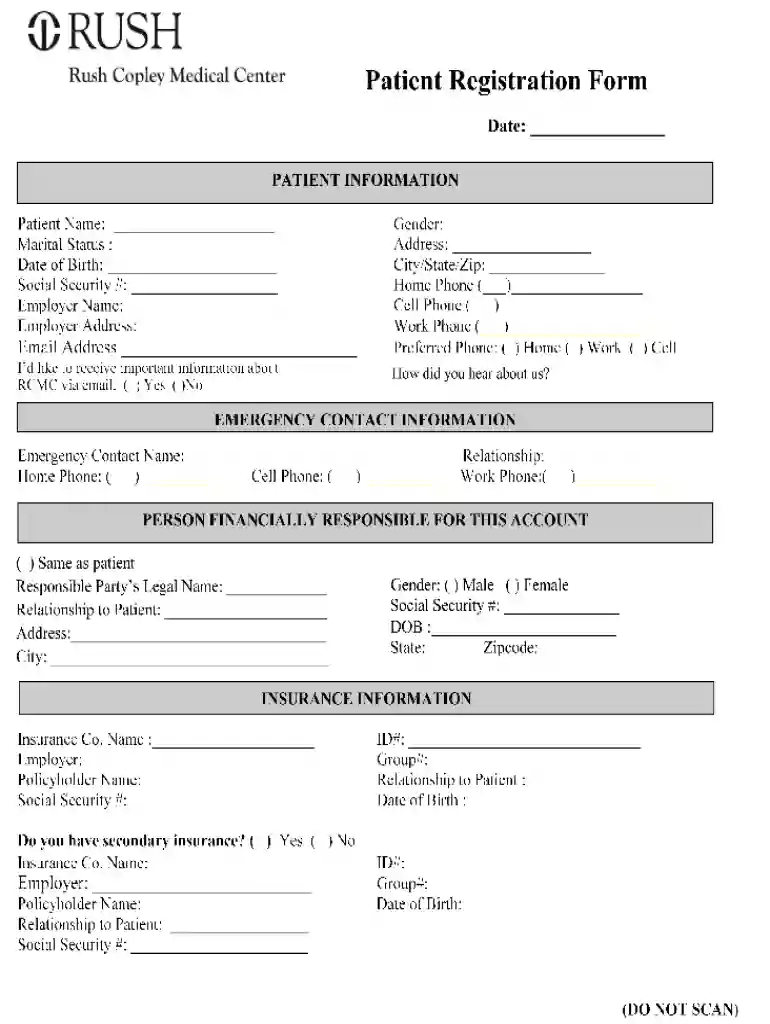
Rush Copley Medical Center Patient Registration Form 2025

Get Form
rush hospital doctors note Preview on Page 1

Here's how it works

01. Edit your rush hospital doctors note online
Type text, add images, blackout confidential details, add comments, highlights and more.

02. Sign it in a few clicks
Draw your signature, type it, upload its image, or use your mobile device as a signature pad.

03. Share your form with others
Send rush doctors note via email, link, or fax. You can also download it, export it or print it out.

Definition & Meaning of the Rush Copley Medical Center Patient Registration Form

The Rush Copley Medical Center Patient Registration Form serves as a crucial document designed for patients when they seek medical services. This form collects essential personal information, medical history, insurance details, and consent for treatment. Its primary purpose is to streamline the patient intake process, ensuring that healthcare providers have access to accurate and comprehensive patient data, which is vital for effective medical care.

By collecting details like the patient's full name, date of birth, contact information, and emergency contacts, the form helps facilitate communication and coordination between the patient and healthcare team. It is also instrumental in ensuring compliance with healthcare regulations and improving overall patient care efficiency, making it an indispensable tool in any healthcare setting.

How to Use the Rush Copley Medical Center Patient Registration Form

Using the Rush Copley Medical Center Patient Registration Form is a straightforward process. Patients begin by obtaining the form, which can typically be downloaded or accessed online through the hospital's official website. Once obtained, patients should:

  1. Fill Out Personal Information: Enter your full name, address, phone number, and date of birth. Ensure this information is accurate for effective communication.
  2. Provide Insurance Details: Include your insurance provider's name, policy number, and any other relevant details. Make sure to verify that the insurance information is current to avoid potential billing issues.
  3. Complete Medical History Section: Fill in information regarding any past medical conditions, surgeries, allergies, or medications currently taken. This section is vital for a comprehensive understanding of your health needs.
  4. Emergency Contact: Provide the name and contact details of someone who can be reached in case of emergencies during your visit.
  5. Consent and Acknowledgment: Read and sign any statements regarding treatment consent and information sharing policies. This ensures that you are aware of your rights and responsibilities as a patient.

By following these steps, patients can efficiently complete the registration process and ensure they receive prompt and appropriate care.

Steps to Complete the Rush Copley Medical Center Patient Registration Form

Completing the Rush Copley Medical Center Patient Registration Form involves distinct steps to ensure accuracy and comprehensiveness. Below are the specific actions to take:

  1. Download or Access the Form: Go to the Rush Copley Medical Center's website to download or print the patient registration form.
  2. Fill in Basic Information: Start with the top section, typically asking for your name, date of birth, and gender.
  3. Enter Contact Information: Provide your address, phone number, and email. Check for any typos or errors to ensure effective communication.
  4. Insurance Information:
    • Fill out the insurance details, including policy numbers.
    • Indicate whether you are the policyholder or a dependent.
  5. Medical History: Provide comprehensive details about your medical history, including chronic conditions, previous surgeries, and current medications. Accuracy in this section is essential for healthcare providers to understand your treatment needs.
  6. Emergency Contact: List your emergency contact along with their relationship to you and their phone number.
  7. Acknowledgments and Signatures: Read through any consent sections carefully and sign where required to confirm your understanding and agreement of the terms outlined in the form.

Following these steps ensures that the information is complete and accurate, which will expedite your care process during your visit to Rush Copley Medical Center.

Why You Should Use the Rush Copley Medical Center Patient Registration Form

Utilizing the Rush Copley Medical Center Patient Registration Form presents several benefits for both patients and healthcare providers. Here are key reasons why this form is essential:

  • Streamlined Patient Intake: The form standardizes the patient registration process, making it faster and more efficient. This allows healthcare providers to focus on care delivery rather than administrative tasks.
  • Improved Accuracy: By collecting comprehensive information at the start, the likelihood of errors diminishes. Accurate data is critical for developing effective treatment plans.
  • Enhanced Communication: The form facilitates better communication between patients and healthcare providers by ensuring that all relevant information is readily accessible at the point of care.
  • Comprehensive Medical Records: Including a detailed medical history ensures that healthcare providers have a thorough understanding of the patient's background and any potential health risks.
  • Compliance with Regulations: The form helps healthcare facilities comply with healthcare regulations, maintaining legal and ethical standards required for patient care.

These factors underline the importance of using the patient registration form, enhancing the overall healthcare experience.

Important Terms Related to the Rush Copley Medical Center Patient Registration Form

Understanding key terminology associated with the Rush Copley Medical Center Patient Registration Form can aid in effectively completing and utilizing the document. Here are some essential terms:

  • HIPAA Compliance: Refers to the regulations governing patient privacy and the security of medical information. Ensuring that the registration form is compliant is crucial for protecting patient rights.
  • Insurance Verification: The process of confirming a patient's insurance coverage to determine eligibility for services and facilitate billing procedures.
  • Patient Demographics: This section typically includes personal details such as age, sex, ethnicity, and contact information, which helps healthcare providers in tailoring care.
  • Pre-authorization: Refers to the prior approval from an insurance provider required before certain medications or procedures can be performed, ensuring that the cost will be covered.
  • Informed Consent: A process where patients are educated about their treatment options and risks before agreeing to proceed with care. This is often included in the registration form.

Knowing these terms can improve the patient's understanding of the registration process and its significance in their healthcare journey.

See more Rush Copley Medical Center Patient Registration Form versions

We've got more versions of the Rush Copley Medical Center Patient Registration Form form. Select the right Rush Copley Medical Center Patient Registration Form version from the list and start editing it straight away!
Versions Form popularity Fillable & printable
2020 4.8 Satisfied (60 Votes)
2010 4.3 Satisfied (40 Votes)
be ready to get more

Complete this form in 5 minutes or less

Get form

Got questions?

We have answers to the most popular questions from our customers. If you can't find an answer to your question, please contact us.
Contact us
Essential Information to Include in a Patient Registration Form Personal Information. Full Name (First and Last Name) Emergency Contact Information. Emergency Contact Name. Medical History Current Health Status. Existing Medical Conditions. Insurance and Payment Information. Appointment Preferences. Terms and Agreements.
Appointments and medical records MyChart: For online prescription refills, test results and appointment scheduling for current patients, call (312) 563-6600 or log in to your MyChart account. Medical records: To request copies of your medical records, call (312) 942-7262.
With AidaForm, you can create fully customizable free registration pages in just minutes no coding skills needed.
How to create a registration form in 7 steps Determine form length. Set clear fields. Set up a confirmation message. Add a payment option (if applicable) Check for accessibility. Embed the form for easy completion. Create your own registration form with SurveyMonkey.
Open a template or use a blank document Go to File New from Template. In Search, type form. Double-click the template you want to use. Select File Save As, and pick a location to save the form. In Save As, type a file name and then select Save.

People also ask

The most common Rush Copley Medical Center email format is [first]. [last] (ex. jane.doe@rushcopley.com), which is being used by 60.2% of Rush Copley Medical Center work email addresses.
6 Steps to Create a Patient Registration Form Step 1: Locate your Practice at the Top of the Registration Form. Step 2: Include Patient Detail Section. Step 3: Add Insurance Detail Section. Step 4: Comprise In Case of Emergency Section. Step 5: Insert Consent For Treatment Section. Step 6: Composing the Registration Form.

Related links