




Here's how it works



How to use or fill out 2018 OH OPERS F-111C with DocHub

- Click ‘Get Form’ to open the 2018 OH OPERS F-111C in our editor.
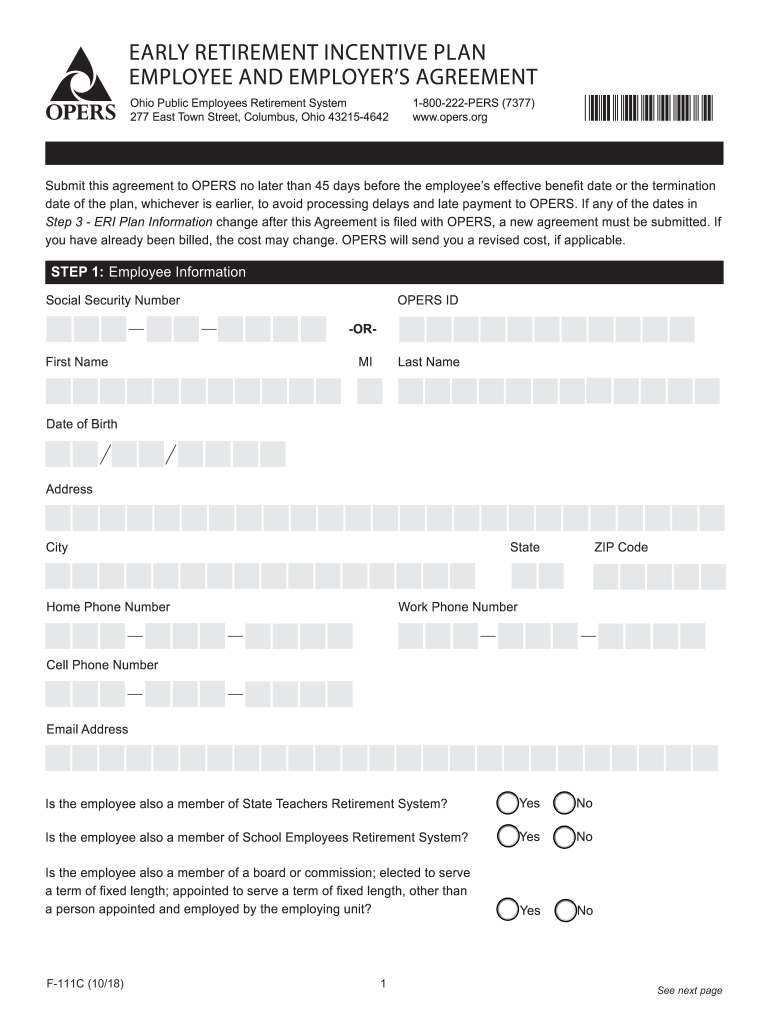
- Begin with Step 1: Employee Information. Fill in your Social Security Number, OPERS ID (if applicable), and personal details such as your name, date of birth, and contact information. Ensure accuracy to avoid processing delays.
- Proceed to Step 2: Employer Information. Enter the employing unit's name and employer code, along with the fiscal officer's details who will report to OPERS.
- In Step 3: ERI Plan Information, provide critical dates including your last day of employment and effective benefit date. Make sure these dates align with OPERS requirements for timely processing.
- Finally, complete Step 4: Employee and Employer’s Agreement by signing where indicated. Ensure all parties involved have signed before submission.
Start using our platform today to fill out your forms online for free!
It's free
See more 2018 OH OPERS F-111C versions
| Versions | Form popularity | Fillable & printable |
|---|---|---|
| 2018 | 4.8 Satisfied (75 Votes) |
Got questions?
How do I sign my 2018 OH OPERS F-111C on iOS?
With DocHub, you can rapidly approve your 2018 OH OPERS F-111C or any other document on iOS, even without installing extra applications. You can access your DocHub account from any internet-connected browser and fill out and sign your document in any preferred method with just a few clicks.
How do you fill out 2018 OH OPERS F-111C on Android?
It is a no-brainer on a computer or via a mobile device to fill out a 2018 OH OPERS F-111C with DocHub. All you need to do is open any installed web browser on your smartphone and go to the DocHub site. Once authenticated, add your file and open it in editing mode. Use our toolbar to make your edits and save adjustments. Optionally, keep your file in your files or send it to a recipient immediately.
Security and compliance
At DocHub, your data security is our priority. We follow HIPAA, SOC2, GDPR, and other standards, so you can work on your documents with confidence.
Learn more




