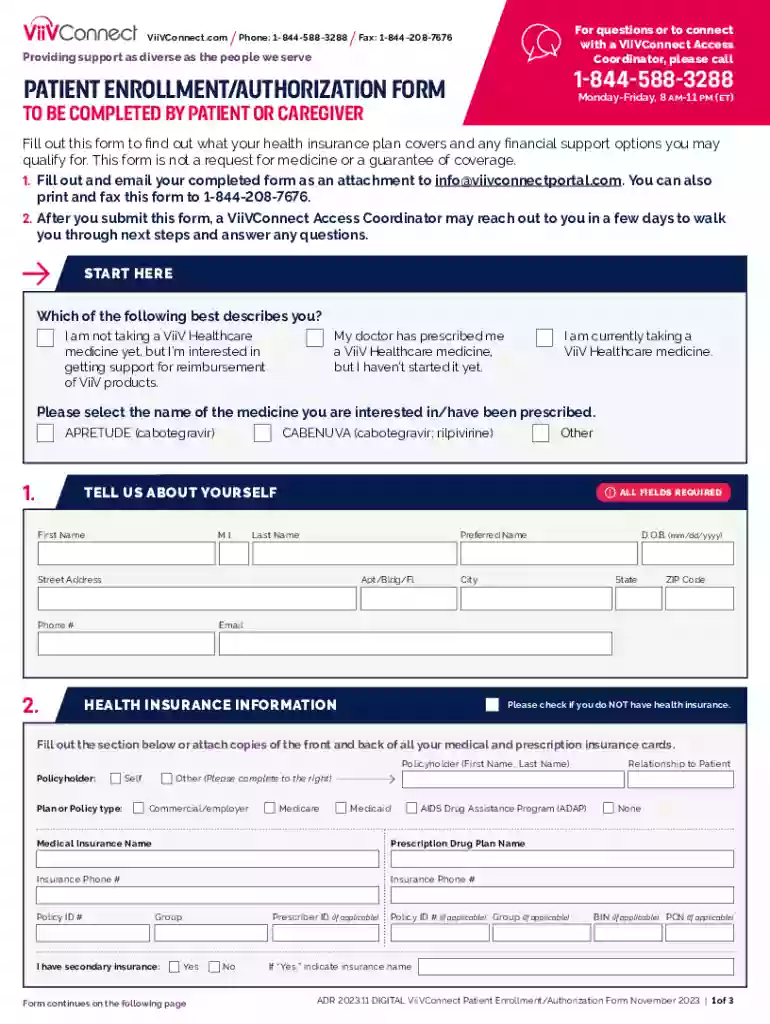
viivconnect insurance medical patient enrollment Preview on Page 1

Patient Enrollment Authorization Form Patient Enrollment Authorization Form 2026

Here's how it works

  • 01. Edit your viivconnect insurance medical patient enrollment online

    Type text, add images, blackout confidential details, add comments, highlights and more.

  • 02. Sign it in a few clicks

    Draw your signature, type it, upload its image, or use your mobile device as a signature pad.

  • 03. Share your form with others

    Send it via email, link, or fax. You can also download it, export it or print it out.

How to use or fill out Patient Enrollment Authorization Form with our platform

Form edit decoration
9.5
Ease of Setup
DocHub User Ratings on G2
9.0
Ease of Use
DocHub User Ratings on G2
  1. Click ‘Get Form’ to open the Patient Enrollment Authorization Form in the editor.
  2. Begin by selecting your status regarding ViiV Healthcare medicines. Choose from options such as not taking a medicine yet, having a prescription, or currently taking a medicine.
  3. Fill in your personal details including First Name, Last Name, Date of Birth, and contact information. Ensure all fields marked as required are completed.
  4. Provide your health insurance information. If you do not have insurance, check the appropriate box and attach copies of your insurance cards if applicable.
  5. Enter your doctor’s information including their name and contact details. Indicate whether you give permission for your health insurance coverage information to be shared with them.
  6. Review the Patient Authorization and Release section carefully. Sign and date where indicated to allow ViiVConnect to access your health insurance information.
  7. If applicable, provide caregiver information and signatures for patients under 18 years of age.

Start using our platform today to complete your Patient Enrollment Authorization Form easily and for free!

See more viivconnect insurance medical patient enrollment versions

We've got more versions of the viivconnect insurance medical patient enrollment form. Select the right viivconnect insurance medical patient enrollment version from the list and start editing it straight away!

VersionsForm popularityFillable & printable
20234.8 Satisfied (23 Votes)
20164.2 Satisfied (50 Votes)

be ready to get more

Complete this form in 5 minutes or less

Got questions?

We have answers to the most popular questions from our customers. If you can't find an answer to your question, please contact us.

Authorization: The customized document that gives Covered Entities (CEs) permission to disclose PHI for a specific purpose or to disclose information to a third party as specified by the document.
By signing the authorization, an individual is giving consent to have their health information used or disclosed for the reasons stated on the authorization.
A Hospital Patient Registration Form is a form template designed to streamline the process of collecting patient details before their stay in the hospital.
What is an Authorization Form? An authorization form is a document that is duly endorsed by an individual or organisation which grants permission to another individual or organisation to proceed with certain actions. It is often used to grant permission to carry out a specific action for a fixed period of time.
Q: How long does an authorization remain valid? A: It remains valid until the expiration date/event, unless the patient revokes it beforehand in writing.

Security and compliance

At DocHub, your data security is our priority. We follow HIPAA, SOC2, GDPR, and other standards, so you can work on your documents with confidence.

Related links

TROGARZO Enrollment Form

I DocHub that the patient and physician information contained in this enrollment form is complete and accurate to the best of my knowledge.Read more

Learn more
Dual Enrollment High School Authorization Form

PRINCIPAL/SUPERINTENDENT CONSENT. The above student is authorized to enroll in the course(s) listed above for the academic term specified.Read more

Learn more
If you believe that this page should be taken down, please follow our DMCA take down process here